
With Christmas around the corner, things are getting festive. At the time of this article, the Christmas season is close. Many Minecraft Servers are getting into the Christmas Mood and have started their decorations. And what’s a Christmas holiday without its Christmas Tree. In today’s article, I will show you how to make a Christmas Tree in Minecraft.
How to Make a Christmas Tree in Minecraft
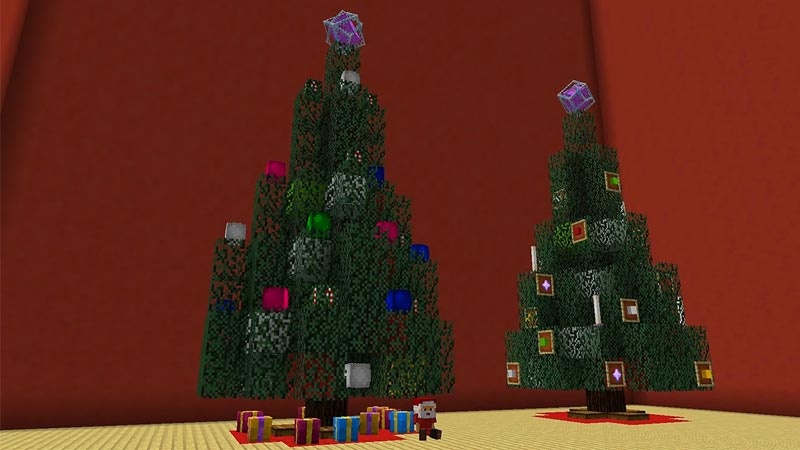
Making a Christmas Tree in Minecraft is pretty easy but a time-consuming one. You are gonna need prep up as you will need a lot of leaves. The Items you will require to build the Christmas Tree in Minecraft are:
- Spruce Logs
- This is the trunk of the Minecraft Christmas Tree.
- Spruce Leaves
- This will be the Leaves and Branches.
- Colored Wool or Concrete ( Red, Green, White, Yellow, Cyan, Pink)
- You can get Colored Wool by applying the color dye on a Sheep and shearing it.
- Spruce Trapdoors
- Obsidian
- End Crystal
- Take an Ender Pearl, put it in the center of a Crafting Table. Place a Ghast Tear under it and place Glass Blocks in the remaining slots to make an End Crystal.
You will need at least 1 Obsidian, 1 End Crystal, 4 Trapdoors, and a stack of everything else.
Steps to Make the Tree
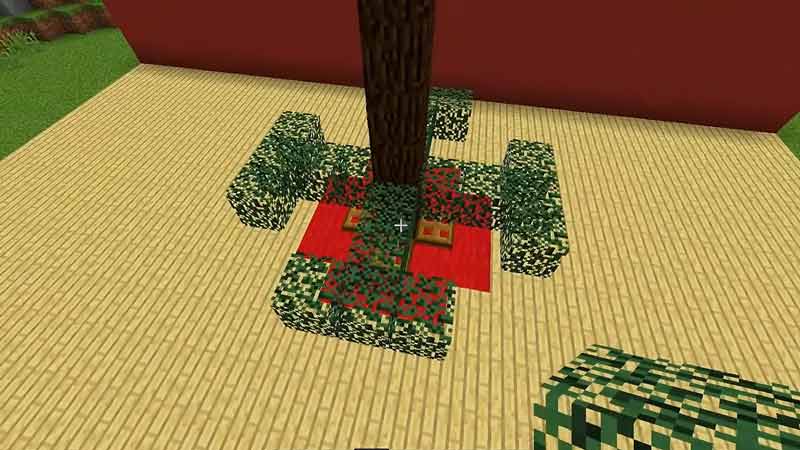
- Firstly, make a column of 10 Spruce Logs near your Minecraft house.
- Now at the base of that column, place 8 blocks of Red Wool surrounding it. The Red Wool has to be on the floor.
- The square that is formed by the Red Wool should have the sides of 3 blocks.
- Extend each side by one block, you should get a Cross or a 5×5 square that is missing its corners.
- Now take the Trapdoors and put one on each side of the Spruce Logs column of your Minecraft Christmas Tree.
- Up next is the Spruce Leaves. On the third block from the bottom of the column, make a Cross of 3 leaves wide.
- At the end of each Leaf row, put a Leaf block on either side. It should form a T at the ends.
- Now at the base of the Spruce Leaves Cross, place the leaf blocks in the corners such that you will get a square at the end.
- After which, place a Spruce Leaf Block diagonal to that square for every corner.
- If you see, there will be some empty slots in the Spruce Leaves base, place some Colored Blocks of choice there. Keep this at like one block per corner.
- Now for the next layer, go one block above the Spruce Leaves Layer and place more Spruce Leaves in the exact shape as what you have just made.
- For the next layer, go one block up again and make the same 3 blocks long Cross of Spruce Leaves as we did earlier.
- Last time we had made T shapes with ends of this cross. This time we are going to do the same but it will be placed in the middle at both sides of the Spruce Leaves Cross.
- You should get + shapes on each side of the Cross.
- Now for the next layer, Repeat the same layer.
- For this layer, place your Colored Blocks in each empty slot of the Christmas tree.
- We are close to the end here.
- For the next layer, leave a one-block space and place a Colored Block on each side of the Spruce Log column.
- At the end of each Colored Block, place a Spruce Leaves Block and extend it one block down.
- The Colored Blocks should have made a + shape, connect them with Spruce Leaves Blocks and extend them one block down.
- You should have a Diamond right now of Spruce Leaves Blocks and the Colored Blocks.
- From the Colored Blocks extend upwards with Spruce Leaves Blocks to the top of the Spruce Logs column.
- At the very top of the Spruce Logs column, place a Spruce Leaf Block and then the Obsidian.
- Now for this Christmas tree in Minecraft, we are going to use an End Crystal as our Christmas Tree-topper.
- Once you have placed the Obsidian, place the End Crystal on top of it.
- Now carefully remove the Obsidian without touching the End Crystal.
- Careful as the End Crystal will explode and destroy your Minecraft Christmas Tree.
- After you broke the Obsidian Block, place a Spruce Leaves Block in its place.
- Once that Block is placed your Minecraft Christmas Tree is done.
From this point on you can decorate the Minecraft Christmas Tree however you want. You can use the same Colored Blocks, maybe Glazed Terracotta Blocks, Glowstone Lamps, Item Frames and place some pretty things like a Nether Star, and the list goes on. If you want a visual aid you can check out the video made by Biggs87x and follow the steps on his video.
This was all about making a Christmas Tree in Minecraft. Hopefully, this guide helped, and have a happy holiday season. You can also check our guides on Parrots and Turtle Shell Helmet in Minecraft











