Home > XDefiant > XDefiant: How To Check Stats And Last Match Results

XDefiant: How To Check Stats And Last Match Results

Published Date :

Knowing how to check stats in XDefiant can be quite useful if you are looking to get better. There are 5 different factions in the game which gives you characters that have unique perks and ultimate. So when you check your stats, it is one of the elements that you can find out about on which faction you play the most. But that isn’t all — here are the Playtime and Performance stats explained for this game and everything that you can find here.

How to Check Your Career Stats in XDefiant
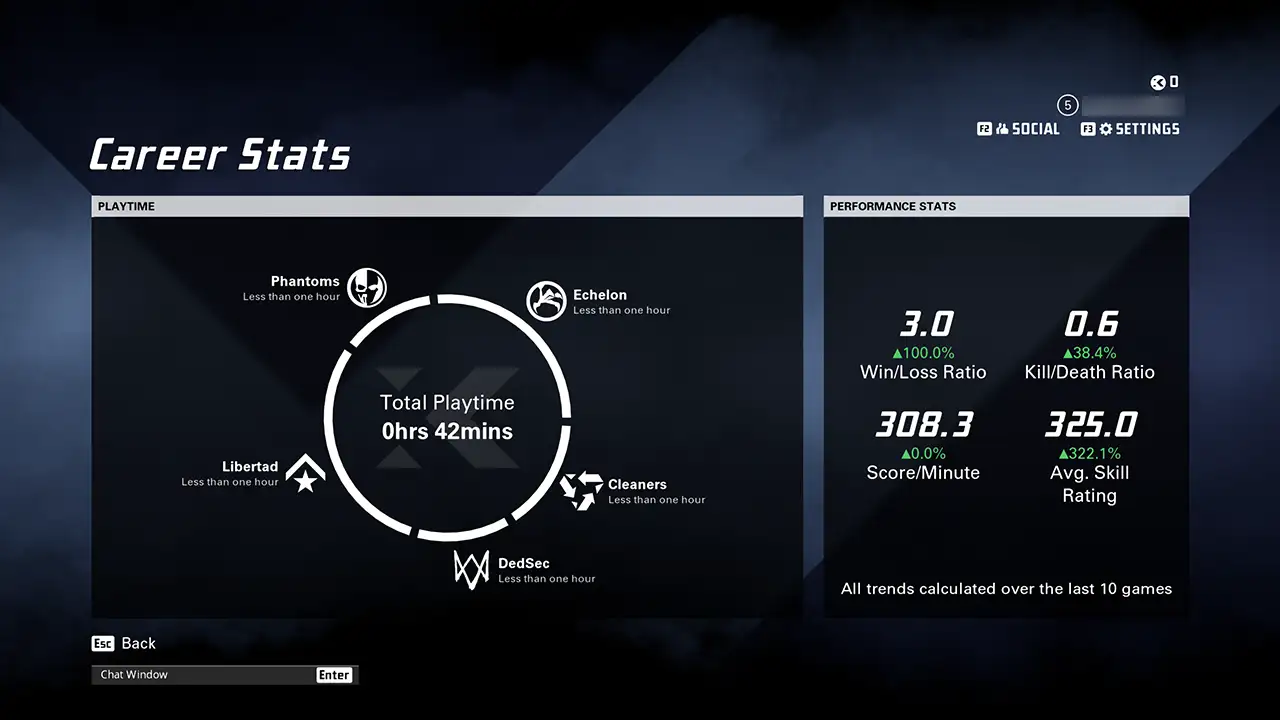
Screenshot: Gamer Tweak. XDefiant Career stats for Playtime and Performance.

You can check your Stats using the Profile tab.

  1. Open XDefiant and in the main menu you can find the Profile tab.
  2. Click on it and you will get several options like:
    • Player Customization
    • Career Stats
    • Last Match Results
    • Challenges
    • News Feed
  3. Here, click on Career Stats.
  4. When you open it you can find out about your Playtime and Performance Stats.
    • Playtime basically shows how many hours you spend playing characters from each faction.
    • As for Performance Stats, here you can check:
      • Win/Loss Ratio
      • Kill/Death Ratio
      • Score/Minute
      • Avg. Skill Rating

Do remember that these stats are calculated based on your last 10 games. So if you play more then depending on your match performance these stats may improve or decline.

How to Check Your Last Match Results in XDefiant
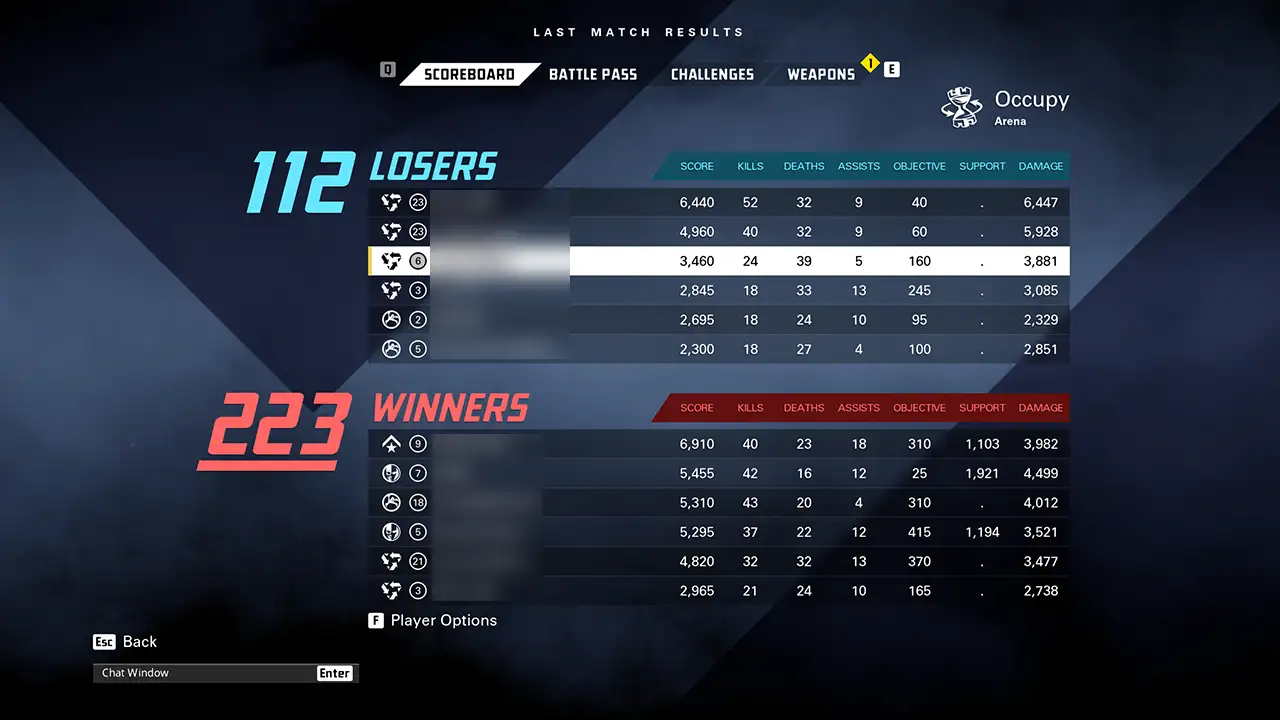
Screenshot: Gamer Tweak. The scoreboard for the last match results in XDefiant.

While your Career Stats give you an overall summary of your performance, you can also check your score of your last match. This can be accessed by going to the Profile tab and clicking on Last Match Results. By default, it opens on Battle Pass but click on Scorebard to check it. Here you get:

  • Score
  • Kills
  • Deaths
  • Assists
  • Objective
  • Support
  • Damage

Finally, it also tells you the winners and losers of the last match.

That is all for how you can check stats in XDefiant and your previous match scoreboard. Since you are playing this game be sure to also check our other guides for it on how to fix the controller not working and check server status.

  • Crunch My Butter Codes (August 2026)

    Crunch My Butter Codes (August 2026)

    Published Date :

    Looking for the latest Crunch My Butter codes? This satisfying Roblox simulator lets you crunch different types of butter, earn cash, unlock better butter, and keep your buttery empire growing. While the game continues to receive updates, many players are also hoping for redeemable codes that offer free Cash or other rewards. Here’s the complete… Read More

  • Trench Decay Codes (August 2026)

    Trench Decay Codes (August 2026)

    Published Date :

    Trench Decay is a WW1 squad PvE shooter, and like most games like this, you can redeem codes to unlock cosmetic crates, medals and more. If you don’t wish to miss out, claim the freebies right away. Trench Decay Codes (August 2026) Expired Codes How to Redeem Trench Decay Codes These are the steps you… Read More

  • Capybaras VS Plants Codes (August 2026)

    Capybaras VS Plants Codes (August 2026)

    Published Date :

    Lots of Cash per second, better eggs and Capybaras are what will make you rich in Capybaras VS Plants, and to get a boost during your grind, you need to redeem these new codes. These goodies are regularly dropped by the developers, and with them, you can unlock Hatch Hammers, Totems, exclusive Eggs, and more!… Read More

  • Heal your Injuries Codes (August 2026)

    Heal your Injuries Codes (August 2026)

    Published Date :

    Heal your Injuries is a JJK-inspired game, where you need math to heal yourself as you get hit by bombs, weapons and more. While playing, you will need EXP and Energy to progress, and thankfully, Heal your Injuries codes drop exactly that! Here’s a complete guide with all the latest rewards and how to claim… Read More