In Call of Duty Modern Warfare 2, you can check your KD ratio to view how well you are playing. Checking how many kills and deaths you get in each match can motivate and push you improve your play. You can also check stats like how many assists you got in that match. So in this guide let us check out how you can view your KD ratio in CoD MW2.
How to Check your KD in CoD MW2
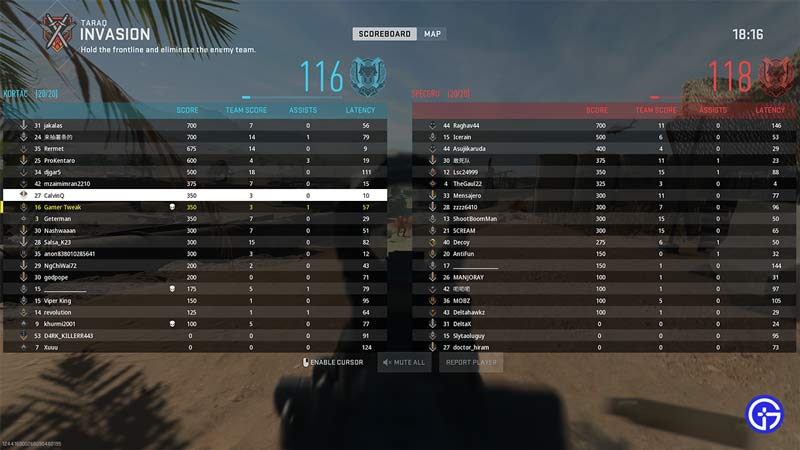
You can check your KD ratio by opening your Match stats in CoD MW2. PC players can open it by pressing the Tab key on their keyboard. PlayStation players can do the same by pressing their touchpad. And Xbox players can press the Menu button on their controllers to check their K/D. Alternatively, if you aren’t interested in checking your score in the middle of the match. Then, you can also check your KD after the match is over.
K/D Ratio stands for Kill/Death Ratio. So your KD Ratio is calculated by dividing the number of kills you get in a match by the number of times you die (get killed). So for example, if by the end of the match you have 15 kills and 10 deaths, then your KD Ratio will be 1.5.
The higher the number the better, you wouldn’t want to die more than you kill. Of course, there are times when it isn’t possible, like if you are having a bad match, facing connection issues, or playing against smurfs. But you must always try to have a K/D Ratio of at least 1 or more than 1.
Other than KD some other stat that you might want to check is your assists. As the name implies, it shows you your assists, that is the number of kills you helped your teammates get. You get an assist after you do a certain amount of damage to your enemy. But instead of you killing them, your teammate gets the finishing shot.
At present, there is no way for you to check the KD of your past matches. So the only times you can check it is during the match, and when you get your stats after finishing it. But we can hope that the developers add this feature in future updates.
That covers this guide on how to view your K/D Ratio in CoD MW2. If you need more help on this game check our guides on how to fix the custom loadout locked error and unlock attachments.