With Chasing Immortality codes, you can get free Soul Fragments and more rewards that can help your progression and since this is a story-driven adventure, any boosts can be of great help! The grind gets much smoother with some extra freebies, and this guide has the complete list. Find out how to redeem codes, why some might not work, and how to stay updated with the latest announcements.
Chasing Immortality Codes (April 2026)
- OPENTEST1: 15 Soul Fragments
- TYFORSUPPORT: 10 Soul Fragments
- LIKETHEGAME2: 1 Heavens Pill
- WELOVEKIRIVA: 10 Soul Fragments
- RELEASE: 2 Soul Fragments
Expired Codes
- There are no expired codes as of now.
Also Read | Build an Island Roblox Codes
How to Redeem Codes in Chasing Immortality
The steps to claim rewards in this game can be slightly confusing because the button is hidden behind an extra step. Don’t worry, here’s how to redeem rewards:
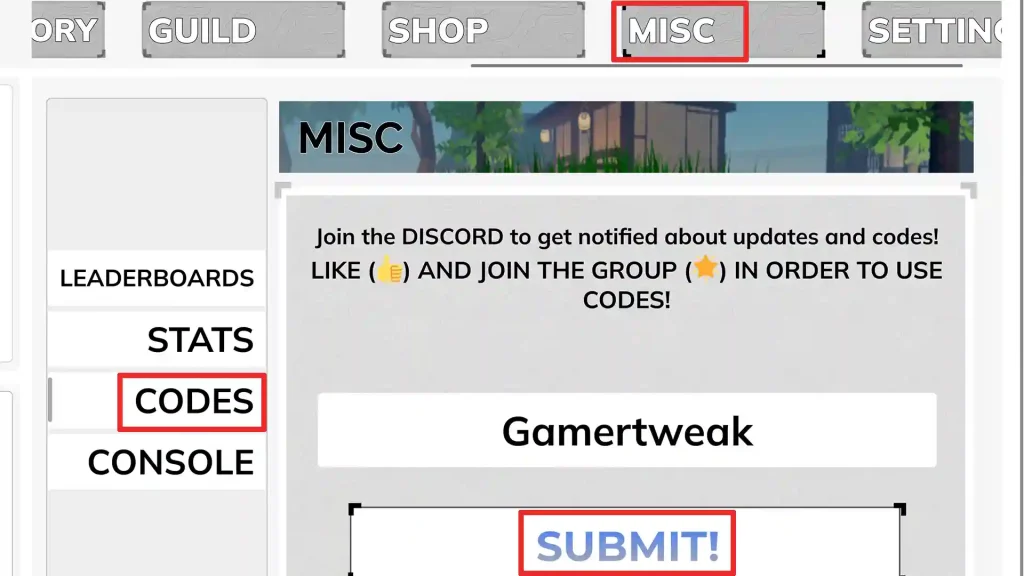
- Launch Chasing Immortality, but make sure you ‘like’ the game and joined the Roblox community beforehand. These are crucial to unlock the code redemption system.
- Next, you will see a menu at the top. Scroll right until you see the MISC button.
- Click on it and then click on the CODES button.
- Type your code in the input field.
- Click on Submit, and the rewards will be yours.
How to Find New Codes
New codes are usually released during updates, milestones, or testing phases. The best way to stay updated is by keeping an eye on the game’s official Discord server and Roblox group, where developers often drop codes alongside patch notes and announcements. Since codes can expire quickly without warning, checking regularly or bookmarking this page ensures you don’t miss out on valuable rewards.
FAQs
They provide resources like Soul Fragments and special items that boost progression and upgrades.
Yes, codes can expire at any time, so it’s best to redeem them quickly.
It may have expired, been mistyped, or already redeemed. Double-check for extra spaces before or after the code. Also make sure that you have liked the game and joined the Roblox group.
Yes, always enter them exactly as shown.
Usually, during updates, testing phases, or milestones.