Home > Mobile > Change PC & Mobile Resolution Diablo Immortal

Diablo Immortal: How To Change Resolution On PC & Mobile

Published Date :

Diablo Immortal is out on Android and iOS and the free-to-play game is attracting a lot of players. The game has brought on new fans to the Diablo fandom. The Android version takes up a space of approximately 12 GB, 1.9GB on download, and an additional file of 10.03 GB. Plus the high-end graphics means some players might have to change resolution on PC and Mobile to adjust to the high demand of Diablo Immortal and this guide explains how to do it.

How to Change Resolution on PC & Mobile in Diablo Immortal
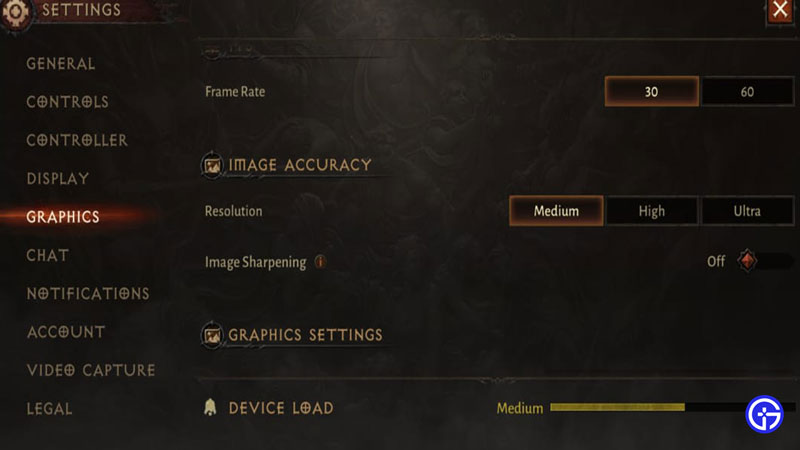
Change Mobile Resolution Diablo Immortal

For PC users, the option to change the resolution in the game has not been added yet. And it is still unknown if Blizzard is going to add the feature.

For Mobile users, the resolution will be set in accordance with the compatibility of your device. However, if you still wish to change the resolution for your mobile, here’s how you can do it –

  • Select the options menu on the top right corner. It’s the three horizontal line-like button from which you can change or equip your skills.
  • Tap on the Settings tab on the top-right.
  • Select the Graphics option and look for Image Resolution.
  • You can select one among three, Medium, High, and Ultra.

Selecting one shows how much load your device will take depending upon your choice. Most users cannot access the Ultra Resolution. It displays that the device is not compatible with the resolution.

If your device starts heating, or you get lag issues, try dropping down your resolution to optimize your device for better gameplay.

That’s all you need to change the resolution on PC and Mobile in Diablo Immortal. While you are here, make sure you check out Diablo Immortal: PC vs Mobile, Diablo Immortal Leveling Guide, and other guides, tips, and tricks on Diablo Immortal right here on Gamer Tweak.

  • Pop for Free Codes (August 2026)

    Pop for Free Codes (August 2026)

    Published Date :

    Pop for Free puts a simple twist on the obby formula. You complete obstacle courses based on their difficulty, earn Pops for finishing them, and then use those Pops to spin different colored wheels. Eventually you can claim free Robux so you have a good reason to keep pushing through more challenging courses. If you… Read More

  • Mine Rocks Codes (August 2026)

    Mine Rocks Codes (August 2026)

    Published Date :

    Mining in Mine Rocks is pretty straightforward: break rocks, collect Coins, turn them into Geodes, and use those Geodes to progress further. While you’re at it, a few boosts can make that process much quicker, especially when you’re just getting started. Here are all the Mine Rocks codes that are currently available. Last checked for… Read More

  • Anime Stars Codes (August 2026)

    Anime Stars Codes (August 2026)

    Updated Date :

    Anime Stars is all about collecting powerful anime Heroes and defeating enemies that prove to be increasingly difficult. You’ll need Coins, Gems, Summons, and other resources to keep upgrading, and codes can give you a nice head start with some of these resources. If you’re curious to know which rewards are working, here’s the full… Read More

  • Ghost Driver Codes (August 2026)

    Ghost Driver Codes (August 2026)

    Published Date :

    Ghost Driver puts you behind the wheel on busy highways where you’ll need to weave through traffic, build up your cash, improve your ride, and more to become one of the best drivers. A better car can make those early runs much easier, and the latest codes can give you a good amount of Cash… Read More