Home > Dragon's Dogma 2 > Dragon’s Dogma 2: How To Change FOV In DD2 (Adjust Camera Distance)

Dragon’s Dogma 2: How To Change FOV In DD2 (Adjust Camera Distance)

Published Date :

Dragon’s Dogma 2 has several things that some like while others don’t, but one feature that almost every player wants is the ability to change their FOV in DD2. In case you are new, FOV stands for Field of View it lets you change your camera settings and lets you decide how far you can see. Often times the higher it is the better, and many games give you a slider that lets you increase or decrease it as per your convenience. Here is what you can do to change it in this game.

How to Change Your FOV in Dragon’s Dogma 2
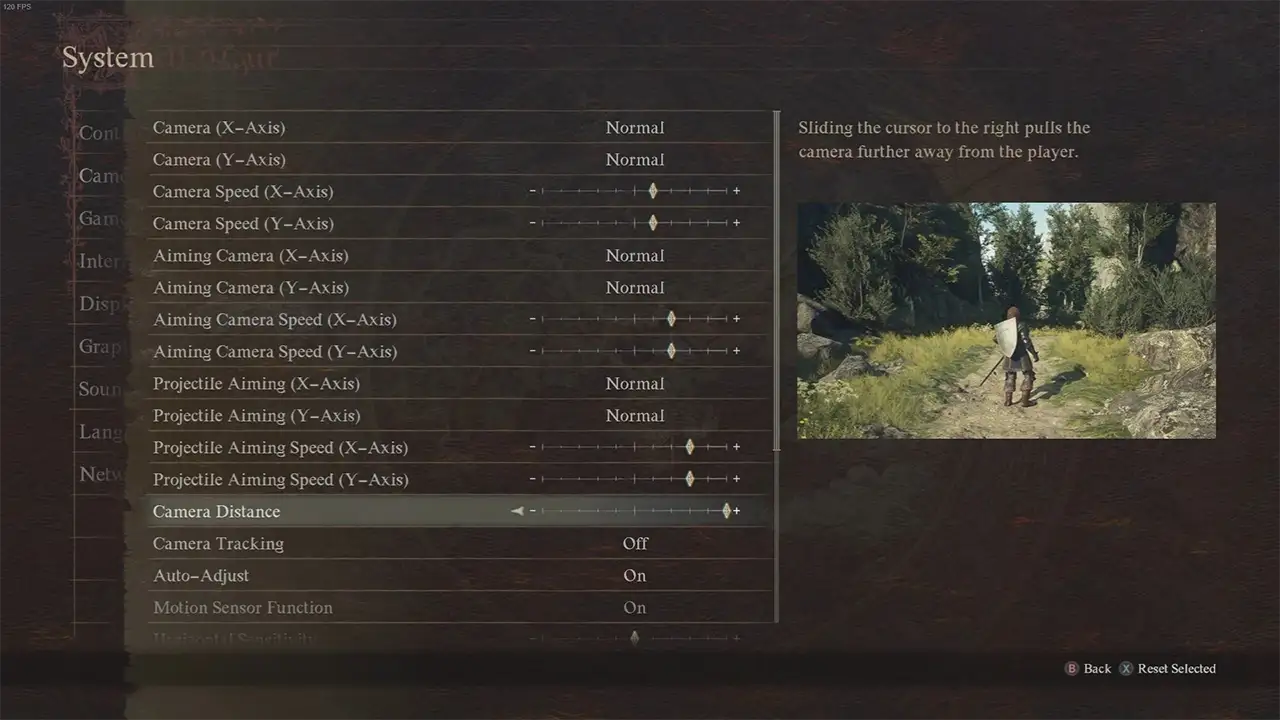
Increase Camera Distance to get better FOV in DD2.

There is no official FOV setting in DD2 however you do have the Camera Distance option instead. As such you can either use this option to marginally improve your FOV. Otherwise, you have to use mods. We will check the mods in a bit but for now, here is how this setting works:

  1. Open the Pause Menu.
  2. Go to System and choose Options.
  3. Here, select Camera Distance.
  4. Finally, change it to adjust the distance between the game’s camera and your character model.

The greater this value will be the more the distance becomes between your character and the camera. This may not be super helpful but is still worth playing with as some players find it useful.

  • Using Mods: You can check NexusMods to find mods that let you improve your FOV, at the time of writing this guide 3 options were available:
    • Over the Shoulder Camera and Wider FOV (Field of View)
    • Camera Tweaks
    • Simple Camera FOV
    • Install them one by one and see which one works out for you. You can do that by using Fluffy Mod Manager and placing the files in the Mods folder of DD2.

Just make sure you check the game’s policy on using mods as some games ban players for using them.

That is all for how you can change your FOV in Dragon’s Dogma 2. While you are here also check our guides on how to get Art of Metamorphosis and how to forge items.
  • Fruit Zombie Survival codes (September 2026)

    Fruit Zombie Survival codes (September 2026)

    Published Date :

    Fruit Zombie Survival is where you eat Devil Fruits, gain their powers, and use them to fight through endless waves of zombies. You can place special builds, earn Berries during runs, and take on powerful bosses but things get much easier if you have some extra boosts. Codes can give you Diamonds, Revives, and Artifact… Read More

  • Titans Ultra Boss Rush Codes (September 2026)

    Titans Ultra Boss Rush Codes (September 2026)

    Published Date :

    Titans Ultra Boss Rush is all about fighting waves of enemies while defending a base and like most Roblox games, there are boosts waiting for you here as well. If you don’t want to miss out on free cash, HP buffs, Samples and more rewards, this guide is for you. Last checked for new codes… Read More

  • Last Stop Codes (September 2026)

    Last Stop Codes (September 2026)

    Published Date :

    Last Stop is a survival game where you search abandoned buildings for valuable loot, and sell what you find to improve your gear. Along the way, you’ll need powerful weapons to fight through waves of zombies, and other threats as you travel toward the Last Stop. Codes can give you useful rewards to help with… Read More

  • The Veil Codes (September 2026)

    The Veil Codes (September 2026)

    Published Date :

    This game throws you into a massive labyrinth filled with dangerous enemies and an unknown evil. You can collect weapons and rare items, fight through huge hordes, take on hostile players in PvP, and complete the story as you work toward ending the threat. Codes can give you useful rewards (such as Race Rerolls) to… Read More