Home > Resident Evil Village > How to Switch Difficulty Level?

RE Village Difficulty Settings: How To Change Difficulty Level?

Published Date :

Many times Resident Evil Village will not be forgiving. The game has three difficulty settings. They are Casual, Standard & Hardcore. In simple words Easy, Medium, and Tough. In the first one, enemies die faster, while the second one requires little effort and the last turns out to be impossible. You can switch difficulty from hard to easy or from hardcore to standard or even lower while playing Resident Evil Village. However the settings are different here, RE Village Difficulty settings are not in the game menu. Read this guide till the end to know more about this issue.

How to Switch Difficulty in RE Village?
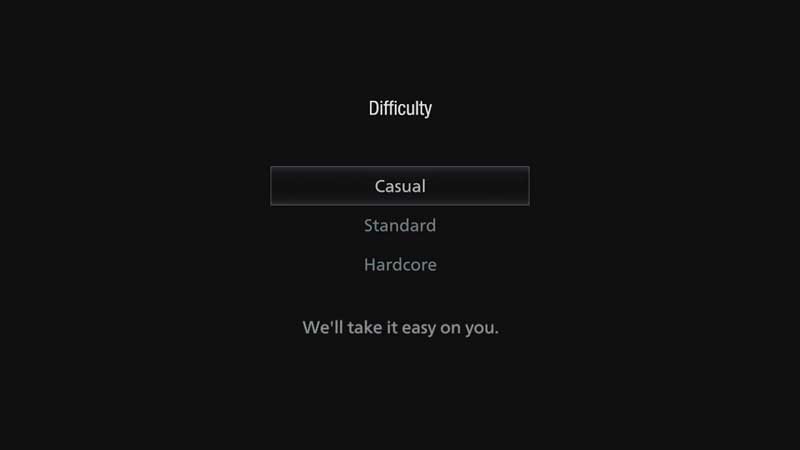
RE Village Difficulty Settings

The choice of Difficulty level is provided at the start of the game. When you see New Game, you will see the above options. If you start with Standard then the game will progress on medium difficulty. The game menu does not allow you to instantly switch to the difficulty level. This where Resident Evil Village turns into an exciting game. At first, you will have to try all your wit on the same difficulty settings.
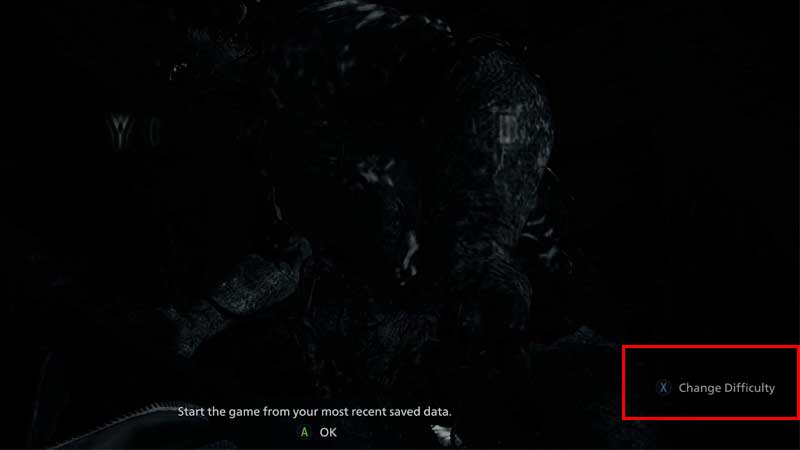
RE Village Difficulty Settings

You can only see Change Difficulty in Resident Evil Village after dying. The game does not give you any options while playing. If you are unable to survive an attack then the screen offers an option to switch to a lower difficulty. You can still confirm to continue with the same settings avoiding the option. Or else on Xbox just press X to change the difficulty level. The game will switch to lower and this will continue until you are playing. This is how you can change difficulty settings in Resident Evil Village.

I had played this game and it sometimes gets too tough in between. It proves to be this year’s best horror survival game. Now you are aware of how difficult settings work in Resident Evil Village. The second thing to do is go through our RE Village Wiki guide to find tiny big secrets about these games. Learn about new crafting recipes and a lot more. We will keep on adding a lot of new stuff every day to the wiki.


  • Monkey Soccer Codes (June 2026)

    Monkey Soccer Codes (June 2026)

    Published Date :

    Monkey Soccer codes can give you plenty of free Bananas and Lucky Spins, making it easier to get a much better experience on the pitch. Since new codes are usually released alongside major updates and milestones, here’s a complete list of rewards to ensure you don’t miss out. Last checked for new codes on June… Read More

  • GTA 6 Console Players May Have to Settle for 30 FPS

    GTA 6 Console Players May Have to Settle for 30 FPS

    Updated Date :

    Ever since Rockstar Games dropped GTA 6 trailers, fans have been thinking about one thing: will the game support 60 FPS on consoles? While plenty of players are hoping for a Performance Mode on the PS5 and Xbox Series X|S, recent technical analysis suggests Rockstar may instead provide a locked 30 FPS experience. We don’t… Read More

  • Top 6 CS2 Case Opening Sites Reviewed: Safety, Odds & User Experience

    Top 6 CS2 Case Opening Sites Reviewed: Safety, Odds & User Experience

    Published Date :

    Opening cases in CS2 has long been a common practice, but many want something more interesting than the standard cases in the game. Therefore, websites have emerged that offer different formats, unique skin sets, and more convenient features. Below is a brief overview of several such platforms that actually work and are trustworthy. Hellcase Is… Read More

  • Immortality Incremental Codes (June 2026)

    Immortality Incremental Codes (June 2026)

    Published Date :

    Immortality Incremental Codes can give you free Tickets, Jade, Potions, and other useful resources that speed up your journey. Since it’s a clicker game, it can feel grindy fast, but these rewards will give you the boosts you need. Last checked for new codes on June 29, 2026 Active Immortality Incremental Codes Expired Codes How… Read More