
If you are facing the Baldur’s Gate 3 can’t sort inventory issue, it might be due to the unmanaged stacked-up items. As you progress, you will gather magical items, artifacts, and various resources. But if you don’t pay close attention to the weight of your inventory, your Inventory can stack up to the maximum. And as a result, you cannot put more items in your Inventory restricting you to equip more items. So, is there a way to remove the unused items and sort your items, better? Check out our guide to find out how to fix the can’t sort inventory in BG3.
Fix Can’t Sort Inventory in Baldur’s Gate 3
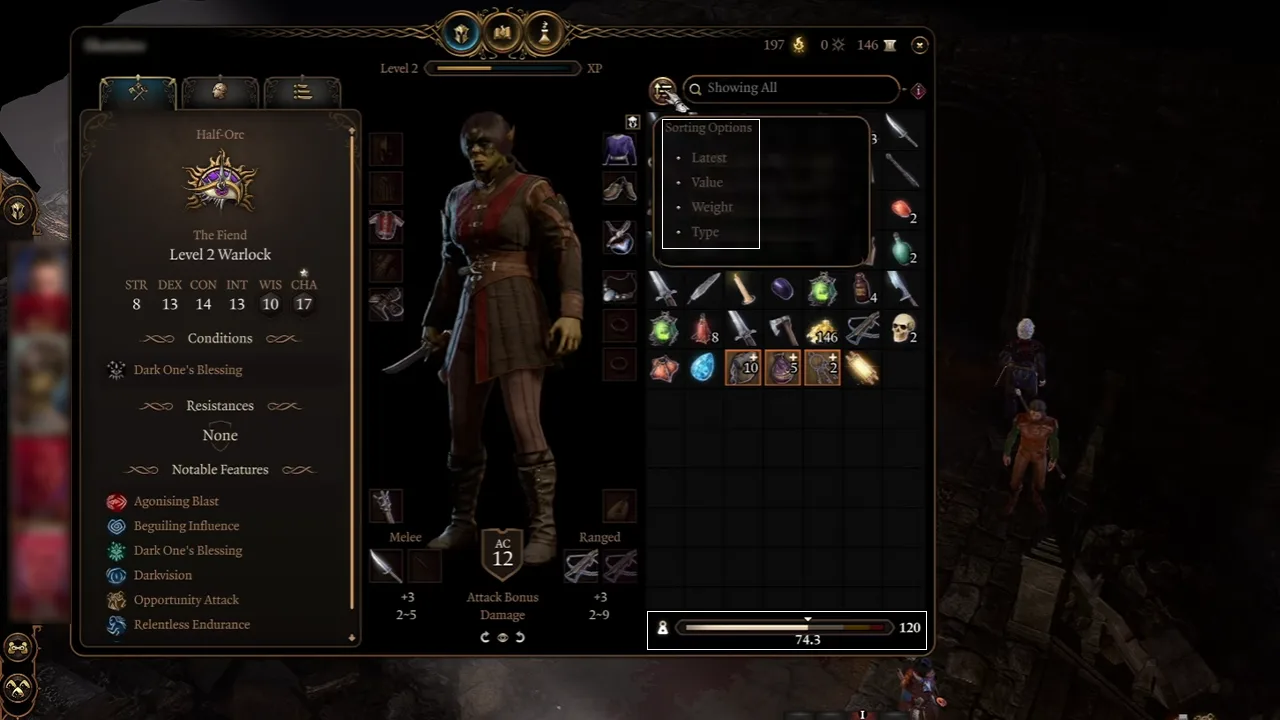
You can fix the can’t sort inventory in BG3 by pressing the Auto-sort button next to the Search bar. Soon as you select this button, it allows you to sort Inventory items with different options.
These sorting options are as follows:
- Latest
- Value
- Weight
- Type
Depending on the way you want to sort Inventory items, you can select any of the above options. If you consider value as a priority, select the Value option that showcases the high rarity items, first. But if you want to check and sort the items taking too much of your Inventory space, select the Weight option. Likewise, you can also select the Latest and Type to sort your Inventory items using those sorting options in Baldur’s Gate 3.
But aside from these options, you can also use the Suggested filters on the Search bar to sort your Inventory. These include Equipment, Potions, Scrolls, Throwables, Consumables, and more. As you select one of the filters, it will show you all the items within that category. From the selected filter, you can remove unused items or less valuable items.
That’s all about how to fix the Baldur’s Gate 3 can’t sort Inventory issue. If you found this guide helpful, check out our guides to find out what to do if Pixie Blessing is lost, if you should cure yourself or Lae’zel, and explore more Baldur’s Gate 3 Guides right here on Gamer Tweak.











