Many players still face an uncommon issue with the BG3 camera stuck Top Down view no matter what you do. Since this is a turn-based RPG, being unable to view your surroundings could mean getting ambushed or walking into a trap. The game gives you several camera controls to enjoy the game as you see fit. But for many, once you use the tactical mode, there is no getting out of it. So here is how you can exit the Bird’s eye camera view in Baldur’s Gate 3.
Being stuck in the top-down camera can be a major buzzkill in a turn-based RPG like Baldur’s Gate 3. Suddenly, you’re almost navigating blind, and you miss many miss enemies hidden in different elevations. Luckily, getting out of this isometric camera isn’t impossible!
Bonus Tip: Remember, the top-down view is a useful strategic tool in the game. Once your view is fixed, use “O” to plan your moves or get a wider view of the surroundings. Just be mindful of not getting stuck in it again unintentionally.
Baldur’s Gate 3: How to Fix BG3 Camera Stuck Top Down
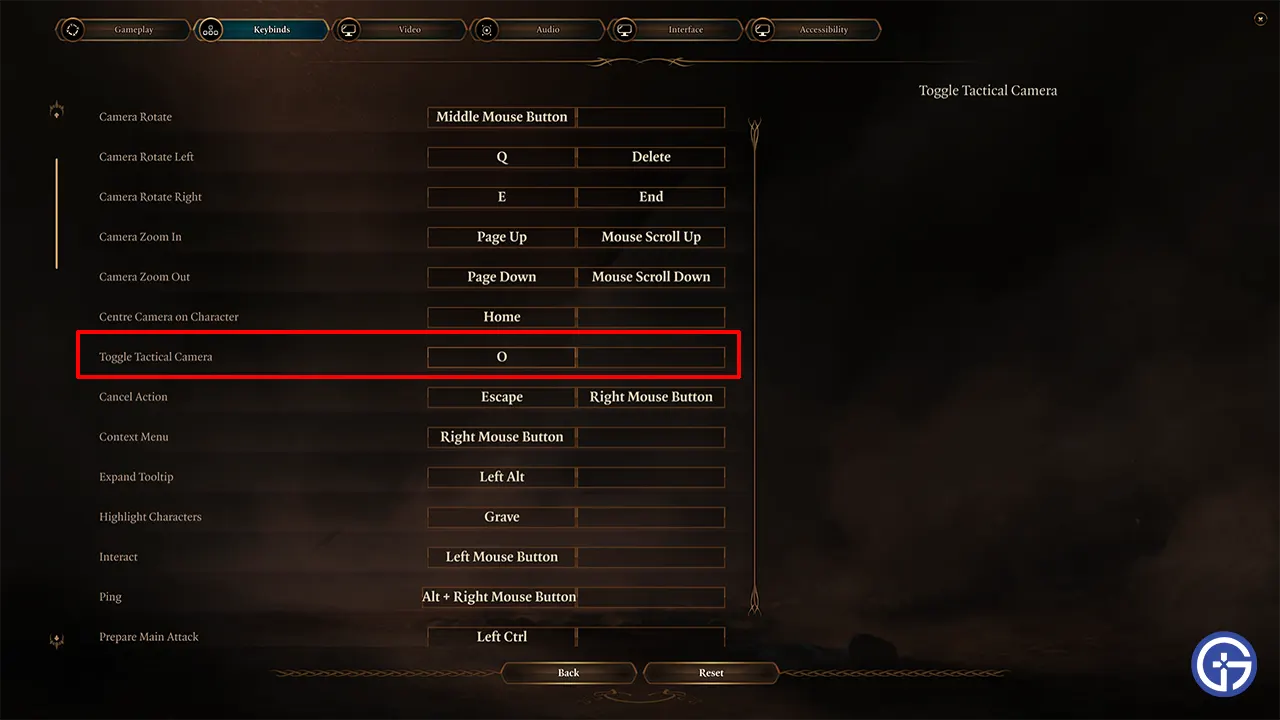
In cases for most players, the issue is none other than the “O” key. It toggles the Tactical Camera by default, offering a strategic bird’s-eye view. But a misplaced press can leave you staring at the tops of your party members’ heads instead of the strategic battle happening right before you.
Yes, that’s right, your view is stuck in this view in Baldur’s Gate 3 because you have accidentally pressed or changed its key bind. You can fix the BG3 camera stuck Top Down view by pressing the O-key on your keyboard by default. But if you or someone else playing on your PC changed it, you can easily fix it by changing its keybind.
- Press the Esc key and go to Options.
- Here, go to the Keybinds tab and scroll down.
- Look for the option Toggle Tactical Camera.
- Click on the keybind and change it back to O or any other key you choose that isn’t currently used.
- Now, go back to the game and press this key, and you should be able to get out of the Tactical top-down view.
Ideally, this should help you solve this issue, but if you still have problems, these solutions can help you.
More Fixes to Exit Bird’s Eye View in BG3
If the camera is not being reset after using the “O” button (Tactical Camera), then you can try the following to fix it by yourself:
- Restart the Game & Steam: Sometimes, a good old-fashioned restart can work wonders. Close Baldur’s Gate 3 and Steam, restart, and relaunch the game. This clears temporary glitches and resets the camera settings. Try pressing O or your new keybind to see if you can change the top-down view. Don’t forget to reboot Steam, too, for additional measure.
- Verify Game Files: There is a chance BG3 might have some corrupted files during an update. Using Steam, Verify the integrity of its files. Once it checks and replaces any broken files, restart the game and check if you still have the issue.
- Disable Mods: There are many instances when using Mods can cause problems or glitches with existing game features. Disable mods if you are using any. If the Camera works normally now, then the problem is with some mod, and you should probably remove it. Or you can wait for the creator to update their mod to work without causing this problem.
- Reinstall the Game: If none of the above fixes work, then reinstalling might help you fix the camera of BG3.
You should no longer have the BG3 camera stuck Top Down anymore. Since you like playing this game, you should also find our guides useful on getting Infernal Iron, opening Gilded Chest, and playing multiplayer with friends.