Home > Fortnite > How To Build And Assign Beds In LEGO Fortnite (Crafting Guide)

How To Build And Assign Beds In LEGO Fortnite (Crafting Guide)

Updated Date :

In LEGO Fortnite Beds aren’t just for decoration; they can be used, and it wouldn’t be far-fetched to say that they are important for your survival. Dealing with the monsters is tough; you have to give the little ones some rest. Food is precious, especially in biomes where foraging isn’t easy, so rather than spending it, they should recover their health by sleeping.

Additionally, you need to build and assign beds in LEGO Fortnite to invite villagers into your camps. They wouldn’t join you until you gave them that. These are just a few of the uses; if you wish to know about others, then scroll down.

How to Craft and Assign Beds in LEGO Fortnite
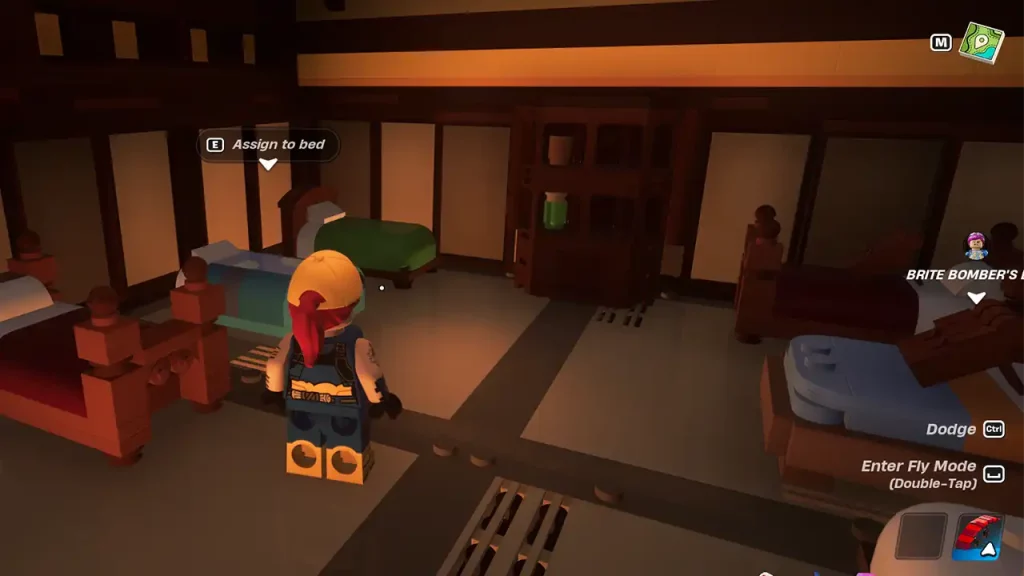
Craft and Assign Beds in LEGO Fortnite
Screenshot by Gamer Tweak

To unlock the bed recipe in Survival mode, you have to first place the Crafting Bench. The Crafting Bench can be built using 3 Wood and 5 Granite and it is unlocked from the start. Next, you must build a shelter. Simple Shack will do the work. You cannot use the bed if it is soaking in the rain. Once you have those, collect at least 10 Wood and follow these steps:

  • Go to Build Menu from the bottom left.
  • Navigate to the Furniture.
  • Select the Bed and place it in the shelter.
  • Interact with it and assign the bed.

How to Assign Beds to Villagers and Friends

Villagers will automatically take any free bed when they become residents. I would suggest creating a big room and placing multiple beds in it. As for your friends, interact with the bed to get the characters list. Select anyone and assign it to them.

What Are Other Uses of Beds?

Apart from inviting villagers and restoring health, it is used to change the spawn point. After assigning the bed to yourself, just interact with it again and choose “Set respawn action and rest” to change it.

That’s all you have to do to build and assign beds in LEGO Fortnite. If you found this guide interesting, you should see our LEGO Fortnite section.


  • Roll to Defend Codes (July 2026)

    Roll to Defend Codes (July 2026)

    Published Date :

    Roll to Defend codes can reward you with free Units, cash, and luck boosts to summon better Units to fight against zombies. Since upgrading your Backpack and unlocking new zones can take time, codes provide much-needed boosts, which is why we have a list of all the currently available rewards. Redeem them before they expire!… Read More

  • Anime Overseer Codes (July 2026)

    Anime Overseer Codes (July 2026)

    Published Date :

    Anime Overseer codes can give you free Gems, Gold, and Trait Rerolls to help you from the start. Since you’ll be summoning units, evolving them, and taking on challenging enemy waves, every free reward can make progression much easier. So, to help your journey, here’s the complete list of all the currently available codes. Last… Read More

  • Stay For Fortune Codes (July 2026)

    Stay For Fortune Codes (July 2026)

    Published Date :

    Stay For Fortune codes can give you free Cromerium, helping you unlock upgrades and progress without having to wait as long. Since the game revolves around staying in the server to earn rewards over time, every bit of free currency can help you get ahead faster. So, here’s the complete list of all the currently… Read More

  • +1 Speed Evolve Codes (July 2026)

    +1 Speed Evolve Codes (July 2026)

    Published Date :

    Speed-based games on Roblox will always stay popular, and this particular experience is quite addictive! Here, you play as an animal and your goal is to evolve into stronger animals, unlock new worlds, and be the fastest player on the server! +1 Speed Evolve codes offer free Speed and Win Boosts that can make your… Read More