Ever since the release of Horizon Forbidden West, it has been well received by not only critics but also a fair share of audiences. It introduces the return of Aloy and her hunting tactics in a new open world. While players won’t run out of exploring different mechanics, there are some issues reported by a few of the players. One of the critical issues encountered while grinding on it is that it bricks the PS5. So, here’s our guide on how to solve the Horizon Forbidden West bricking PS5 issue.
Is Horizon Forbidden West Bricking PS5?
The answer to that question is unsure as there is no word from Guerrilla Games or Sony. While players have been tweeting their bitter-sweet experiences of the Horizon sequel, one of the players tweeted that their PS5 turned off and bricked randomly. For some players, their console bricked as soon as they inserted the disk and some had to factory reset their console. Here is a compilation of different tweets of some of the players that encountered the bricking issue.
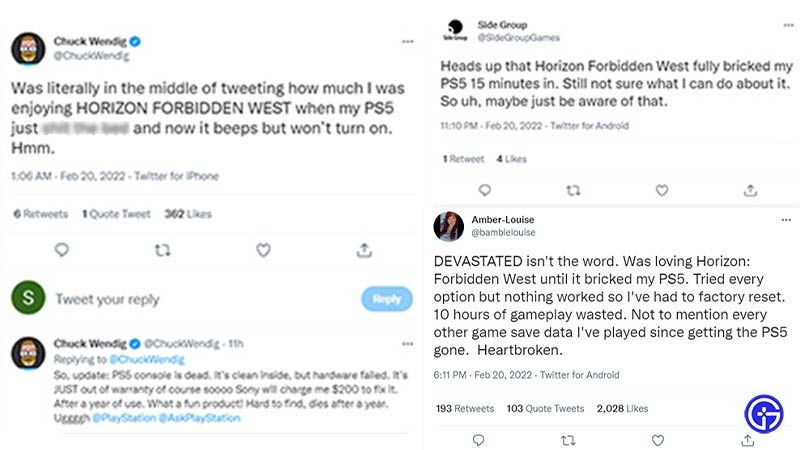
Thus, here are some fixes to solve the Horizon Forbidden West bricking PS5 issue.
Fixes to Solve Horizon Forbidden West Bricking PS5
Here’s a potential fix for the players who cannot turn on their PS5 console. Follow these steps:
- Unplug all the wires of your PS5 and plug it back in.
- Then, hold and press the power button for about 15 seconds or more.
- This will reboot your console’s hardware completely.
- It should hopefully do the needful and reboot your PS5 into functioning.
Once you have managed to successfully boot your PS5, follow the below steps to avoid such problems in the future.
Clearing Cache and Rebuilding Database
- Turn off your PS5 console, then press and hold the power button until you hear two beeping sounds.
- Now that you are in safe mode, connect your controller with USB and press the PS button on the controller.
- Head over to Clear cache and Rebuild database (option 5).
- You will get two options when you select it.
- One will be to rebuild the database option and the other will be to clear the system software cache option.
- Select Rebuilt database option.
- To clear the downloaded cache, follow the above steps and select the Clear system software cache option.
We also suggest reinstalling the game and updating your PS5 console after you have successfully booted it.
That’s all on how to resolve the Horizon Forbidden West bricking PS5 issue. If you liked this guide, you can check our other guides on performance vs quality modes and how to use the co-pilot mode in Horizon Forbidden West right now here on Gamer Tweak.