When you apply the best Settings in Starfield, you can experience butter smooth gameplay experience. You will be traveling between hundreds of planets going through different environments, lighting, etc. There are chances for lags and stutters if your system isn’t capable of rendering them. And that’s why, you will need these best graphics settings to enjoy Starfield on PC with Max FPS.
Starfield Best Graphics Settings PC for High FPS
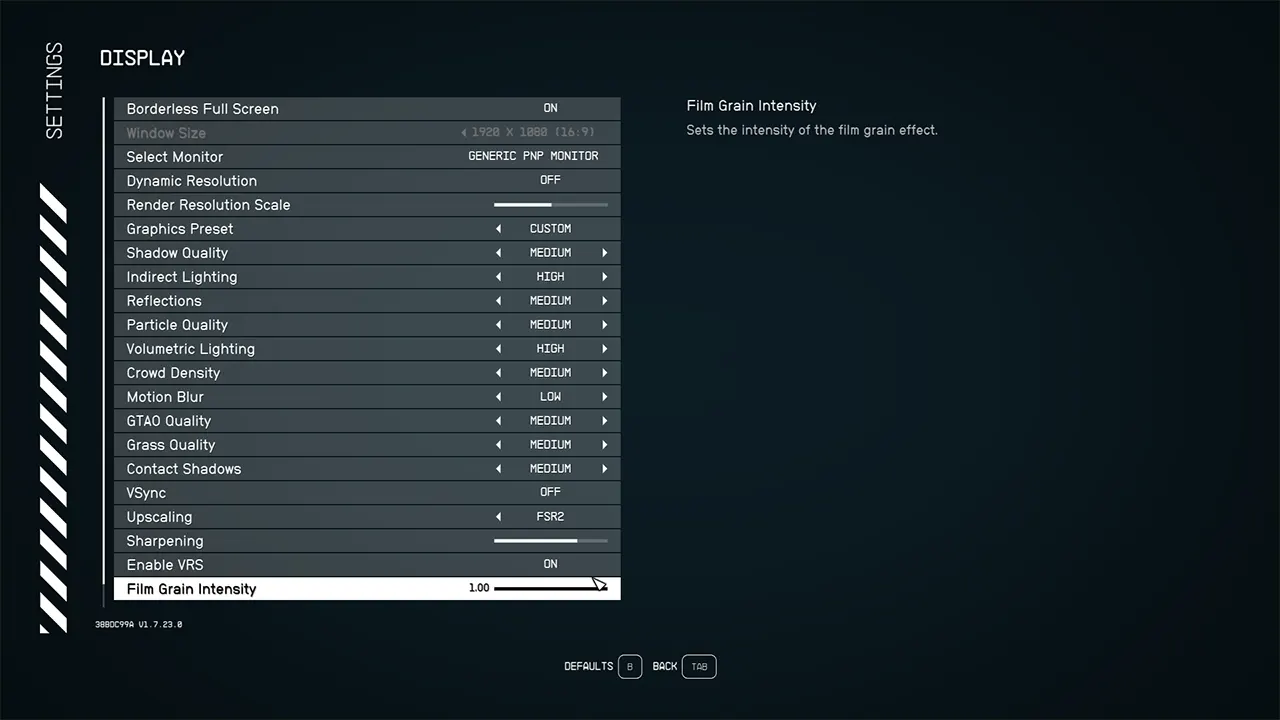
You can use the following settings for the best visual experience with no lags and high FPS performance in Starfield:
- Borderless Full Screen: On
- Dynamic Resolution: Off (turn it on if you’ve high-spec system)
- Render Resolution Scale: 75%
- Graphic Preset: Custom
- Shadow Quality: Medium (adjust it to lower settings if the game is lagging)
- Indirect Lighting: High (adjust it to lower settings if lagging)
- Reflections: Medium
- Particle Quality: Medium
- Volumetric Lighting: Medium (adjust it to higher if your system can take it)
- Crowd Density: Medium (adjust it to low or high if you have a high-spec PC)
- Motion Blur: Select the Preferred Option
- GTAO Quality: Medium (adjust it to higher settings if you have a good graphics system)
- Grass Quality: Medium
- Contact Shadows: Low
- VSync: Off
- Upscaling: FSR2
- Sharpening: 75%
- Enable VRS: On (turn it off if the game begins to lag)
- Film Grain Intensity: Select the Preferred Option
- Enable Depth of Field: Select Preferred Option
In Starfield, the Shadow Quality and Indirect Lighting Graphic Settings will affect your performance the most. So, you can come back and lower these two settings if your system is struggling to run the game properly. Also, note that the above settings guarantee you Max FPS with no lags and freezing issues. So, you can adjust them to higher options if you are looking for stunning visuals.
That’s everything covered about the Best Starfield Settings on PC for a good gameplay experience. Besides Graphics, your FOV matters a lot in this game as well. You can check out our guide on How to Change FOV for more information about it. Moreover, you can also head over to our dedicated section for Starfield Guides on Gamer Tweak. We have stacked up plenty of helpful guides for you there.