
The Finals gives you the option to play the game using both types of inputs, via controller or through keyboard and mouse. This is a great way to let your players decide if they want to play laid back and relaxed or get more competitive. Regardless of what you choose having the right settings can make or mar your experience.
At first glance, you might have thought of Aim Assist. Sure it is important but there are other options too that can affect how you play. Below we have listed down all the options that you should change when playing The Finals on a controller.
Best Controller Settings For The Finals
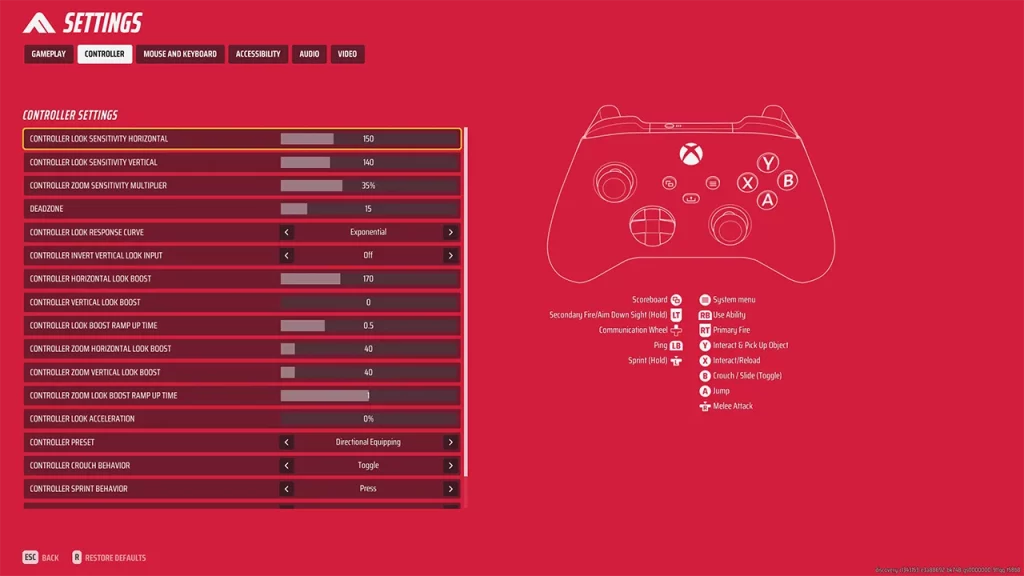
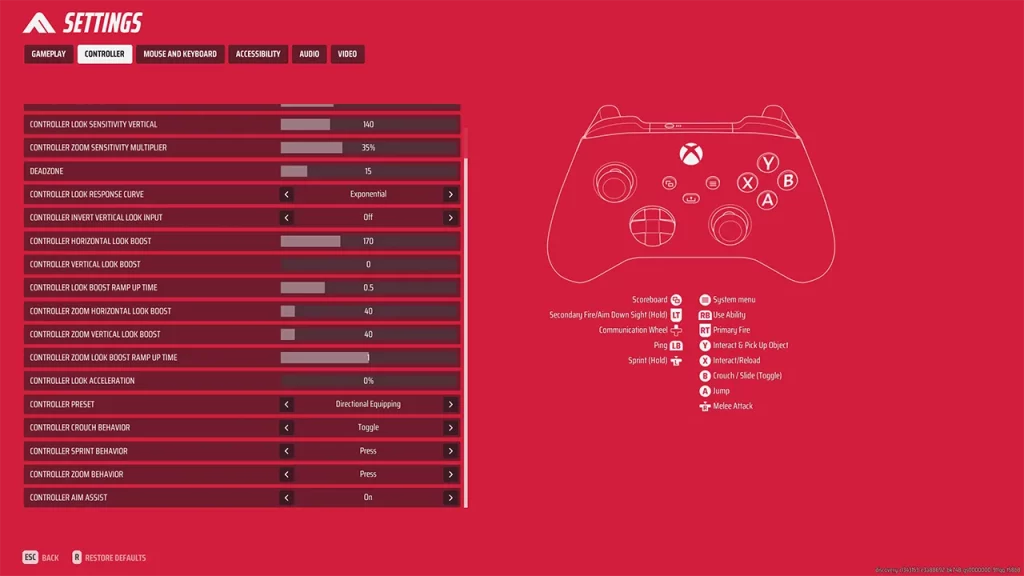
- Controller Look Sensitivity Horizontal: 150. You can increase or decrease it as per what suits you the best.
- Controller Look Sensitivity Vertical: 140. You can increase or decrease it as per what suits you the best.
- Controller Zoom Sensitivity Multiplier: 35%. You can increase or decrease it as per what suits you the best.
- Deadzone: 15. This setting varies from controller to controller and on things like if you are using a wired or wireless one. Be sure to increase or decrease it accordingly.
- Controller Look Response Curve: Exponential
- Controller Invert Vertical Look Input: Off
- Controller Horizontal Look Boost: 170
- Controller Vertical Look Boost: 0
- Controller Look Boost Ramp Up Time: 0.5
- Controller Zoom Horizontal Look Boost: 40
- Controller Zoom Vertical Look Boost: 40
- Controller Zool Look Boost Ramp Up Time: 1
- Controller Look Acceleration: 0%
- Controller Preset: Directional Equipping. You can change this as per what suits you the best.
- Controller Crouch Behavior: Toggle
- Controller Sprint Behavior: Press
- Controller Zoom Behavior: Press
- Controller Aim Assist: On
The above settings are the ones that worked for us. But depending on things like how comfortable you are with high sensitivity and quick movements you might want to change them.
To find what works for you, what you can do is apply the above settings and start training mode. Here you can test the above settings and modify the above options based on your preferences.
With that, you have the best controller settings for The Finals. While you are here you should also check out the best crosshair settings.
Like playing this game? You might also find these guides useful!











