You can change your Discord Settings based on the mic or input device you use to improve your audio quality. Discord is one of the best VoIP software out there to connect with your friends or other people. It is especially handy for communicating in games that don’t have native voice chat support. But many Discord users face issues with their mic and other settings that can easily be fixed by changing them. So in this guide let us take a look at the best voice settings for Discord to improve your audio & mic quality.
Best Discord Mic Settings to improve audio quality
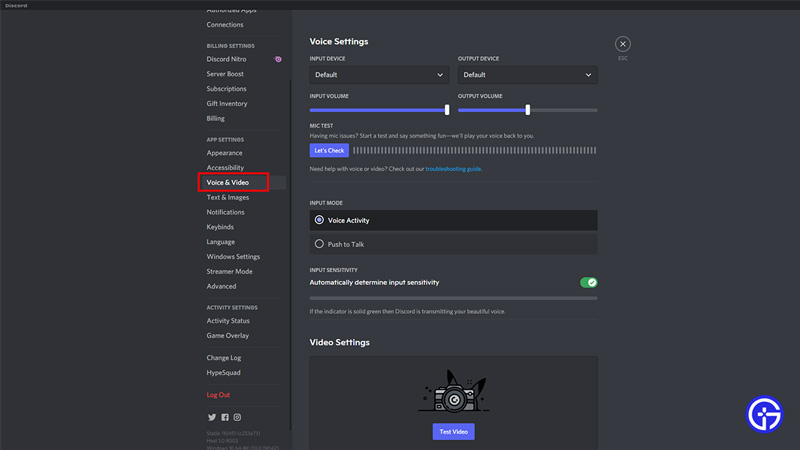
Before we get into the settings it is important to know that every hardware configuration is different so you might still face issues with your mic or voice chat on Discord. But trying out these settings might help at least improve your audio quality if not resolve it. So below are the recommended voice settings for discord.
- Open Discord and click on the cogwheel gear icon on the right beside your discord name.
- Next, go to Voice & Video settings under the App Settings section.
- The first option is the Input device. Click on the dropdown and select the device you use for input that is your mic. It could be your headphone’s mic, a separate USB mic, or some other mic. Select that device here.
- Change the input mode to Voice Activity or Push to Talk based on how you want to use voice chat.
- Voice Activity keeps your mic on throughout the call.
- Push to Talk lets your mic work only when you press the assigned key.
- You can disable the Automatically determine input sensitivity to try playing with it to see if a custom setting works best with your mic. Although it is recommended to keep it on.
- Under the Advanced section enable Noise suppression.
- Keep the Echo cancellation enabled.
- Disable Advanced voice Activity.
- Enable Automatic Gain Control.
- Toggle the Enable Quality of Service High Packet Priority to on.
- Change Audio Subsystem to Legacy.
That covers this guide on the best mic & audio settings for Discord to improve your voice quality. You should check out our guides on how to get verified on Discord and how to disable overlay as you might find them helpful.