
A Beacon is one of the end-game items that provide status effects to the player. When activated, this block projects a beam of light in the sky which can be easily spotted from far away. However, there is no detailed tutorial explaining this item. Hence, here is a guide that features the steps to craft & activate a Beacon in Minecraft. Make sure to read till the end to know all the status effects as well.
How to Craft a Beacon in Minecraft
Similar to all the craftable items, you are required to gather the ingredients to make a Beacon as well. Here is what you require in order to successfully make it:
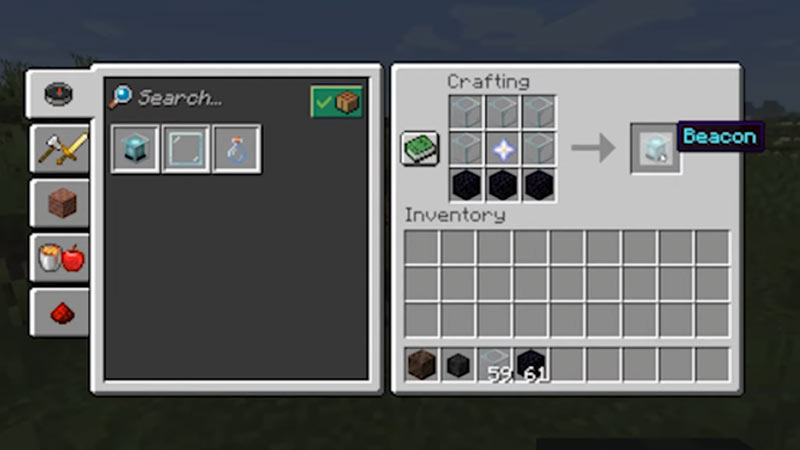
- 5x Glass
- 1x Nether Star
- 3x Obsidian
Once you have obtained the above-mentioned resources, place them in the 3×3 crafting grid in the following order:
- Place 3 Glasses in the first row and the remaining 2 in the left and right grid of the middle row.
- Secondly, place all the 3 Obsidians in the bottom row.
- At last, place the Nether Star in the middle grid.
Once done correctly, you will successfully craft a Beacon in Minecraft.
How to Use a Beacon in Minecraft
Now that you know how to craft a Beacon, here are a few things to keep in mind before learning to activate it:
- First things first, there should not be any obstruction between the Beacon and the sky.
- A Pyramid is required on the top of which you will be placing a Beacon.
Also, keep in mind that a high-level Pyramid guarantees more powers within the radius. Further, you can make the Pyramids only by using Iron, Gold, Emeralds, Diamonds, or Netherite Blocks. There is no compulsion on using only a specific block while making a Pyramid. You can use a combination of all these blocks to make a Pyramid. Here are all the levels of a Pyramid on top of which you can place a Beacon in Minecraft:
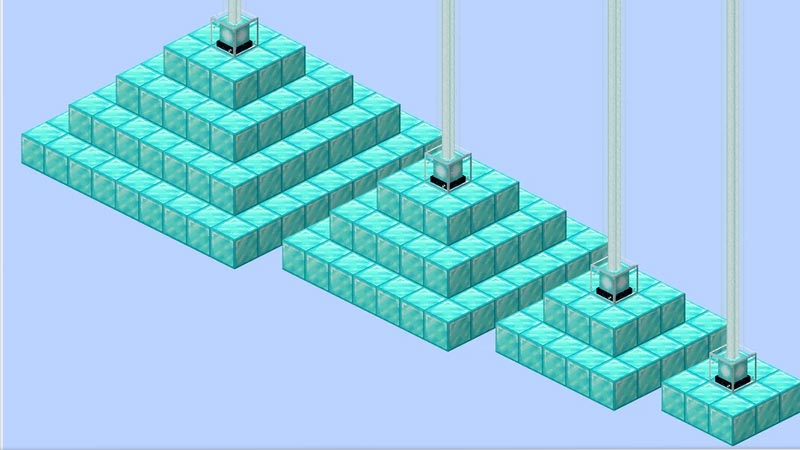
Level 1 Pyramid
To make a level 1 Pyramid, place the blocks in a 9×9 radius. For the next step, place the Beacon in the center block of that pyramid. Further, head over to a Beacon and select the status effect you want from it. Here are they:
- Speed
- Haste
These powers will last for 11 seconds if you leave the radius (20 blocks).
Level 2 Pyramid
A level 2 Pyramid can be built on top of the level 1 Pyramid. Place the blocks in a 7×7 radius in the center of which you will be keeping a Beacon. Here are the powers from which you can make a selection:
- Speed
- Haste
- Resistance
- Jump Boost
These powers will last for 13 seconds if you leave the radius (13 blocks).
Level 3 Pyramid
A level 3 pyramid can be made by placing the blocks in a 5×5 radius on top of both level 1 & 2 Pyramids. Following are the options of Powers for you to select from the Beacon in Minecraft:
- Speed
- Haste
- Resistance
- Jump Boost
- Strength
These powers will last for 15 seconds if you leave the radius (40 blocks)
Level 4 Pyramid
As for the level 4 Pyramid, place it on the top in a 3×3 radius. Similarly, put a Beacon in the middle of the grid to get the job done. Take a look below for the list of powers you can receive from here:
- Speed
- Haste
- Resistance
- Jump Boost
- Strength
- Regeneration
These powers will last for 17 seconds if you leave the radius (50 blocks).
At last, in order to activate a Beacon in Minecraft, you have to use Iron Ingot, Gold Ingot, Netherite Ingot, Diamond, or an Emerald. Simply add any one of the mentioned ingots in the Beacon to activate it.
That covers everything about the Beacons in Minecraft. While you are here, make sure to check out our other Minecraft Guides on Gamer Tweak.











