Close Menu
    Facebook X (Twitter) Instagram
    Gamer TweakGamer Tweak
    • GT Originals
    • Guides
      • AC Mirage
      • Starfield
      • Wordle
      • Mobile
      • GTA 6
      • AC Valhalla
      • Genshin Impact
      • Honkai Star Rail
      • Minecraft
      • Discord
      • Street Fighter 6
      • Project Slayers
      • The Sims 4
      • Lies of P
      • Zelda TOTK
    • Roblox
      • Codes
      • Blox Fruits
      • Type Soul
      • Grow a Garden
      • 99 Nights in the Forest
    • Review
    • Codes
    • BG3
    • CS2
    Gamer TweakGamer Tweak
    Home > Discord > Bad Network Request Error On Discord: How To Fix?
    Discord

    Discord Bad Network Request Error Fix

    Nikita HarinameBy Nikita HarinameAugust 19, 2022Updated:October 25, 20252 Mins Read

    Discord is no stranger to sudden outages and errors and this time, many users are facing one that says Bad Network Request. What does this mean and is there anything you can do to fix it? Here’s everything you need to know.

    What does “Bad Network Request has Occurred” Mean?
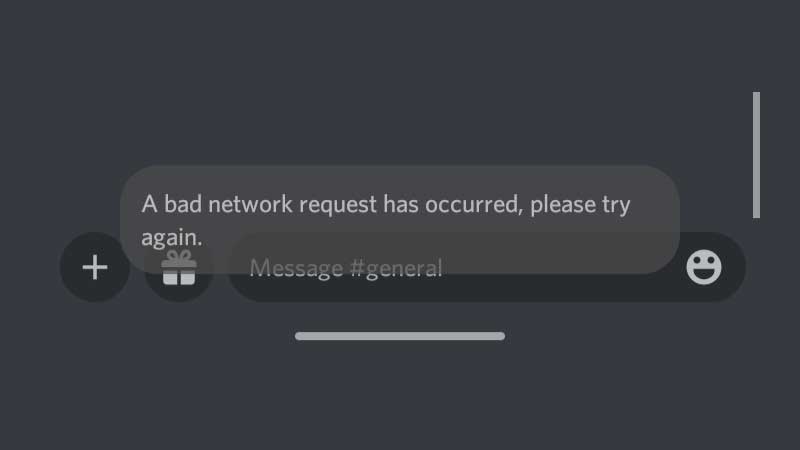
    bad network request has occurred

    Bad Network Request means that there was a problem sending data from your computer to the server. During this time, you will not be able to send or receive messages or any notifications and this could come up due to multiple reasons.

    How to Fix Bad Network Request Error on Discord?

    The first thing you should do is check Discord’s server status. If you see that the servers are having issues at the moment, there’s nothing you can do because only Discord can fix it from their end. Wait and check again after some time. Follow @Discord for updates.

    If it’s not a server issue and other users are able to access Discord normally, then check your internet. Reset your router and try again. Make sure your router is close to your device and if possible, use an Ethernet cable for your PC.

    Also Read | Discord Game Activity Not Showing

    There are a few things you should also check, because they can interrupt your network connection. Check your antivirus software and firewall settings and disable them temporarily. Check if Discord is working properly. If it is, add Discord as an exception so that it may work smoothly later as well.

    Lastly, a simple restart of your PC should ideally solve the problem if it’s a glitch. But if it’s a server issue, again, all you can do is wait. For additional help, head to Discord support and click on Submit a Request.

    That’s everything you can do to fix the bad network request error on Discord. If you’d like to know how to get an invisible character name and PFP on Discord as well, check out our related guide.

    Android Discord Guides iOS PC Tips and Tricks
    Share. Facebook Twitter Pinterest LinkedIn Tumblr Email Reddit
    Nikita Hariname

    From making games to writing about them, she's been in the world of entertainment since a decade now. She writes features, the latest trending news and guides on games like Diablo 4, Overwatch 2, Roblox, codes and more fun stuff! Connect with her at - contactus@gamertweak.com

    Related Posts

    How to Get the Maelstrom Mutation in Grow a Garden

    August 28, 2025

    How to Get the Seedling Pet in Grow a Garden

    August 28, 2025

    Easiest Grow a Garden Candy Apple Recipes

    August 16, 2025

    Best Grow a Garden Smoothie Recipes

    August 14, 2025
    Latest Codes

    Grow Anything Codes (November 2025)

    November 7, 2025

    Pixel Blade Codes (November 2025)

    November 7, 2025

    Anime Fight Codes (November 2025)

    November 4, 2025

    Monkey Climb Codes (October 2025)

    October 24, 2025

    Pixel Quest Codes (October 2025)

    October 24, 2025

    Parasite.exe Codes (October 2025)

    October 24, 2025
    Trending
    • How to Get the Hammer in 99 Nights in the Forest
    • How to Get the Trinity Fruit in Grow a Garden
    • How to Get the Strong Axe in 99 Nights in the Forest
    • Grow Anything Codes (November 2025)
    © 2025 Gamertweak.
    • Advertise With Us
    • About Us
    • Team
    • Contact Us
    • Privacy Policy
    • Terms
    • Open Critic

    Type above and press Enter to search. Press Esc to cancel.