Home > Gaming Guides > How To Fix Anchor Lever Not Working In Engine Controls Of Raft

Raft: Anchor Lever Not Working In Engine Controls (Fix)

Published Date :

Raft is an open-world survival game on a 2×2 Raft as you push to survive while sharks hunt you. The game has multiple locations where you must travel to collect the necessary items and resources. Not only will these help you survive but also improve your Raft from a 2×2 to as huge as a ship. While they may be difficult, the multitude of challenges on offer can prove to be your beeline to moving forward. Of course, you will also need anchors to hold your raft while you scour through a few locations. Although a few players have reported that the anchor lever is not working in the Engine Controls in Raft, this guide will provide you with a way to fix it.

How to Fix Anchor Lever Not Working in Engine Controls of Raft
Raft Anchor Lever Not Working in Engine Controls Fix

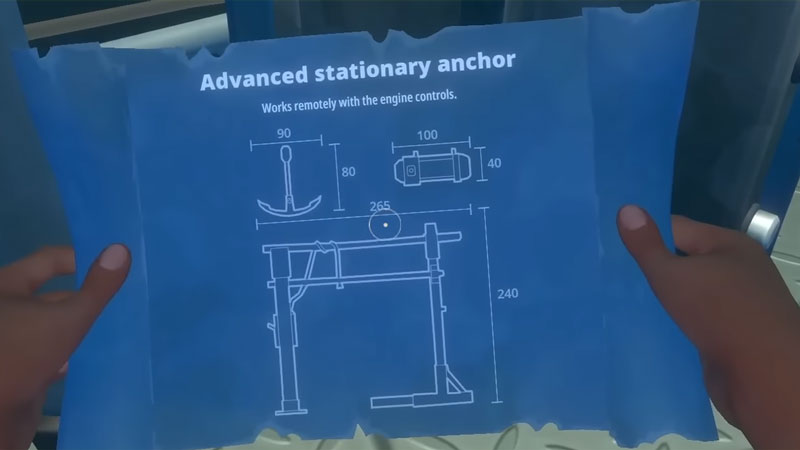
While it is true that some anchor lever are not working in Engine controls, it is not due to any game bug. Neither is it an error that is troubling players. The problem is simple, the anchor lever in Engine Controls works with a higher level anchor than the one you currently have.

More specifically, you need an Advanced Stationary Anchor on your raft. Additionally, to get the Advanced Stationary anchor, you will have to travel to Temperance Island. You encounter this location during chapter three of Raft. The blueprints for the said anchor are available inside a locker at the Observatory.

If you just want to skip traveling to Temperance Island amidst this problem, we have mentioned the necessary items to make the Advanced Stationary Anchor. Here’s what you need:

  • Plank x10
  • Rope x6
  • Metal Ingot x4
  • Bolt x4
  • Titanium Ingot x8

Once you make the Advanced Stationary Anchor and place it on your raft, you will be able to use the Anchor Lever from the Engine Controls.

That’s all on how to fix anchor lever not working in Engine Controls of Raft. While you are here, make sure you check out how to build beehive, how to craft a recycler, and other guides, tips, and tricks with Gamer Tweak.
  • CookieRun: Crumble Codes (August 2026)

    CookieRun: Crumble Codes (August 2026)

    Published Date :

    The Devsisters Corporation is back with another Cookie adventure, and like other games, there is a code redemption system in CookieRun: Crumble too! This means we can expect to get regular rewards as drops to help you assemble a team of adorable yet powerful Cookies. Here’s a list of everything currently available. Last checked for… Read More

  • Smiles Codes (August 2026)

    Smiles Codes (August 2026)

    Published Date :

    Smiles is a multiplayer survival mascot horror game where you join other players, complete objectives and survive the dangers lurking in the dark. To make the game more interesting, you can unlock emojis, animations, and more that require in-game currency (Fluff), but it can be quite a grind to earn. Don’t worry, you can redeem… Read More

  • Decaying Winter Codes (August 2026)

    Decaying Winter Codes (August 2026)

    Published Date :

    In Decaying Winter, you’re stranded on EDEN-277 where you need to survive not just scavengers, raiders and supernatural enemies but also the hostile environment. Since it’s a roguelike co-op survival experience, every little boost helps, and that’s where Decaying Winter codes will come in handy. Luckily, there is a code redemption mechanic in the game,… Read More

  • Fishing Tower Defense Codes (August 2026)

    Fishing Tower Defense Codes (August 2026)

    Published Date :

    Fishing Tower Defense codes can help you build a stronger defense by rewarding you with free Diamonds, Dice, and other useful items. Unlike the usual tower defense games, this Roblox experience has you catching unique fish and deploying them as living towers to stop waves of invading humans. As you unlock rarer fish and upgrade… Read More