One thing that I personally feel annoying about Starfield is its sluggish Aim Sensitivity Settings. I recently tried playing it with Mouse/Keyboard and Controller. While aiming with the Mouse was a fine experience, but it wasn’t the same with the Controller. The aiming sights were moving drastically slow which ruined the gameplay for me. Just after this, I surfed the internet and was able to find a perfect combination of settings that fixed Aim Sensitivity for me. For your reference, I’ll be sharing it with you below.
Starfield Aim Sensitivity Settings
Here are the Settings that helped me enhance my aiming while playing Starfield with Controller:
- Invert Y: Off
- Invert Flight Y: Off
- Invert Menu Camera X: Off
- Invert Menu Camera Y: Off
- Flight Stick Swap: Off
- Roll Dominant: Off
- Look Sensitivity V: 100%
- Look Sensitivity H: 100%
- Aim Sensitivity V: 50%
- Aim Sensitivity H: 50%
- Controller Look Sensitivity: 21%
- Controller Cursor Sensitivity: 20%
- Controller Vibration: As per your preference
- Outpost Item Rotation Speed: 5.00x
- Outpost FlyCam Translation Speed: 2.00x
- Outpost FlyCam Rotation Speed: 1.50x
- Outpost FlyCam Distance Speed: 1.50x
- Outpost FlyCam Starting Pitch: 65
- Outpost Flight Starfield Distance: 60
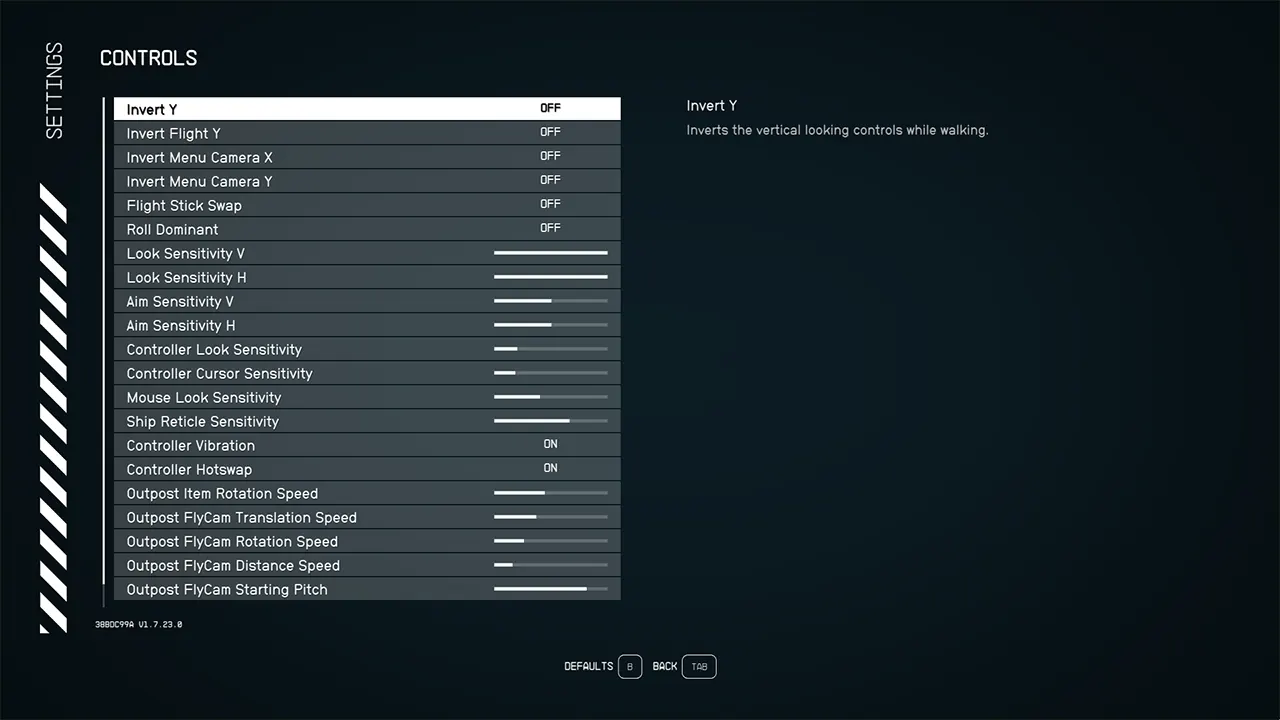
I started playing Starfield with the above Sensitivity Settings and I got the best results in aiming. Note that you won’t get quick results after changing settings. Please make sure to give it some time so that you get accustomed to them. Also, you are free to try out your own combinations and experiment with them in the game. It’s just a matter of time until you find your sweet spot and absolutely kill it in-game.
That was the Best Aim Sensitivity Settings in Starfield according to us. If you are looking to gain a Max FPS performance, then make sure to try out our Best Graphic Settings too. Moreover, if you have any sort of queries, then feel free to check out our dedicated section for Starfield at Gamer Tweak. We have stacked up plenty of helpful guides for you there.