Home > Helldivers 2 > How To Add Friends In Helldivers 2 And Play Multiplayer

How To Add Friends In Helldivers 2 And Play Multiplayer

Updated Date :

While there is always an option to play the game solo, playing Helldivers 2 with friends can just add to the experience. The game also supports crossplay so it doesn’t matter if your friends play on a PC or PS5 you can still invite them. To make things better the process in itself is fairly easy. So here is a quick guide on how you can set up and play multiplayer.

How to Add Friends in Helldivers 2
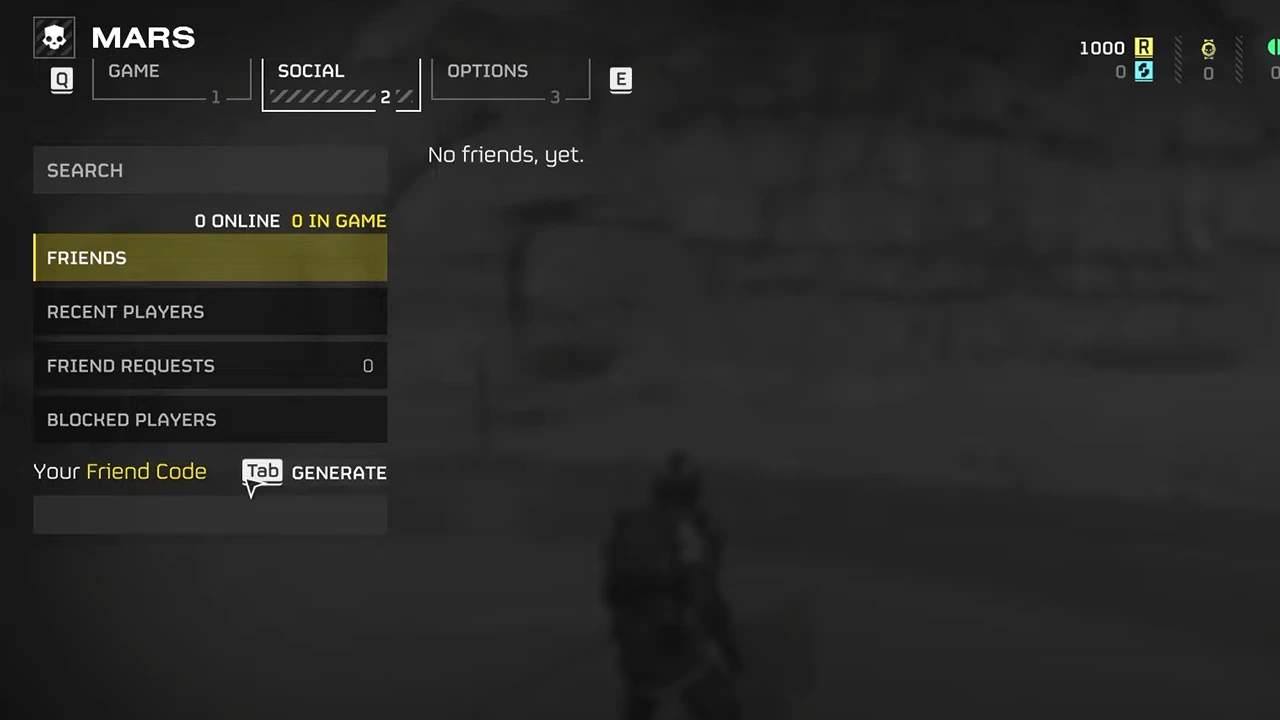
Image Credits: HardReset.Info on YouTube. Add friends in Helldivers 2 by sending them friend request.
  1. Open the game’s menu.
  2. Next, go to the Social tab.
  3. Now, there are two important things to note here:
    • Search tab: This is where you can enter your friend’s code that the game generates for them.
    • Your Friend Code: This is what you need to use to generate your own code and give it to them for searching you. It is the Tab key on PC and the Triangle button for PS5.
  4. Here, one friend has to generate the code and the other has to look them up.
  5. You can find the request in the Friend Request tab.
  6. Accept the invite and you will add them as your friend.

How To Invite Friends to Squad and Play Multiplayer

  1. Go to the Social tab in the menu.
  2. In the Friends section, you can see a list of all your friends.
  3. Now, either choose “Invite to Squad” or “Join Squad”.
  4. After everyone has joined the squad you can start playing with them.

I suggest you check out our video below if you need a little extra help with it:

Can’t Add Friends Fix for Helldivers 2

There is an odd bug where PC and PS5 players can’t seem to add each other as friends. However, this happens if your Steam ID doesn’t have normal characters. Thanks to Reddit user u/TrustLily for finding this fix, you can check their comment here. So change your Steam name to something with regular characters and it should also have at least 3 of them. Now, invite again and you should have no trouble adding them, some comments have also confirmed it to work.

That is all for how you can add and play crossplay with friends in Helldivers 2. In case you are having trouble with the game then be sure to check the fixes for server request failed and unable to establish connection.


  • Heal your Injuries Codes (August 2026)

    Heal your Injuries Codes (August 2026)

    Published Date :

    Heal your Injuries is a JJK-inspired game, where you need math to heal yourself as you get hit by bombs, weapons and more. While playing, you will need EXP and Energy to progress, and thankfully, Heal your Injuries codes drop exactly that! Here’s a complete guide with all the latest rewards and how to claim… Read More

  • Steel Crossfire Codes (August 2026)

    Steel Crossfire Codes (August 2026)

    Published Date :

    Steel Crossfire is a thrilling PvP robot-fighting game inspired by Transformers, so yes, you can change into a vehicle, get into Jet mode, and get into some explosive battles. To make things interesting, you can unlock more characters and skins using Shards, which is what Steel Crossfire codes frequently drop! Here’s the complete list of… Read More

  • CookieRun: Crumble Codes (August 2026)

    CookieRun: Crumble Codes (August 2026)

    Published Date :

    The Devsisters Corporation is back with another Cookie adventure, and like other games, there is a code redemption system in CookieRun: Crumble too! This means we can expect to get regular rewards as drops to help you assemble a team of adorable yet powerful Cookies. Here’s a list of everything currently available. Last checked for… Read More

  • Smiles Codes (August 2026)

    Smiles Codes (August 2026)

    Published Date :

    Smiles is a multiplayer survival mascot horror game where you join other players, complete objectives and survive the dangers lurking in the dark. To make the game more interesting, you can unlock emojis, animations, and more that require in-game currency (Fluff), but it can be quite a grind to earn. Don’t worry, you can redeem… Read More