Home > Mobile > How To Use Town Portal In Diablo Immortal To Teleport

Diablo Immortal Town Portal – How To Use To Teleport

Published Date :

Traversing through the lands in this game can be time-consuming, but you can significantly reduce the time taken by fast traveling and teleporting to locations. This is where Town Portals in Diablo Immortal come in. Let’s take a look at how and when to use them.

How to Use the Town Portal in Diablo Immortal?
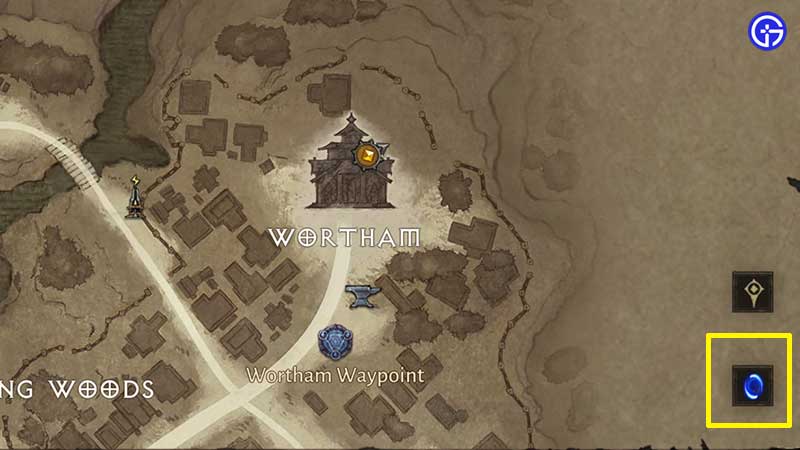
town portal on map

  • After you have spoken to Cain and gained access to the World map, tap on the minimap at the top right of the screen. This will be your Zone Map, and at the bottom right, you will see the blue Town Portal icon.
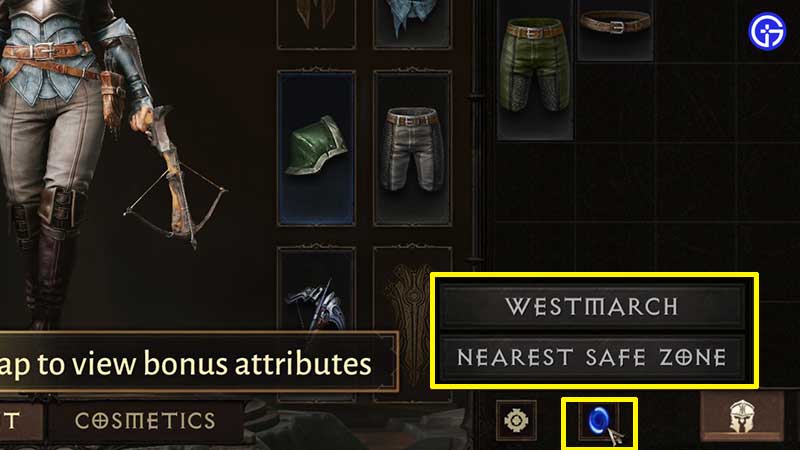
town portal from inventory

  • Apart from this, you can also open the Inventory and tap on the blue icon present at the bottom of the screen.
  • Once you click on this blue button, click on the one of the options to get teleported there. For example, from the options shown, you can either head to Westmarch or the Nearest Safe Zone. Click on the latter if you wish to head back to a safe location that’s closest to where you currently are on the map.
  • A blue portal ring will appear in the game and you have to interact with it to use it. A blue bar will get filled up in a few seconds and you will be teleported.
  • Note that players should have unlocked the Level 12 to get access to the Town Portal teleportation ability.
  • While playing, one of the main quests City of the Light requires you to open a portal to Westmarch.
  • Town Portals are different from Waypoints. Waypoints have to be discovered and activated. And then you can teleport from one location to other via these Waypoints. You don’t need any special item for this and we’ve explained the process to fast travel right here in this guide.

Can you Teleport from Anywhere?

No, you cannot teleport from dangerous locations such as Dungeons, Hidden Lairs, Elder Rifts, Challenge Rifts but other than that, you can create a Town Portal and go back to safe zones.

Now that you know how to use the Town Portal in Diablo Immortal, find out how to turn on auto navigation and auto pick up loot as well.


  • Warden Codes (August 2026)

    Warden Codes (August 2026)

    Published Date :

    Warden takes you on a fantasy PvE adventure where you’ll play as powerful creatures, solve puzzles, complete objectives, and uncover the mystery behind a spreading corruption. While you’re at it, you can redeem the latest Warden codes to unlock Shooms, the in-game currency. Before any further ado, here’s the latest list of active rewards. Last… Read More

  • Stay Hard Run Codes (August 2026)

    Stay Hard Run Codes (August 2026)

    Published Date :

    Inspired by David Goggins’ famous “Stay Hard” mindset, Stay Hard Run challenges you to push through demanding obstacle courses without giving up. Every successful run earns you more progress, helping you unlock upgrades and if you’re looking for an extra boost along the way, redeeming the latest Stay Hard Run codes is something you should… Read More

  • PartyBox Codes (August 2026)

    PartyBox Codes (August 2026)

    Published Date :

    Answering trivia questions or sketching hilarious drawings is super fun with a group of friends in PartyBox. Since you’ll be competing across a variety of game modes, any free rewards you can claim are always worth picking up, and luckily, the devs release goodies that reward Confetti and more, perfect for your next game night.… Read More

  • Roblox Lowball Codes (August 2026)

    Roblox Lowball Codes (August 2026)

    Published Date :

    Buying items below their market value and flipping them for a profit is the fastest way to get rich in Lowball. Every successful negotiation grows your cash, letting you take on bigger trades and expand your inventory even further. If you want an extra boost without waiting for your next big deal, redeeming the latest… Read More