Home > Lost Ark > How To Accept Guild Quest Requests In Lost Ark

Lost Ark: Accept Guild Quest Requests

Published Date :

Accepting Guild Quest Requests and completing the quest contributes to leveling up the guild you are in, in Lost Ark. If you are unable to find this option, then you don’t need to worry as it is quite easy to do. Once you accept and start completing guild quests your guild will level up and grant you more guild perks. So in this guide let us check how to accept guild quest requests in Lost Ark and how to find Guild quests.

How to Accept a Guild Request & Join Guild in Lost Ark
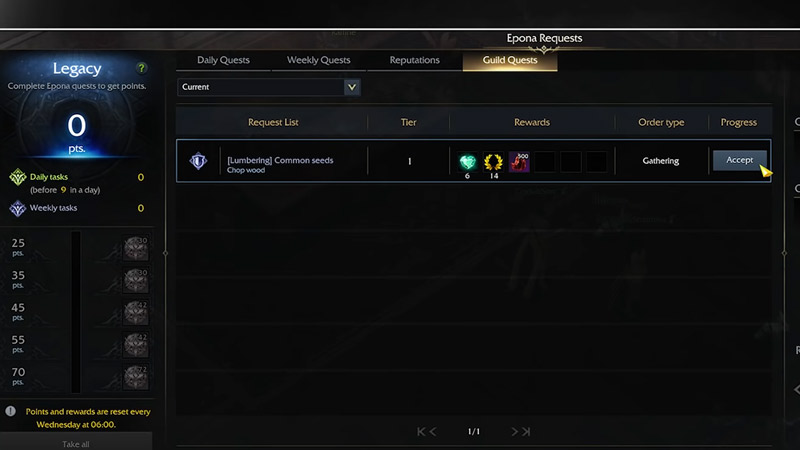
lost ark accept guild quest requests
Image Credit: Legacy Gaming on YouTube
  1. Open the Quest Journal by pressing the Alt + J on your Keyboard.
  2. This will bring up your Daily Quests.
  3. Click on the Guild Quests tab. It should be the fourth right tab on this menu.
  4. Below you will see all the guild quests that are available for you to do.
  5. Click on the Accept button under the Progress section to accept the quest.

Once you follow the above steps correctly you should have no problem accepting guild quest requests.

When you complete the quest and all the other members have completed their individual quests it will help in filling up the guild progress bar. And once it completely fills up the guild will receive the rewards for it.

How to find Guild Quests

If you are unable to see the Guild Quests tab that means you may not be part of a guild. You can easily fix that by joining a guild.

  1. Go to Prideholme city.
  2. You can find a new button below that says Community.
  3. Here you will see three options.
  4. Click on Guilds.
  5. Below you will find many guilds. Some will have a direct join option and others you will have to request before joining.
  6. Once you join a guild, follow the above-mentioned steps in the accept guild request section to find the guild quests.

That covers everything you should know about how to accept a guild quest request in Lost Ark. Since you are learning about guilds, you should check our other guides on how to leave a guild, how to make a guild, and how to change guild name in Lost Ark.


  • Warden Codes (August 2026)

    Warden Codes (August 2026)

    Published Date :

    Warden takes you on a fantasy PvE adventure where you’ll play as powerful creatures, solve puzzles, complete objectives, and uncover the mystery behind a spreading corruption. While you’re at it, you can redeem the latest Warden codes to unlock Shooms, the in-game currency. Before any further ado, here’s the latest list of active rewards. Last… Read More

  • Stay Hard Run Codes (August 2026)

    Stay Hard Run Codes (August 2026)

    Published Date :

    Inspired by David Goggins’ famous “Stay Hard” mindset, Stay Hard Run challenges you to push through demanding obstacle courses without giving up. Every successful run earns you more progress, helping you unlock upgrades and if you’re looking for an extra boost along the way, redeeming the latest Stay Hard Run codes is something you should… Read More

  • PartyBox Codes (August 2026)

    PartyBox Codes (August 2026)

    Published Date :

    Answering trivia questions or sketching hilarious drawings is super fun with a group of friends in PartyBox. Since you’ll be competing across a variety of game modes, any free rewards you can claim are always worth picking up, and luckily, the devs release goodies that reward Confetti and more, perfect for your next game night.… Read More

  • Roblox Lowball Codes (August 2026)

    Roblox Lowball Codes (August 2026)

    Published Date :

    Buying items below their market value and flipping them for a profit is the fastest way to get rich in Lowball. Every successful negotiation grows your cash, letting you take on bigger trades and expand your inventory even further. If you want an extra boost without waiting for your next big deal, redeeming the latest… Read More