Home > The Finals > What Is Zoom Snapping In The Finals And How To Use It

What Is Zoom Snapping In The Finals And How To Use It

Published Date :

The Finals is a very competitive FPS shooter that lets you get into the game no matter what your skill level is. As such you get the choice of using both a keyboard & mouse or a controller to play. But everyone knows that mouse aiming is very precise when compared to a controller. So to compensate for it games usually give aim assist to players using a controller. However, Zoom Snapping is a feature that you can enable in The Finals to give your opponents a run for their money.

What is Zoom Snapping in The Finals?
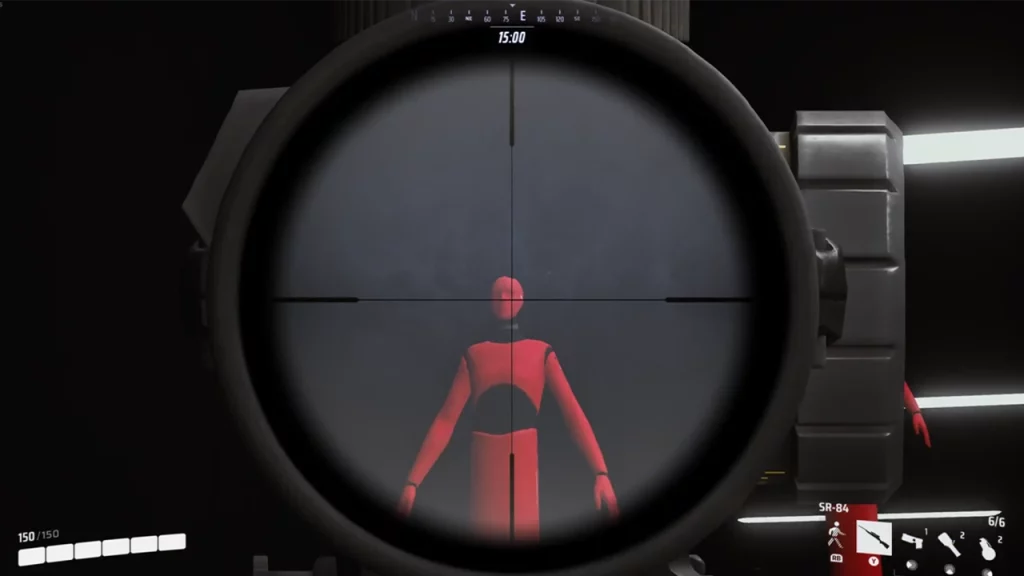
Image Credits: u/awhaling on Reddit

Zoom Snapping as the name suggests is a feature that when you are using ADS and zoom in on an enemy, the crosshair snaps to them. So to give you a vague explanation when you aim in the general direction of your enemy and zoom in, your aim snaps to them. Do remember this is an oversimplification of how it works. You still need to have some precision with your aiming when attacking someone and cannot expect zooming in to get you free kills.

Thanks to u/awhaling on Reddit for making this post with an excellent video that showcases how this feature works, you can check it out here.

However, if you are worried about it being too broken then fear not. Patch 1.4.1 addressed a lot of the problems that players had been reporting about the game’s aim assist. Some of the highlights in this update included the prevention of zoom snapping on unintended rapid 90-degree turns, its time being reduced to 0.3 from 0.25 seconds, and more.

How to Use Zoom Snapping
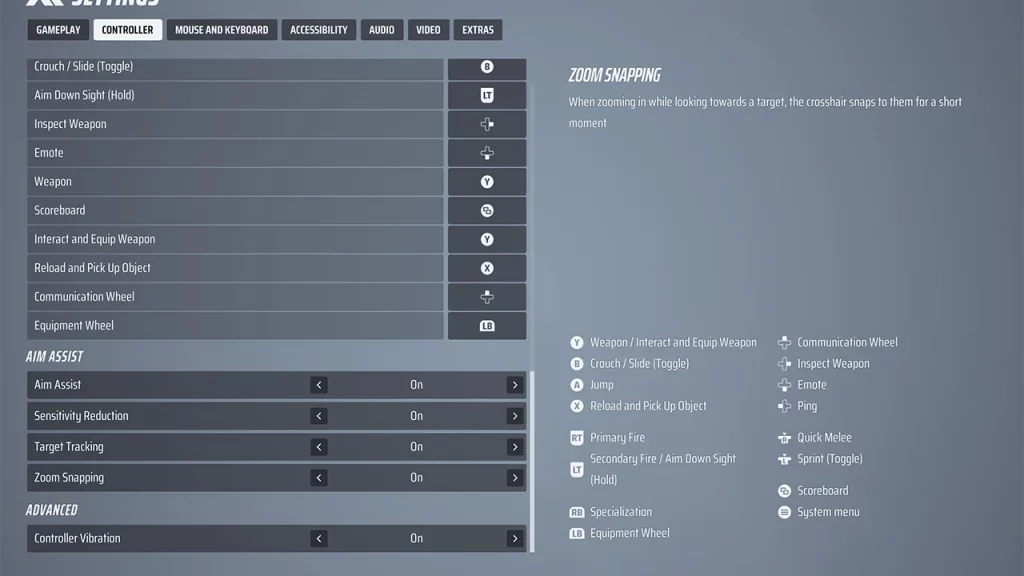
Screenshot: Gamer Tweak
  1. Open the game’s Settings.
  2. Go to the Controller tab.
  3. Under the Aim Assist section, the last option is Zoom Snapping.
  4. Set it to on or off as per your preference. But since having it enabled gives you an advantage it is better to leave it on.

That is all on how zoom snapping works in The Finals. Speaking of in-game settings you should also check out what focal length sensitivity scaling does.

  • +1 Speed Evolve Codes (July 2026)

    +1 Speed Evolve Codes (July 2026)

    Published Date :

    Speed-based games on Roblox will always stay popular, and this particular experience is quite addictive! Here, you play as an animal and your goal is to evolve into stronger animals, unlock new worlds, and be the fastest player on the server! +1 Speed Evolve codes offer free Speed and Win Boosts that can make your… Read More

  • Yeet a Brainrot Codes (July 2026)

    Yeet a Brainrot Codes (July 2026)

    Published Date :

    If you’re annoyed at the Brainrot trend, this is your opportunity to “yeet” them into the distance! To launch Brainrots farther, you need better pets, potions, and more rewards, and thankfully, these Yeet a Brainrot codes will come to the rescue. You can easily unlock various Divine Relic Chests, Primeval Relic Chests, Coin/Luck/Power potions, exclusive… Read More

  • Build A Soccer Squad Codes (July 2026)

    Build A Soccer Squad Codes (July 2026)

    Published Date :

    To build your dream team, you’ll need plenty of rerolls and shop refreshes, which is how you can get better cards and complete your collection. Build A Soccer Squad codes can help with exactly that, giving you various freebies so you get more chances to improve your lineup without waiting. Here’s the complete list of… Read More

  • Aura Monster Simulator Codes (July 2026)

    Aura Monster Simulator Codes (July 2026)

    Published Date :

    Climbing an endless staircase might sound simple at first, but the higher you go, the more Aura you’ll need to keep progressing and unlock stronger upgrades. Thankfully, Aura Monster Simulator codes provide free Gems and Aura Boosts, helping you strengthen your character and reach new heights. More specifically, you can use these Gems to unlock… Read More