Xbox Live is like a Netflix that features a wide range of different games for the gaming community to relish. But with the recent outage, players were neither able to access their digitally downloaded games nor purchase them on Xbox. While online connectivity is a big headache, this outage also prevented players from accessing their downloaded games. So, here’s everything you need to find out about the downloaded games not working on Xbox.
Downloaded Games Not Working Outage on Xbox
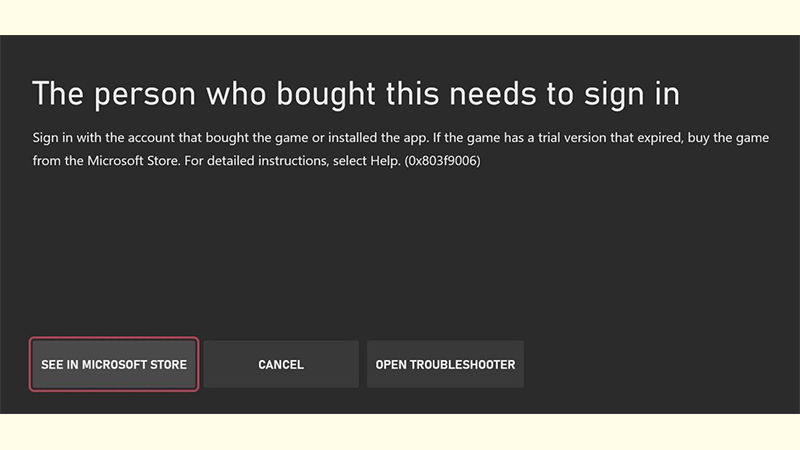
As mentioned, this issue was caused due to the Xbox Live Outage. Xbox players were neither able to join online game sessions nor launch them. Players were also not able to purchase any game or make any purchases. In addition to that, this outage also had an impact on streaming apps like Disney+ and Netflix. When players launched their downloaded or digital games, they were prompted with an error message “The person who bought this needs to sign in“.
The Xbox Support acknowledged the issue in a tweet and stated that they are working to resolve this issue. They added that rebooting their Xbox device might fix launching the downloaded games, purchasing the games, and joining Cloud gaming issues. While it resolved the issue for some players, most of the players complained they were still facing the issue.
After a Saturday night of disappointment, Xbox Support tweeted that the players should no longer encounter any issues. These include issues related to purchases, launching downloaded games, or joining Cloud sessions.
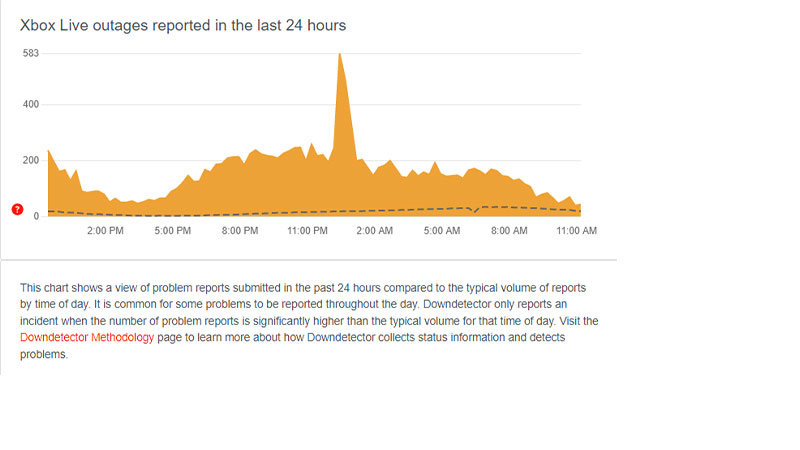
Although some of the players reported that they have been still facing these issues, the numbers have been reducing so far, according to DownDetector.
If you are still facing this issue, we suggest checking their official Twitter and Xbox status for a full update on their functionality. Let’s hope that all the players can play their favorite titles soon on their Xbox consoles.
That’s everything to know about the downloaded games not working on Xbox. If you liked this guide, make sure to check out our more Video Gaming Guides right here on Gamer Tweak.