The first mission of Watch Dogs Legion needs you to restart DedSec. If you are new to Watch Dogs games then you may not know much more about hacking. If that’s the case then don’t worry, we will teach you some of the basic things that will help you get used to the mechanics.
If you have been having trouble knowing how to disable the security system in Watch Dogs Legion in the Restart Dedsec mission then keep reading this guide.
How to restart DedSec and disable the Security System in Watch Dogs Legion
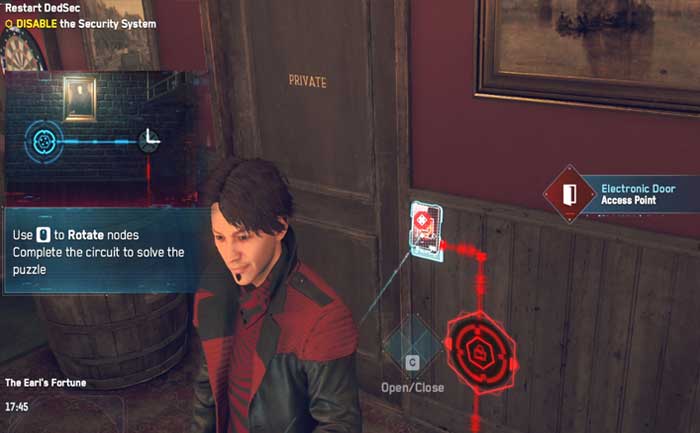
Head over to the pub, The Earl’s Fortune and make your way to the security lock located next to the door. Sabine will inform you that she downloaded a patch to your Optik to get access to the security system. The system will prevent any random people from entering and accessing it. You will learn about some connecting circuits upon interacting with the Electronic Door access point.
Now, go toward the opposite side of the pub and hit the Q button to rotate the nodes on the floor. Notably, your only aim should be to align them to make the circuit connect to the door. Make a straight line by rotating it once.
Next, you will have to look for the second node located on the ground in front of the bar. Rotate this node as well to align it properly. You will have to do the same procedure for all the four nodes until the security code turns green, granting you the room’s access.
The third node can be found inside the portrait on the wall, which you need to rotate once.
Unlike the first three-nodes, the last and final node needs you to rotate twice to get it aligned correctly. This can be found in front of the door, and you can easily hack the final node to complete the Network Bypass.
In order to unlock the Internal Network, you will have to press Q on the node beneath the access lock. Now, you will be able to open and close the “Private” door whenever you wish. Now, go inside and have a talk with the object next to the wall to proceed to the Safehouse.
That’s everything you need to know about how to restart DedSec and disable the Security System in Watch Dogs Legion. Get more such tips in our Watch Dogs Legion Wiki on Gamer Tweak.