
Fortnite is one of those games that offers plenty of helpful services to their players. They have been using this tactic for years and have proven themselves successful. One of their latest additions includes a new Voice Reporting feature that aims to reduce toxicity among teammates. How so? Well, it simply records the latest 5 Minutes of Voice Chat and then the victim can use this evidence to report the abuser.
For most players, this feature is not enabled by default. So in this guide, we will mention the steps to turn on the Voice Reporting in Fortnite. Alongside this, we will also provide some crucial information that can help you while using Voice Reporting. So stick to the end to learn it all.
How to Enable Voice Reporting Feature in Fortnite
- Firstly, launch Fortnite and enter the Settings menu.
- Now, enter the Audio tab and navigate down to the Voice Chat section.
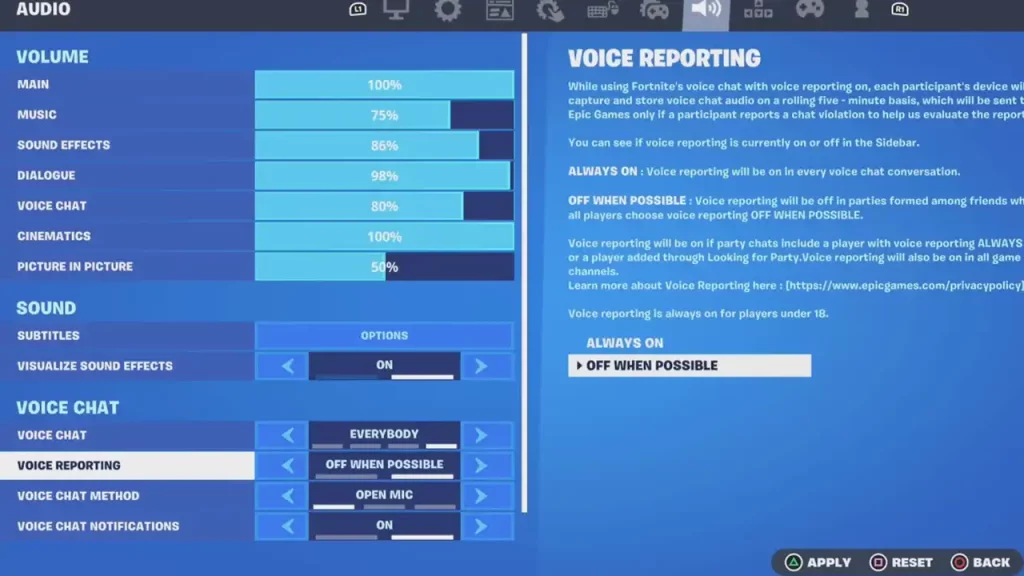
- From there, you can toggle on the Voice Reporting in Fortnite.
You will have two different options here that say ‘Always On’ and ‘Off when Possible’. Check out below to learn what these two options mean in Voice Reporting:
- Always On – If you opt for this setting, then Voice Reporting will always be On.
- Off When Possible – If you have selected this option, then Voice Reporting will be off during matches where all the party members are friends. However, if any of the party members have selected the ‘Always On’ option, then the entire party’s Voice Reporting will be enabled.
How does Voice Reporting Work?
Whenever this option is enabled, the most recent 5 minutes of voice chat among a party gets recorded. After 5 minutes, the previous recording will be deleted and replaced by the new recording. This keeps on happening on a rolling basis.
Note: The voice recording is saved on your device and not on the Epic Games server. Epic does not use your Voice Recordings by any means unless you have reported a player.
One more important thing to note is that a Voice Recording sent to Epic Games will be automatically deleted after 14 days. However, in case of an appeal, the recording will be retained for a couple of more days.
Lastly, players who are under 18 years of age have Voice Reporting enabled by default. And for those who are above 18 years old have the access to customize this setting to ‘Always On’ or ‘Off When Possible.’
That covers everything about the Voice Reporting feature in Fortnite. For more such content, be sure to check out our dedicated section for Fortnite Guides on Gamer Tweak.










