Home > Pikmin 4 > How To Use Gadgets In Pikmin 4

How To Use Gears And Items Pikmin 4

Published Date :

Trying to equip gears and use items from Pikmin 4, but don’t know how to. We have given step-by-step guide to access the menu and equip any item you own. And we have also provided a way to obtain new items with the in-game currency. The game has several unique gadgets that players can use for paralyzing enemies, collecting Sparklium, increasing speed, restoring health, surveying areas, freezing foes, and much more. Now, based on your strategy, you might want to add crucial gadgets in the shortcut, so we have given steps for that too.

How to Buy and Use Items in Pikmin 4
How To Use Gears And Items Pikmin 4

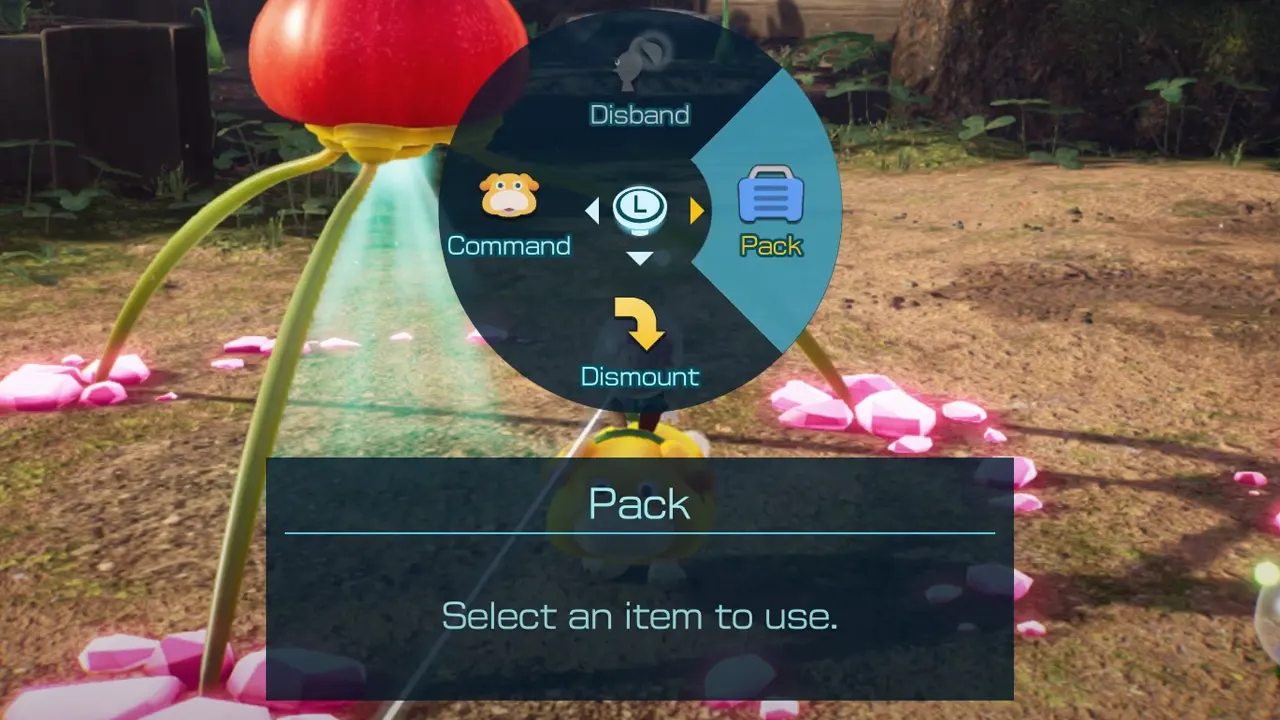
  • Hold Y and scroll to Pack to see all items of Pikmin 4.
  • Select the items you want to equip and press Y to confirm.
  • Your character will equip or consume the gadget and you will come back to the main screen.
  • Now, if you are using a gear item, like Survey Drone, you will have to press B to unequip it and come back to the screen.
  • You can use this menu end number of times to equip or consume any item you own.
  • If you use it frequently and find it a hassle to go in the Pack repeatedly, then give them shortcuts.
  • Press the “” button from the controller to access the Pikmin 4 Shortcut Settings.
  • Set the shortcut key for the item you want to use fast.

How to Get Gadgets in Game

In Pikmin 4 you buy items from Russ of The Lab. And Russ can be first found in the Last-Frost Cavern of Sun-Speckled Terrace, you have to rescue him. Once you have rescued him, you can visit him with a Radar Map. He is a Rescue Corps Officer, who is an inventor, material engineer, and science lover. You can exchange Materials for the gears and items present in his lab.

With this, you can now equip gears and use items in Pikmin 4. For more interesting Pikmin 4 guides, we suggest you skim through the list and get to know about its bosses, Pikmin, Castaways, areas, and more.

  • Spin a Car Codes (July 2026)

    Spin a Car Codes (July 2026)

    Published Date :

    Spinning games are pretty popular on Roblox and rightly so, because they’re very addictive! Spin a Car is where you roll dice to unlock various cars and upgrades – the rarer your vehicle, the more money it makes! Since free rewards are always welcome, the developers share codes that provide Gasoline, Coin Potion, cash and… Read More

  • Build Your Butterfly Garden Codes (July 2026)

    Build Your Butterfly Garden Codes (July 2026)

    Published Date :

    Build Your Butterfly Garden codes let you grow your butterfly sanctuary even faster by rewarding you with useful items like Eggs, Flowerbeds, and Luck Boosts. As you hatch new butterflies, expand your collection, and decorate your peaceful garden, these freebies can give your progress quite a boost! Here are the latest rewards you don’t want… Read More

  • Paint or Die Codes (July 2026)

    Paint or Die Codes (July 2026)

    Published Date :

    Paint or Die Codes can help you build up your Cash balance before you jump back into another round of hiding in plain sight. In this Roblox game, your goal is to blend perfectly with the environment by painting yourself while avoiding the Seeker (similar to the viral Meccha Chameleon). And if unlocking certain character… Read More

  • Monkey Soccer Codes (June 2026)

    Monkey Soccer Codes (June 2026)

    Published Date :

    Monkey Soccer codes can give you plenty of free Bananas and Lucky Spins, making it easier to get a much better experience on the pitch. Since new codes are usually released alongside major updates and milestones, here’s a complete list of rewards to ensure you don’t miss out. Last checked for new codes on June… Read More