Close Menu
    Facebook X (Twitter) Instagram
    Gamer TweakGamer Tweak
    • GT Originals
    • Guides
      • AC Mirage
      • Starfield
      • Wordle
      • Mobile
      • GTA 6
      • AC Valhalla
      • Genshin Impact
      • Honkai Star Rail
      • Minecraft
      • Discord
      • Street Fighter 6
      • Project Slayers
      • The Sims 4
      • Lies of P
      • Zelda TOTK
    • Roblox
      • Roblox Codes
      • Blox Fruits
      • Type Soul
      • Grow a Garden
      • 99 Nights in the Forest
    • Review
    • Roblox Codes
    • BG3
    • CS2
    Gamer TweakGamer Tweak
    Home > Gaming Guides > How To Upgrade Your Weapons In Steelrising
    Video Game Guides

    Steelrising Weapons Upgrade Guide

    DarwinBy DarwinSeptember 8, 20222 Mins Read

    Steelrising is an Action Role-Playing Souls-like Game created by Spiders. In this game, you play as Aegis, a Mysterious Automaton Masterpiece, & must confront the army of King Louis XVI who has suppressed the French Revolution with Bloodshed. You and your Allies must put a stop to him before it’s too late. As such, you will need good Weapons. In this game, Weapons are your tools of destruction. But at a certain point, they cannot dish out the damage needed. In this guide, I will show you how to Upgrade your Weapons in Steelrising.

    How to Upgrade your Weapons in Steelrising
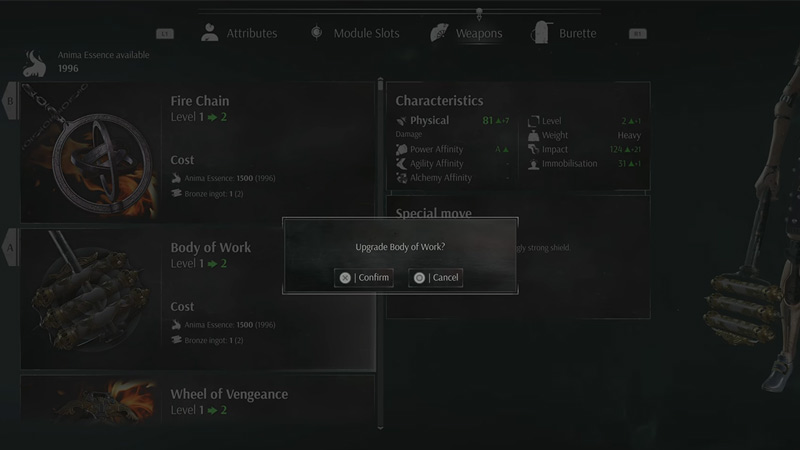
    upgrade weapons steelrising

    As you progress through Steelrising, you will gain various types of Weapons. Some will be strong and may become your Main Weapon. But after a while, these Weapons can handle the more formidable enemies. As such, upgrading your Weapons becomes necessary. To Upgrade your Weapons in Steelrising, you will need to find a Vestal. A Vestal is the respawn Checkpoint of this game. It functions similarly to other Souls-like games with their Bonfires, Sites of Grace, etc. A Vestal can be found at certain points in the game and you will come across it.
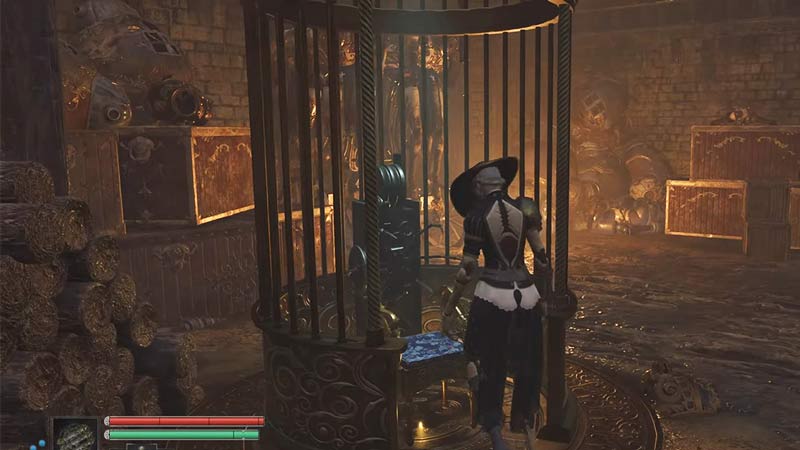
     vestal upgrade weapons steelrising

    A Vestal looks like a Salon Chair in a Circular Cage. Interact with it and it will open up the Vestal Menu. Click on Upgrades & then select Weapons. Now it will show you the list of Weapons you have. Choose the one you want to upgrade & click on it. if you have the right resources then the Weapon will get upgraded. The common resource you will require for all upgrades is Anima Essence which you can farm off of your Enemies.

    This was all about how to Upgrade your Weapons in Steelrising. Hopefully, This guide has helped you. You can also check out our other guides like How to Fast Travel in Steelrising.

    PC PS5 Steelrising Guides Xbox Series S Xbox Series X
    Share. Facebook Twitter Pinterest LinkedIn Tumblr Email Reddit
    Darwin
    • X (Twitter)

    Before you ask, yes my name is Darwin and no I am not Charles Darwin's cousin. But I do love everything Science, Games, and Anime. Think of me as your Baymax. Oh, I also like the Rubik's Cube.

    Related Posts

    How In-Game Skins Shape and Strengthen a Player’s Personal Brand

    November 27, 2025

    Unwritten Helldivers 2 Rules – Don’t Make These Mistakes!

    November 20, 2025

    Where Winds Meet Codes (November 2025)

    November 19, 2025

    User Experience in Quick Online Games – How to Retain Players

    November 11, 2025
    Latest Codes

    The Forge Codes Roblox (December 2025)

    December 1, 2025

    Inazuma Strikers Codes (November 2025)

    November 26, 2025

    Deadly Delivery Codes (November 2025)

    November 26, 2025

    Roblox Hypershot Codes (November 2025)

    November 26, 2025

    SLAP Codes Roblox (November 2025)

    November 25, 2025

    Catch a Monster Codes (November 2025)

    November 25, 2025
    Trending
    • Cuprite in The Forge: How To Get and Farm It
    • How to Find Bard’s Missing Guitar in The Forge
    • How to Change Race in The Forge
    • The Forge Codes Roblox (December 2025)
    © 2025 Gamertweak.
    • Advertise With Us
    • About Us
    • Team
    • Contact Us
    • Privacy Policy
    • Terms
    • Open Critic

    Type above and press Enter to search. Press Esc to cancel.