Close Menu
    Facebook X (Twitter) Instagram
    Gamer TweakGamer Tweak
    • GT Originals
    • Guides
      • AC Mirage
      • Starfield
      • Wordle
      • Mobile
      • GTA 6
      • AC Valhalla
      • Genshin Impact
      • Honkai Star Rail
      • Minecraft
      • Discord
      • Street Fighter 6
      • Project Slayers
      • The Sims 4
      • Lies of P
      • Zelda TOTK
    • Roblox
      • Roblox Codes
      • Blox Fruits
      • Type Soul
      • Grow a Garden
      • 99 Nights in the Forest
    • Review
    • Roblox Codes
    • BG3
    • CS2
    Gamer TweakGamer Tweak
    Home > Tower Of Fantasy > How To Unlock The Map In Tower Of Fantasy
    Mobile

    Tower Of Fantasy: How To Unlock Map

    DarwinBy DarwinAugust 29, 20222 Mins Read

    Tower of Fantasy, a.k.a. TOF, is a Sci-Fi-Themed Open World MMORPG from Hotta Studio. Here, you can enjoy this Anime-based game in an expansive world while completing the storyline or by just adventuring. Along your adventures, you will need a map to guide you through the regions. But all of the regions are locked as you start your journey at the Shelter. In this guide, I will show you how to Unlock the Map in Tower of Fantasy.

    How to Unlock the Map in Tower of Fantasy
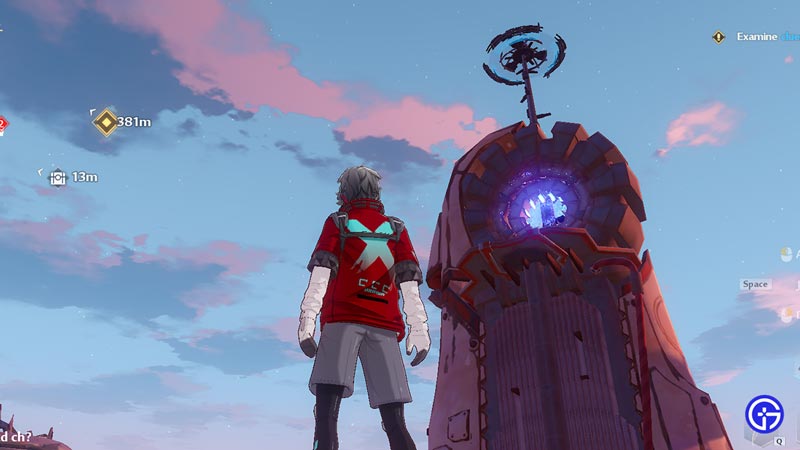
    unlock map tower of fantasy

    In most games, the map of the land is locked or sections of them are hidden away. As such, the player has to either complete a Task like a Quest or they will have to interact with a POI to unlock it. For Tower of Fantasy, the latter option is true. In Tower of Fantasy, you will have to scale and get to the Top of Omnium Towers to unlock the map. They are large Obelisk-like structures that harness the power of Omnium. When you get to the top, you must interact with it to unlock the Map of Aida, or at least for that region.

    In Aida, there are Five regions, i.e. Astra, Banges, Navia, Crown, & Warren. As such, there are 5 Omnium Towers that you will have to interact with. Once you have interacted with all of them, the entire map of Aida will be unlocked. Omnium Towers are usually the largest Structure in the region. But if you cannot locate them, then check out our guide on all of the Omnium Towers locations guide in Tower of Fantasy.

    This was all about how to Unlock the Map in Tower of Fantasy. Hopefully, this guide has helped you. You can also check out our other guides like How To Get Seabreeze Coins in Tower of Fantasy.

    Android iOS Mobile Games PC Tips and Tricks Tower of Fantasy Guides
    Share. Facebook Twitter Pinterest LinkedIn Tumblr Email Reddit
    Darwin
    • X (Twitter)

    Before you ask, yes my name is Darwin and no I am not Charles Darwin's cousin. But I do love everything Science, Games, and Anime. Think of me as your Baymax. Oh, I also like the Rubik's Cube.

    Related Posts

    How In-Game Skins Shape and Strengthen a Player’s Personal Brand

    November 27, 2025

    Unwritten Helldivers 2 Rules – Don’t Make These Mistakes!

    November 20, 2025

    Where Winds Meet Codes (November 2025)

    November 19, 2025

    User Experience in Quick Online Games – How to Retain Players

    November 11, 2025
    Latest Codes

    The Forge Codes Roblox (December 2025)

    December 1, 2025

    Inazuma Strikers Codes (November 2025)

    November 26, 2025

    Deadly Delivery Codes (November 2025)

    November 26, 2025

    Roblox Hypershot Codes (November 2025)

    November 26, 2025

    SLAP Codes Roblox (November 2025)

    November 25, 2025

    Catch a Monster Codes (November 2025)

    November 25, 2025
    Trending
    • Discover the Best Casino Games at Greatwin Casino for UK Players
    • Ultimate Guide to Player Safety at MegaWin Casino for UK Players: Expert Tips and Advice
    • Ultimate Guide to Player Safety at Cashmo Casino: Understanding UK Regulations and Security Measures
    • Cuprite in The Forge: How To Get and Farm It
    © 2025 Gamertweak.
    • Advertise With Us
    • About Us
    • Team
    • Contact Us
    • Privacy Policy
    • Terms
    • Open Critic

    Type above and press Enter to search. Press Esc to cancel.