
Home > Gaming Guides > Unlock Mad Chainsaw Mode In RE4 Remake

How To Unlock Mad Chainsaw Mode In Resident Evil 4

Published Date :

With the launch of the Resident Evil 4 remake demo, many players are wondering how to unlock the Mad Chainsaw Mode. The game gives you access to the first 10 – 20 minutes of the gameplay. This includes a fight with the villagers and a masked man with a chainsaw at the end. For players who want to get more out of this demo, there is a higher difficulty level. But the game does not specify how to unlock it. So this guide will tell you how to trigger it.

How to Unlock Resident Evil 4 Mad Chainsaw Mode
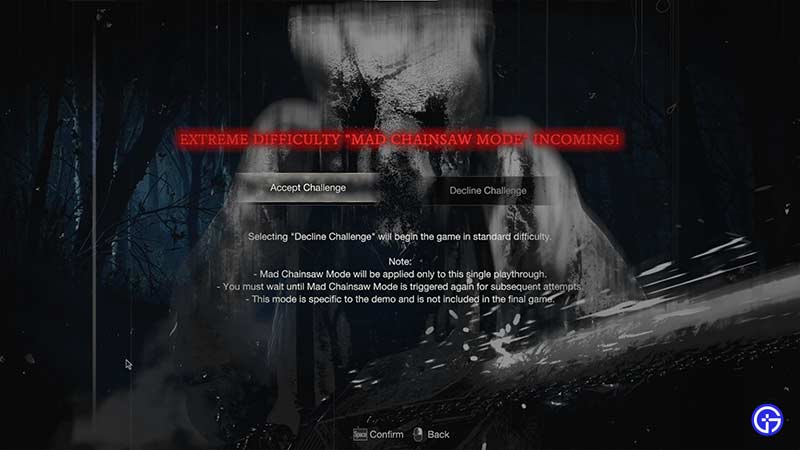
Unlock Chainsaw Mode in RE4 remake

To trigger the Mad Chainsaw mode in the Resident Evil 4 remake, players will have to restart a new game until the event triggers. Once the event triggers, you will see a message showcased in the image above. Then, you have to select “Accept Challenge” and the Mad Chainsaw Mode will unlock.

What happens in Mad Chainsaw Mode in RE4

As we mentioned, the Mad Chainsaw mode is just a higher difficulty mode. Here, you will face stronger, faster, and more durable enemies in the village. If you somehow manage to get rid of them, you’ll face the boss with a flaming chainsaw. The Chainsaw Man (Dr. Salvador) is a lot stronger in this mode compared to the normal mode.

If you die in the Mad Chainsaw mode, you’ll have to restart a new game. Now when you do that, you’ll have to repeat the restarting process until you trigger the mode. So if you don’t want to repeat the process, make sure you follow these tips to beat the level.

  • Avoid Enemies: Before you face Dr. Salvador, you’ll come across many enemies. Make sure to run past as many as you can and save your ammo.
  • Collect Supplies: Make sure you check out everything in your surroundings. Since you’ll need loads of ammo, check out every nook-and-cranny for supplies.

That’s everything from us on how to unlock Mad Chainsaw Mode in Resident Evil 4. For more such content like How to Fix D3D, make sure you visit our RE4 Remake section.


  • Will GTA 6 Have First-Person Mode? Latest Footage Leaves Fans Wondering

    Will GTA 6 Have First-Person Mode? Latest Footage Leaves Fans Wondering

    Published Date :

    GTA 6’s latest extended look has given players a closer look at the game’s action, story, driving, exploration, and open world. However, the gameplay steers away from one familiar feature: first-person mode. The new footage shared by Rockstar has brought back questions about whether GTA 6 will let players switch between third-person and first-person perspectives… Read More

  • Who is Jason’s Voice Actor in GTA 6? His Voice Is Already Dividing Fans

    Who is Jason’s Voice Actor in GTA 6? His Voice Is Already Dividing Fans

    Published Date :

    Jason Duval is one of GTA 6’s two main protagonists, but Rockstar Games has yet to reveal the actor behind his voice. That hasn’t stopped fans from trying to figure it out, especially after the latest GTA 6 footage gave players more of Jason’s dialogue to analyze. The discussion has also moved beyond his identity,… Read More

  • Fly Your Wings Codes (August 2026)

    Fly Your Wings Codes (August 2026)

    Published Date :

    Fly Your Wings lets you glide across the map and earn Coins as you improve your equipment. You can upgrade your wings and fireworks to travel farther and free Coins from codes can help you get those upgrades without waiting as long. Here are all the codes you can redeem right now. Last checked for… Read More

  • Power a City Codes (August 2026)

    Power a City Codes (August 2026)

    Published Date :

    Power a City is all about keeping a growing city supplied with electricity. You can build generators, connect your power network, upgrade your equipment, and expand your operation as the city’s energy needs increase. Managing everything well can take time, so free Cash and other rewards can give your progress quite a boost. So, here… Read More







