Are you looking to unblock someone on Snapchat? Well, as you know, Snapchat is one of the best instant messaging applications and social networks that has the most users these days. In case your Snapchat friends list includes people you no longer want to snap with, you can delete or block them. Or maybe you accidentally blocked someone you know and don’t know how to unblock them? It’s easy. Almost all of us share this application on our device and have added contacts that we often don’t know, either because they added us and we responded or for another reason. In this guide, you will find out ways to unblock people or friends on Snapchat below.
Steps to Unblock Someone on Snapchat
There may be some situation in the past where you decided to block someone or you just did it by accident. Do not worry, as below you will find some useful tips that will help you out quickly to unblock someone on Snapchat.
How to Unblock a Friend on Snapchat
- Launch Snapchat and click the Bitmoji icon, which is located in the upper left corner of the screen. After that, when your profile page appears, click on the “Settings” icon which will be represented by a gear icon and located in the upper right corner.
- Next, you need to go to the bottom of the section and select “Account Actions”.
- Now, click on the “Blocked” tile. In this location, you will find a list of all the users you have blocked on Snapchat.
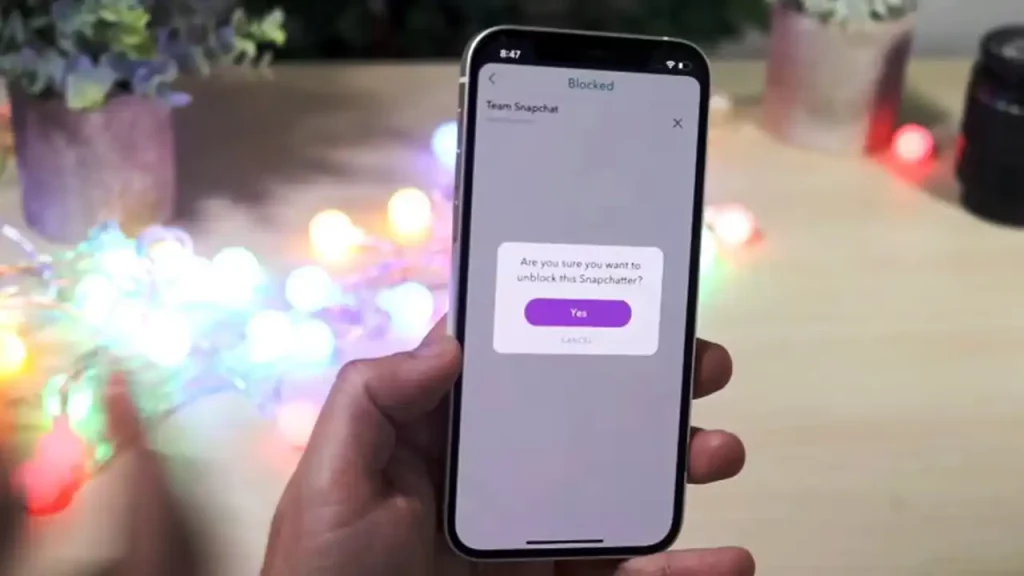
- Now, to simply unblock a user, click on the “X” icon next to the user’s name to unblock him.
- Finally, a new window will pop up and ask you whether you are sure you want to do this. Just click on the option that says “Yes” and this way you will unblock someone on Snapchat.
Note that the method used to unblock someone on Snapchat works for both iOS and Android smartphones/tablets, without the need to install any additional software or apps.
Why You Need to Block People on Snapchat?
You can block people from the view of someone who have recently added you to their list, from the friends view or from the recent conversations. The easiest way to block someone is from the list of recent conversations. To do this, launch Snapchat and swipe from the left edge of the screen to display the conversation tab.
Conversations with your friends will be displayed here. To block someone, just hold your finger on their username. A small window with options for a given user will appear, you can open the message sending window, the camera screen, or additional settings. After that touch the gear icon to bring up additional settings for the selected user.
Available options will appear, and here you can change the displayed username at your discretion, completely remove the friend from the contact list, and also block the user. Tap “Block” to block the selected person. Then confirm blocking and select the reason for blocking a given user.
That is all you need to know about how to unblock someone on Snapchat. In the meantime, do not forget to check out our other Snapchat Guides like different ways to play games with friends, etc.