Stray is a game all about reuniting a lost cat with its family. This game takes you all over a cybercity with tons of cool bots. Here, you go through alleys, buildings, and more with your trusty B-12 bot by your side. At the beginning of your journey, you will have to roam around on your own for a bit. Chapter 3 is where you will find your newest (and soon-to-be dearest) companion. But before you can get to B-12, you will have to turn on a computer in the lab. To do this, here is your Gamer Tweak guide on how to turn on the big computer in Stray.
How to Turn on the Big Computer in Stray
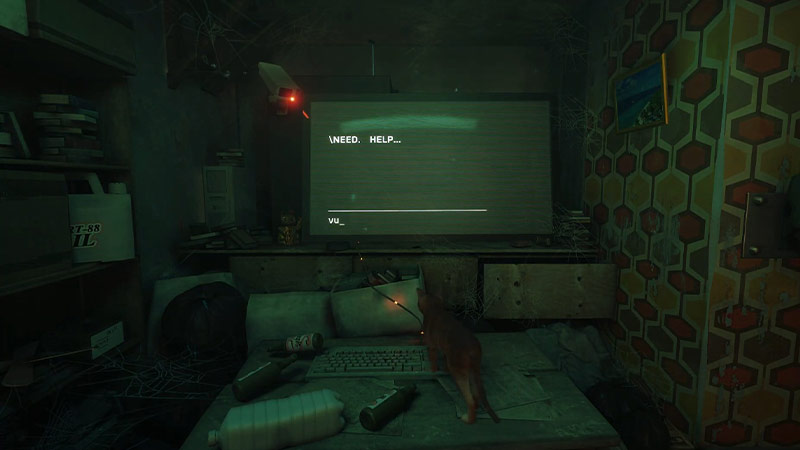
As you explore the flat, you will notice that there is a computer screen asking for help. Press the enter key to reply to the message. Now, after a few messages, you will be led to the door of a secret lab. In this lab, there will be even more computers and monitors.
Unfortunately, the ones that you will actually need to use won’t have any power. Your cat has to now find the energy cells that will turn the power on for these monitors as well as the big computer. There is no particular order to find all four of these cells. But of course, some are more convenient than others. Here is how you can find all four of the energy cells that will make everything work properly:
First Energy Cell
On the right side of the room, you will find a lit-up computer terminal next to a lever. Simply jump on the lever to slide the computer to the other side of the room. Once you do that, you can collect the energy cell from the bottom of the computer terminal.
Second Energy Cell
Now that the computer terminal is on the other side of the room, you can use it as a leaping off point to get to the shelf on top. You will find an old computer server that will have the second energy cell.
Third Energy Cell
Right in front of the main computer monitors, you will find a desk. Climb on top to unplug the energy cell from the devices.
Fourth Energy Cell
On the left side of the room, there will be a stool. Just like with the second energy cell, you can use it as a leaping off point to get to the top of the showcase. On the right side, you will find the last energy cell.
And there you have it, this is how you can turn on the big computer in Stray. If you found this guide useful then check out this one on all of the hidden trophies in the game.