Home > Gaming Guides > How To Turn Auto Buy & Auto Skill On Or Off In Smite

Smite Auto Buy & Skill: How To Turn On Or Off

Published Date :

Smite is a free-to-play multiplayer online battle arena developed by Hi-Rez Studios. Players can assume one of the playable god, goddess or other mythological figures. Each game challenges players to take on other players along with AI-controlled minions. Such challenges are won owing to great skill build and proper item purchase and utilization. For players who are new and do not want to experiment with new items and skills, the game has provided an auto assist. If you are wondering how to turn on or turn off this auto buy and auto skill in Smite, we have you covered. Check out this guide for more info on this feature.

How to Turn Auto Buy & Auto Skill On or Off in Smite
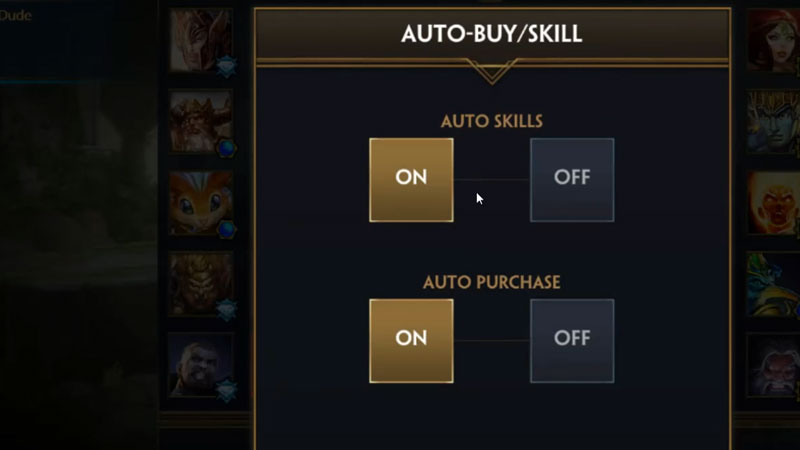
Smite Turn Auto Buy On or Off

The skills and abilities that the Gods possess provide players with better buffs and attacks. So naturally, you will want your build to be good enough to beat other players. While experimenting and finding the best one for yourself is the better way to go. But since you want to enable the Auto buy and Auto skill in Smite, here is how you do it:

  • While in the game, as you enter a match and select one of the gods, you will get the Auto Buy/Skill button.
  • Click the button and you can turn on or turn off the Auto Buy and Auto Skill from this new window.
  • Additionally, you can also turn off the Auto Buy and Auto Skill in-game. But you will have to do it individually.
  • To turn off the Auto Buy, head over to the Store and click the Turn Off button under Auto Purchase.
  • Along with this, to turn off the Auto Skill, open the Skill menu and click the Turn Off at the bottom of the menu.

Although once you disable Auto Buy and Auto Skill mid-game, you can only Enable them after the game when selecting characters again.

That’s all you need on how to turn Auto Buy & Auto Skill on or Off in Smite. If you liked this guide, check out how to use crossplay, Gods Tier List, and more guides, tips, and tricks waiting for you at Gamer Tweak.
  • +1 Speed Evolve Codes (July 2026)

    +1 Speed Evolve Codes (July 2026)

    Published Date :

    Speed-based games on Roblox will always stay popular, and this particular experience is quite addictive! Here, you play as an animal and your goal is to evolve into stronger animals, unlock new worlds, and be the fastest player on the server! +1 Speed Evolve codes offer free Speed and Win Boosts that can make your… Read More

  • Yeet a Brainrot Codes (July 2026)

    Yeet a Brainrot Codes (July 2026)

    Published Date :

    If you’re annoyed at the Brainrot trend, this is your opportunity to “yeet” them into the distance! To launch Brainrots farther, you need better pets, potions, and more rewards, and thankfully, these Yeet a Brainrot codes will come to the rescue. You can easily unlock various Divine Relic Chests, Primeval Relic Chests, Coin/Luck/Power potions, exclusive… Read More

  • Build A Soccer Squad Codes (July 2026)

    Build A Soccer Squad Codes (July 2026)

    Published Date :

    To build your dream team, you’ll need plenty of rerolls and shop refreshes, which is how you can get better cards and complete your collection. Build A Soccer Squad codes can help with exactly that, giving you various freebies so you get more chances to improve your lineup without waiting. Here’s the complete list of… Read More

  • Aura Monster Simulator Codes (July 2026)

    Aura Monster Simulator Codes (July 2026)

    Published Date :

    Climbing an endless staircase might sound simple at first, but the higher you go, the more Aura you’ll need to keep progressing and unlock stronger upgrades. Thankfully, Aura Monster Simulator codes provide free Gems and Aura Boosts, helping you strengthen your character and reach new heights. More specifically, you can use these Gems to unlock… Read More