The Tide Armor Trim is a Smithing Template used for customizing your armor in Minecraft. It was introduced with 1.20 update version along with several other new features. Besides this, there are 15 more Armor Trims that you can use. But the Tide Armor Trim is a little different as it can not be found inside any chest. So what can you do to get hold of this item? To help you out with it, here’s how you can get the Tide Armor Trim. Take a look below to get started.
Where to Find Tide Armor Trim in Minecraft (Location)
To get Tide Armor Trim in Minecraft, you must find and kill an Elder Guardian (fish). After which there’s a 20% chance that this mob will drop a Tide Armor Trim. With such a low chance of obtaining this Smithing Template, you must have patience while finding this item. Now, to make things even simpler for you, the Elder Guardian spawns inside the Ocean Monument.
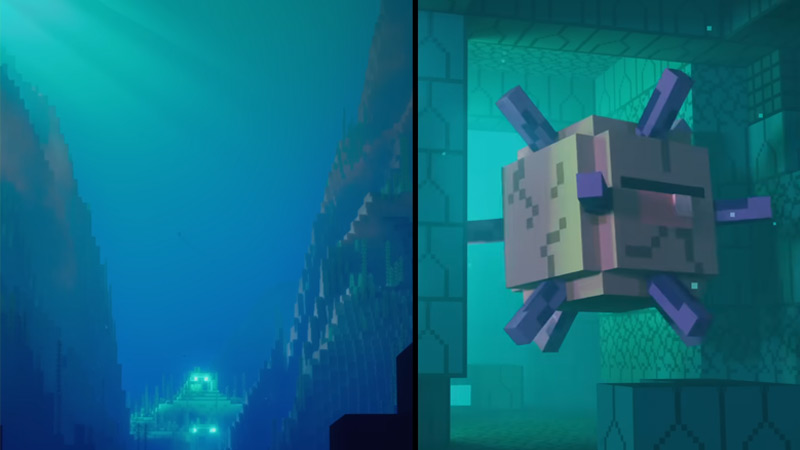
The Ocean Monument is a pyramid-like structure found inside water bodies. You can dive inside any of the following 6 waterbodies to find an Ocean Monument.
- Deep Lukewarm Ocean
- Deep Cold Ocean
- Deep Frozen Ocean
- Deep Ocean
- Deep Warm Ocean
- Ice Spikes
Once you have found the Ocean Monument and defeated the Elder Guardian fish nearby, you will get Tide Armor Trim in Minecraft. Luckily, if you already have a Tide Armor Trim, you can get one more by crafting it. Here’s how you can do so.
How to Craft Tide Armor Trim (Duplication)
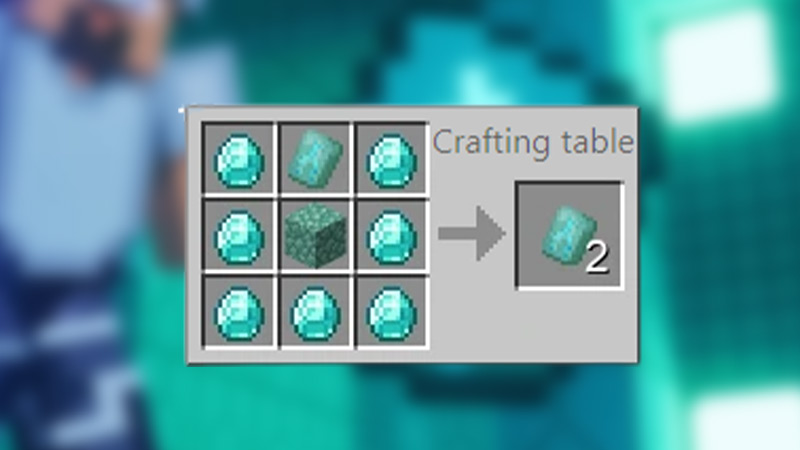
To create a Duplicate Tide Armor Trim in Minecraft, you must already have one in your inventory. Moreover, make sure that you have 7 Diamonds and a Prismarine with you. Once you have collected these items, take them to a Craftin Table and place them in the following order.
- Place the Tide Armor Trim in the middle slot of the top row.
- After that, take a Prismarine block and place it in the middle slot of the middle row.
- Next, place Diamonds in the remaining 7 Slots to duplicate the existing Tide Armor in Minecraft.
How to Use Tide Armor Trim in Minecraft
Now that you have the Tide Armor Trim, you can place it with an armor piece and any of the following items:
- Emerald
- Green Color
- Redstone
- Red Color
- Lapis Lazuli
- Dark Blue Color
- Amethyst Shard
- Purple Color
- Quartz
- White Color
- Netherite Ingot
- Black Color
- Diamond
- Light Blue Color
- Gold Ingot
- Yellow Color
- Iron Ingot
- Grey Color
- Brick
- Chestnut Red
Use any of the above items with your armor and Tide Armor Trim to give it the respective color.
That’s everything covered on the Tide Armor Trim and how to get it in Minecraft. If you liked this guide, then make sure to check out another one on the Silence Armor Trim. For more such informative content, take a look at our Minecraft section right here on Gamer Tweak.