Modern Warfare 2 is the latest title in the COD franchise and it has some completely revamped features like water combat mechanics and an overhauled vehicle system. One of those features is the third-person mode. Players across the world are excited about this feature as it was rarely introduced in the previous Call of Duty iterations. The addition of this mode will open up a whole new world of strategies and gunplay. In this article, we will tell you how to play in the third-person mode, turn it off, and change the 3rd-person field of view in COD MW2.
How to Play in Third-Person Mode in Modern Warfare 2
The fan-favorite Third Person mode was removed from Call of Duty MW2 on January 26, 2023. However, after a heavy backlash from the fans, it returned on February 1, 2023. To play in the 3rd person mode in MW2, all you have to do is select the Third Person Moshpit in the mode selection menu.
Alternatively, you can play this mode in Private Matches. Simply head to the Private Match settings. Then, go to the Player tab and scroll down till you find the Third Person mode. You can use this switch to turn on this mode in private matches.
How to Turn Off 3rd Person Mode in MW2
The 3rd person mode is only available in the MW2 Third-Person Moshpit mode, so you can simply deselect it to turn it off. Similarly, you can use the switch in the Player tab of Private Matches settings to turn it off.
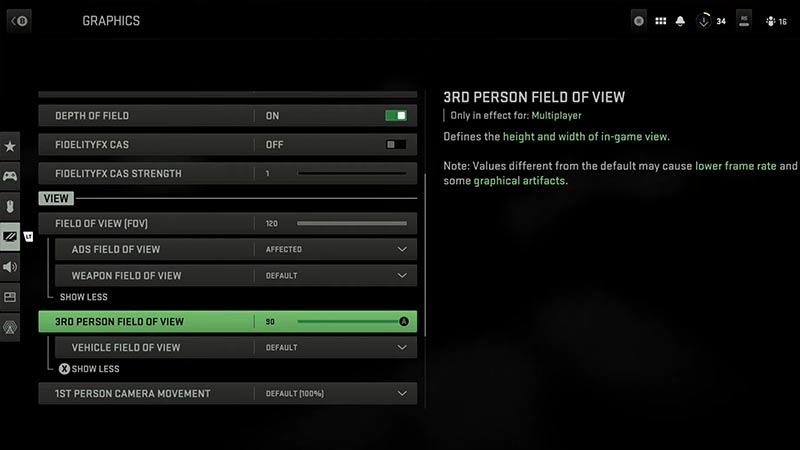
How to Change the 3rd-Person FOV Slider
- Click on the Options button in Main Menu
- Go to the Graphics section
- As you scroll down in the ‘View’ section, you will come across the ‘3rd-Person Field of View’ slider
- Adjust it according to your preference.
The default setting will be 80 but you can max it up to 90 so you will have a wider FOV.
Many players reported that they are enjoying the third-person mode in COD MW2. The mode truly feels like a whole different game itself. You will also get a better view of your hard-earned Skins in this new mode.
That’s all from us on how to play in and turn off 3rd Person Mode in COD MW2. For more helpful articles like How to Unlock Edge-47 Grip, head over to our Modern Warfare section soon.