While playing Fortnite, you must’ve seen symbols in other players’ usernames in the lobby. Since this is a free-to-play game, it has a massive player base across the world. In order to stand out, you can use these special characters in your username. Moreover, you can also use them to make your whole team stand out while having uniformity. This guide will tell you how to add special characters to your username along with a table full of them for you to use.
How to Put Symbols in Your Fortnite Username
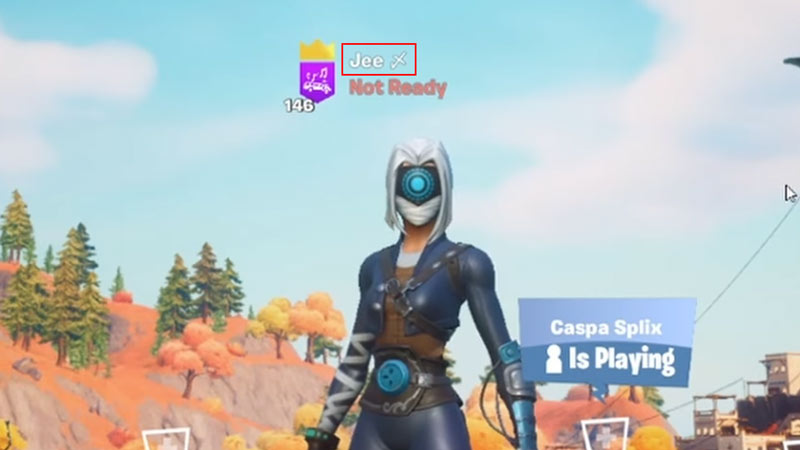
Since your keyboard doesn’t have all the cool symbols, you’ll have to go online and look for the ones you want. However, you can also scroll down to select from a table full of symbols. But first, we will tell you how to add them.
To put Symbols in your Fortnite Username, you’ll have to copy it and paste it into your Epic Games account. Follow these steps to do so:
- Go to the Epic Games website and Sign In to your account.
- Hover your mouse over your Username and click on Account.
- In the Account Settings tab, click on the Pencil Symbol next to the Display Name box.
- Copy any symbol from the chart below or from the internet.
- Paste it along with your new username in the “New Display Name” box and paste the same name in the box below to confirm it.
- Check the box below notifying you that you cannot change the display name again for 2 weeks.
- Click on Confirm to update your username.
- Then launch Fortnite and the Display Name will be updated.
That being said, here’s a list of cool special characters for your display name.
Symbols to Use in Fortnite Display Name
| ソ | ぁ | 🜀 | 🝏 | 🜦 | 🝋 | 🜕 | 🝤 | 🜻 | 🝉 |
| ナ | ゜ | 🜁 | 🝐 | 🜧 | 🝌 | 🜖 | 🝥 | 🜼 | 🝊 |
| ル | ア | 🜂 | 🝑 | 🜨 | 🝍 | 🜗 | 🝦 | 🜽 | 🝃 |
| ウ | ゥ | 🜃 | 🝒 | 🜩 | 🝎 | 🜘 | 🝧 | 🜾 | 🝄 |
| チ | く | 🜄 | 🝓 | 🜪 | 🜟 | 🜙 | 🝨 | 🜿 | 🝬 |
| ざ | ひ | 🜅 | 🝔 | 🜫 | 🜠 | 🜚 | 🝩 | 🝀 | 🝭 |
| あ | ポ | 🜆 | 🝕 | 🜬 | 🜡 | 🜛 | 🝪 | 🝁 | 🜝 |
| ぽ | ぼ | 🜇 | 🝖 | 🜭 | 🜢 | 🜜 | 🝫 | Ψ | 🜞 |
| ヌ | ヲ | 🜈 | 🝗 | 🜮 | 🜣 | ✿ | ⚜ | ✣ | ꕥ |
| ぞ | イ | 🜉 | 🝘 | 🜯 | 🜤 | ❀ | ❁ | ✣ | ☘ |
That’s everything you need to know on how to put Symbols in Fortnite Username. For more helpful guides like How to Mark Enemies, check out our Fortnite section.