Close Menu
    Facebook X (Twitter) Instagram
    Gamer TweakGamer Tweak
    • GT Originals
    • Guides
      • AC Mirage
      • Starfield
      • Wordle
      • Mobile
      • GTA 6
      • AC Valhalla
      • Genshin Impact
      • Honkai Star Rail
      • Minecraft
      • Discord
      • Street Fighter 6
      • Project Slayers
      • The Sims 4
      • Lies of P
      • Zelda TOTK
    • Roblox
      • Roblox Codes
      • Blox Fruits
      • Type Soul
      • Grow a Garden
      • 99 Nights in the Forest
    • Review
    • Roblox Codes
    • BG3
    • CS2
    Gamer TweakGamer Tweak
    Home > Gaming Guides > How To Switch Characters In Party In Tales Of Arise
    Video Game Guides

    How To Switch Characters In Tales Of Arise

    DarwinBy DarwinSeptember 14, 2021Updated:September 14, 20212 Mins Read

    Tales Of Arise is a gorgeous RPG set in the worlds of Dahna and Rena. Tales Of Arise not only have an amazing Story and stunning landscapes but also thrilling Combat. In this guide, I will explain how you can Switch Characters in Battle and in the Overworld.

    How to Switch Characters in Tales Of Arise
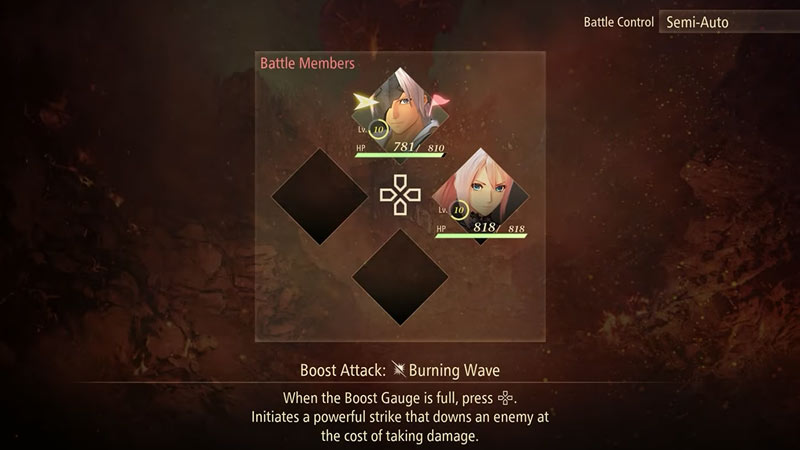
    switching characters

    In Tales Of Arise, there are two scenarios where you will want to Switch Characters in your Party. They are when you are in Combat and when you are Exploring the World. First, we will see how you can change Characters in the Overworld.

    In the Overworld

    When you are in the game, press the Menu Button on your Controller. This will open a Menu where at the bottom there will be an option of Change Party Leader. Now Depending on which Console you playing with the button to confirm on Change Party Leader will be different. For PlayStation, it is Square while for Xbox it is X. Now on clicking on the option, it will change the Character, this is indicated by the Green Flag shifting between Characters. Alternatively, you can select the Edit option from the menu and then select the Character you want by using the D-Pad. To indicate which character you are selecting a Pink Flag will be hovering over the selected character.

    During Combat in Tales Of Arise

    Lastly, you can switch characters during Combat. To do you will have to hold down the Left Shoulder on your Controller. After a small menu will appear in the Bottom Left of the screen. In that Menu, you can switch to any of the characters by using the D-Pad. Note that you can only swap between Characters that are Active Battle Members, you cannot switch into any of your Support Characters. This will allow you to utilize the full extent of your Characters Abilities and Strengths.

    This was all about Switching Between Characters in Tales Of Arise. Hopefully, this was helpful and solved all of your doubts. You can also check out our guides on the Tales Of Rise Tier List.

    PC PS4 PS5 Tales Of Arise Xbox One Xbox Series S Xbox Series X
    Share. Facebook Twitter Pinterest LinkedIn Tumblr Email Reddit
    Darwin
    • X (Twitter)

    Before you ask, yes my name is Darwin and no I am not Charles Darwin's cousin. But I do love everything Science, Games, and Anime. Think of me as your Baymax. Oh, I also like the Rubik's Cube.

    Related Posts

    How In-Game Skins Shape and Strengthen a Player’s Personal Brand

    November 27, 2025

    Unwritten Helldivers 2 Rules – Don’t Make These Mistakes!

    November 20, 2025

    Where Winds Meet Codes (November 2025)

    November 19, 2025

    User Experience in Quick Online Games – How to Retain Players

    November 11, 2025
    Latest Codes

    Inazuma Strikers Codes (November 2025)

    November 26, 2025

    Deadly Delivery Codes (November 2025)

    November 26, 2025

    Roblox Hypershot Codes (November 2025)

    November 26, 2025

    SLAP Codes Roblox (November 2025)

    November 25, 2025

    Catch a Monster Codes (November 2025)

    November 25, 2025

    Run and Jump Codes (November 2025)

    November 21, 2025
    Trending
    • How to Get Twisted Relic in Fisch
    • How to Get Shard of Time in Fisch
    • How to Get to the Underground Music Venue Location in Fisch
    • Next 99 Nights in the Forest Admin Abuse Update Party (November 2025)
    © 2025 Gamertweak.
    • Advertise With Us
    • About Us
    • Team
    • Contact Us
    • Privacy Policy
    • Terms
    • Open Critic

    Type above and press Enter to search. Press Esc to cancel.