Bugs and Errors are the banes to many gamers. They always ruin a player’s day as they are unable to play their favorite game. Valorant is no exception to this. Riot works on fixing all issues possible but newer ones always pop up. One infamous problem is the Stuck On Map Loading Screen issue. This occurs to many players & sometimes the game can crash at the Map Loading Screen. In this guide, I will show you how to fix the Stuck On Map Loading Screen issue in Valorant.
How to Fix the Stuck On Map Loading Screen issue in Valorant
The reasons for the Stuck On Map Loading Screen issue can be anything from PC issues to Network issues. No matter what the cause, the problem is easy to fix. So, here are the solutions for the Stuck On Map Loading Screen issue in Valorant.
Update your PC to Fix the Stuck On Map Loading Screen issue in Valorant
Usually, Valorant tends to have issues like the Stuck On Map Loading Screen issue when there is a pending Windows update. In the Start Menu, click on the Settings button & then click on Update & Security. From there, click on Check for Updates and Windows will update any pending patches if they are available.
Grant access to Valorant in Windows Defender Firewall
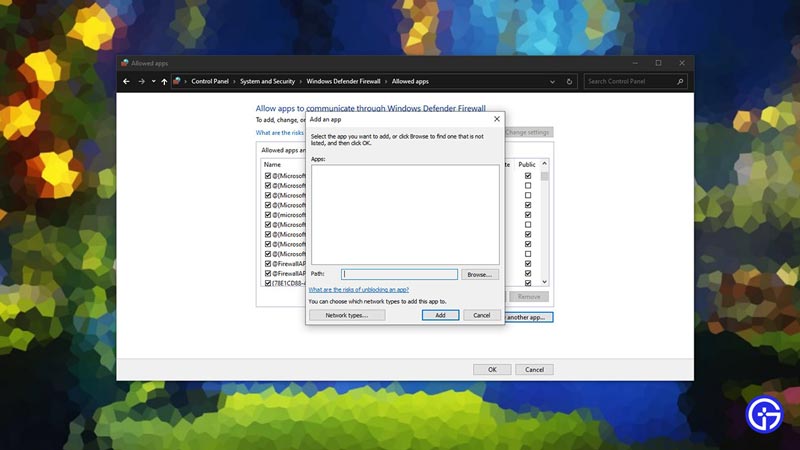
Windows Defender Firewall is there to protect your PC from third-party Software malicious attacks. As such, it is strict on every Software including Valorant. So we need to allow Valorant to have access with the Windows Defender Firewall interrupting it. To do this, go to your Start Menu & search for Windows Defender Firewall. Now click on Allow an app or feature through Windows Defender Firewall. You will have to add the following apps after clicking the Allow another app…
- C:\Riot Games\VALORANT\live\VALORANT.exe
- C:\Riot Games\VALORANT\live\ShooterGame\Binaries\Win64\VALORANT-Win64-Shipping
- C:\Program Files\Riot Vamnguard\vgc.exe
- C:\Riot Games\Riot Client\RiotClientServices.exe
Find these files on your PC. If you have saved Valorant on another location then these addresses will differ. After adding them, make sure to make them Public & Private. Click on OK and then close the Windows Defender Firewall.
Restart your PC
Restart your PC by doing a Clean Boot. Usually, this fixes all of the issues. Make sure the vgc.exe is active service. To do that, press Windows Key + R and search for msconfig. Click on the Services tab and hide all Microsoft services. At the bottom, you will find vgc.exe. Tick it if it is not active.
This was all about how to fix the Stuck On Map Loading Screen issue in Valorant. Hopefully, this guide has helped you. You can also check out our guide on Valorant This Game Is Not Available On Your Operating System Fix.