
Steam is one of the biggest, if not the biggest, stores from which to purchase and get video games. The usual process of getting a game from Steam is logging in with your Steam account and finding the game you want. From there, you will get it, depending on whether it is free. Sometimes, Players can’t log in to Steam as the Captcha verification is not working. There have been multiple reports on this issue. In today’s guide, I will show you how to fix the Steam Captcha not working error.
Steam Captcha Not Working Error Fix
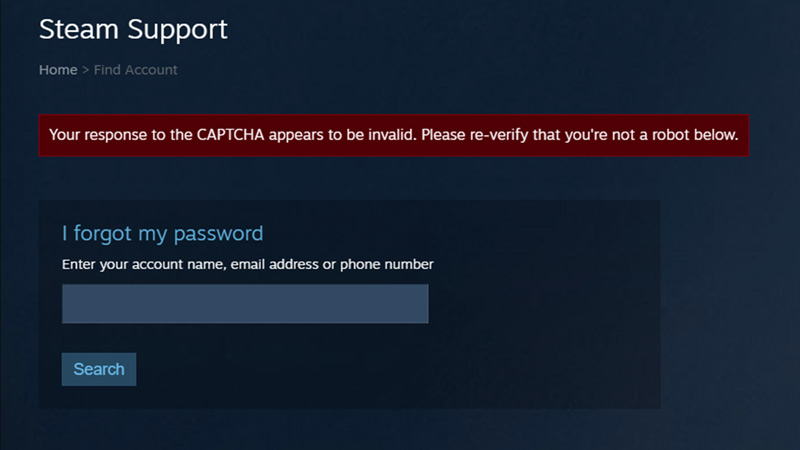
You can fix the Steam captcha not working error in a few ways. These fixes are pretty simple, and you can return to Steam in no time. Those solutions are:
- Delete Browser Cookies & Site Data.
- CMD: Flush DNS & Reset Winsock.
- Toggle Off the Proxy Server & disable VPNs.
- Try another Browser.
- Login on the Steam App.
Here is how to do them.
Delete Browser Cookies & Site Data to fix the Steam Captcha Not Working Error
The first and easiest method to solve the Steam captcha not working Error is clearing the Browsers Cache Data and Cookies. Depending on what Browser you use, the Steps will differ. Here is how you can do it on some common Browsers:
- Microsoft Edge:
- Open up the Browser.
- Go to the far right and click on the 3 dots.
- Under it, click on Settings.
- This will open your Browser Settings, under it click on Privacy, search, and services.
- Now, scroll down till you find Clear browsing data.
- Click on Choose what to clear, checkmark all options, and then click on Clear now.
- Google Chrome:
- Open up the Browser.
- Go to the far right and click on the 3 dots.
- Under it, click on Settings.
- This will open your Browser Settings.
- Under it on the right side, click on the Security and Privacy Tab.
- The very first option should be to Clear browsing data.
- Click it, checkmark all options, and click on Clear data.
CMD: Flush DNS & Reset Winsock
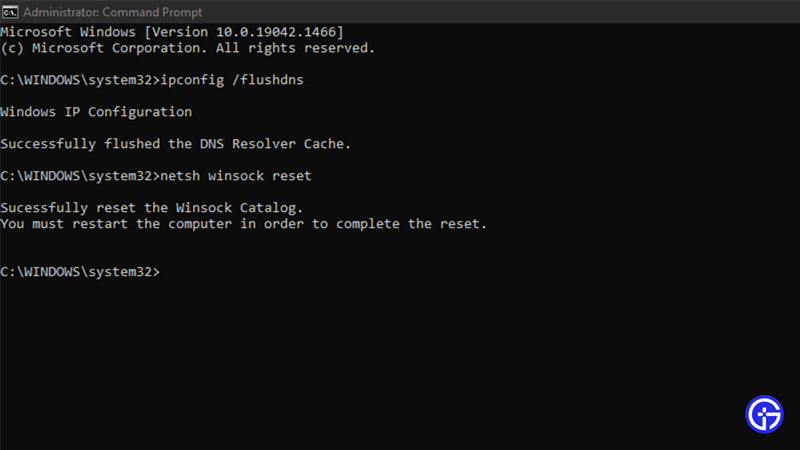
If the above fix did not work for your Steam captcha not working error, then try this next one out. Click on the Start button and search for Command Prompt or CMD. Alternatively, you can press Windows Key + R and search for CMD. If you are the admin, then you should be fine. If you are not the admin, right-click CMD in the Start Menu and click on Run as administrator. Once it is open, you must type the following commands, one at a time:
- ipconfig /flushdns
- netsh winsock reset
This clears any database data kept by the DNS and will also reset your Winsock.
Toggle Off the Proxy Server & disable VPNs
Errors like the Steam captcha not working error occur due to certain conflicts between the Apps and the VPN. It is best to switch off the VPN during those times. So, go to your VPN and disable it till the error is resolved. If the Proxy settings are on, that may also cause the error. To toggle it Off, press Windows Key + R and search ms-settings:network-proxy. Alternatively, from the Start Menu, you can go to Settings. Go to Network & Internet and click on the Proxy tab. There will be a section called Manual proxy setup, so toggle off if it is On. Your ‘Steam captcha not working error’ should be fixed now. Go back to Steam and check it once.
Try another Browser
If none of the above steps helped fix the Steam captcha not working error, try another browser. There could be some issues with Steam and the Browser you are using. This is a temporary thing and should be fixed, but if you want to get into Steam, then use the below Browsers if the one you are using is not working:
- Microsoft Edge
- Google Chrome
- Brave
- Opera GX
- Mozilla Firefox
Use one of the above, and the issue should be resolved.
Login on the Steam App
Usually, people log in to Steam through the website from a Browser. This is fine, but you may face issues like the Steam captcha not working error. To avoid such problems, I suggest you download and install Steam. It is pretty simple, and you can activate the Remember Me option so you don’t have to re-login every time. This will bypass the Captcha requirement, and you can browse through the plethora of games on Steam freely.
This was all about the Steam captcha not working error fix. Hopefully, this guide has helped you. You can also check our guides on the ‘Steam Was Unable To Sync Your Files’ Error Fix and how to check the Steam Server Status.











