While Warzone 2.0 is a battle royale game that should be enjoyed with friends, it did not launch as expected. Some errors and bugs are plaguing the game and players are wondering how to fix them. Most notable is the Social Not Working in Warzone 2 & MW2 and how to invite friends to it. Since players cannot join their friends, they are increasingly frustrated and are looking for ways to fix it. If you are here for the same, the good news is that you can fix it and work around it to enjoy with your friends. And in this guide, we will show you exactly how to workaround this error. So let’s check out this guide and fix the Social Tab error.
How to Fix Social Not Working in Warzone 2 & MW2
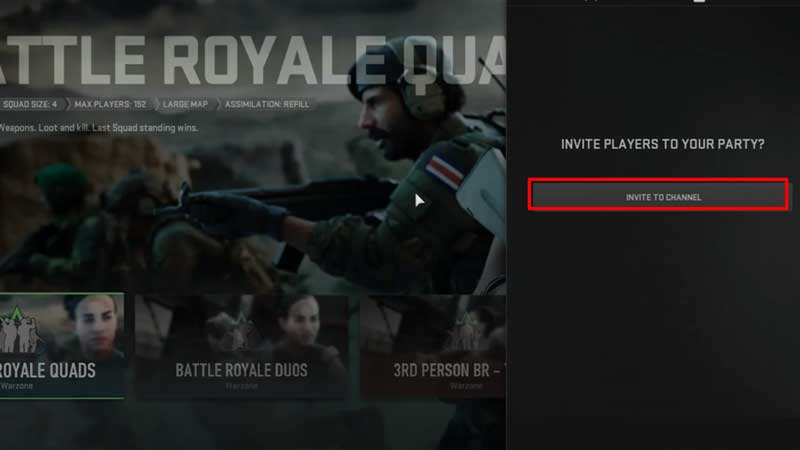
Since you are here, you have been hit by the error that is not allowing players to enjoy with their friends. With the social bugged, it becomes difficult to invite friends in Warzone 2. Whenever you select the Social tab, it will send you back to the main menu. However, the workaround is quite simple and fortunately, it is the easier way of inviting friends. It involves inviting them to your channel and forming a party.
Before we go into the workaround, there is no official fix to the Social not working error in Warzone 2. However, that does not stop us from using the workaround. Hence, here’s how to invite friends in Warzone 2.0 & MW2:
- Head over to the Channels tab from the menu in the top right corner. This is the one close to the Social tab and looks like a headphone.
- Once you select it and open it, head over to Create Your Own Channel and then select your new channel when you create it.
- Now all you have to do is open the Channel and then invite your friends to your party in Warzone 2.0.
While waiting is the only option, you can try contacting Warzone 2 Support.
If you are still unsure, we recommend you check out our video below and get an example.
That’s all there is on how to fix Social Not Working in Warzone 2 & MW2. While you are here, make sure you check out our Warzone 2 section for more guides with Gamer Tweak.