Starfield’s expansive customization system lets you tailor your spaceship to create a unique home-away-from-home amongst the stars. Parts and upgrades allow you to fine-tune the function and form of your ship to suit your playstyle. The possibilities are endless, whether you want to maximize speed and maneuverability or focus on defense and firepower. We will help you configure ship parts in Starfield.
How to Add Ship Parts in Starfield?
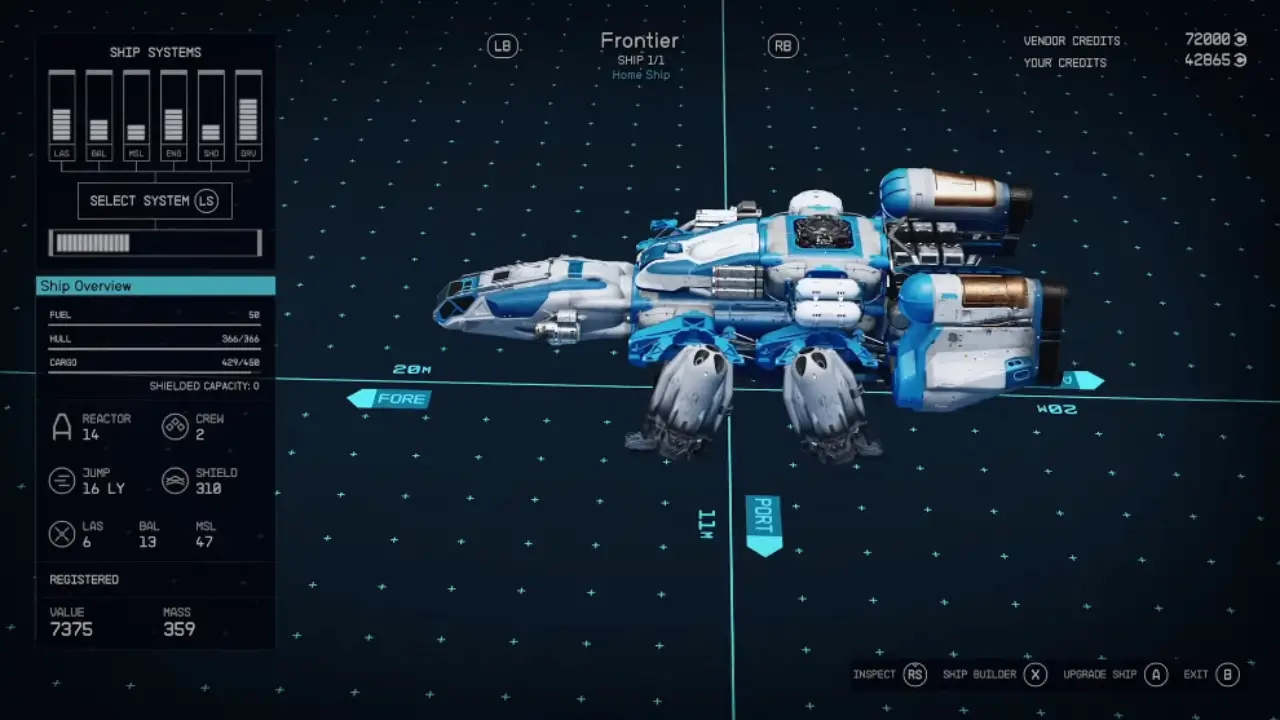
Customizing your ship is an exciting part of the Starfield experience. To add new parts to your ship, open the Ship Builder menu by talking to the ship services technician and selecting “I’d like to view and modify my ships”.
Once in the Ship Builder, look for the “Add” button in the bottom right corner. This opens up a menu showing all the new parts you can attach to your ship’s exterior. To connect a new part, simply click and drag it near an existing ship piece until blue connection circles appear.
You may need to move parts around to make everything fit together. Experiment with different configurations until you get the shape and loadout you want. You can build a unique ship tailored to your playstyle with some creativity.
Main Ship Stats and Modules
When customizing your ship in Starfield, pay close attention to the overview screen, which displays vital stats and information. Here are the most essential ship stats and modules:
- Reactor Class – The power generation capacity, enabling more advanced modules.
- Crew Capacity – Determined by components like cockpit, habs, and reactors.
- Cargo – Total storage capacity for materials and resources.
- Hull – The total hit points of all installed ship parts.
- Jump Distance/Grav Drive – FTL travel range, calculated from grav drive and ship mass.
- Shield – Protects against damage, limited to one shield module.
- Weapons – Lasers, ballistics and missiles restricted to 3 models.
That’s all on ship parts in Starfield. If you found this guide helpful, check out our Starfield Guide section has more such guides that you might need.