Home > Retro Bowl > How To Set Punt Or Kick Returner In Retro Bowl

How To Set Punt Or Kick Returner In Retro Bowl

Published Date :

One of the important parts of football that most people neglect in Retro Bowl is the Punt Returner. So if you don’t know how to set a Kick Returner in Retro Bowl, you will be simply relying on the game. While you need to enable it from settings, selecting the right player to be your punt returner is equally important. If you are new to the game don’t have much knowledge on the subject of football, this guide will help you set up your kick return with the best player possible.

How to Set Kick Returner in Retro Bowl
How To Set Punt Or Kick Returner In Retro Bowl
Image Source: Simple Tips (YT)

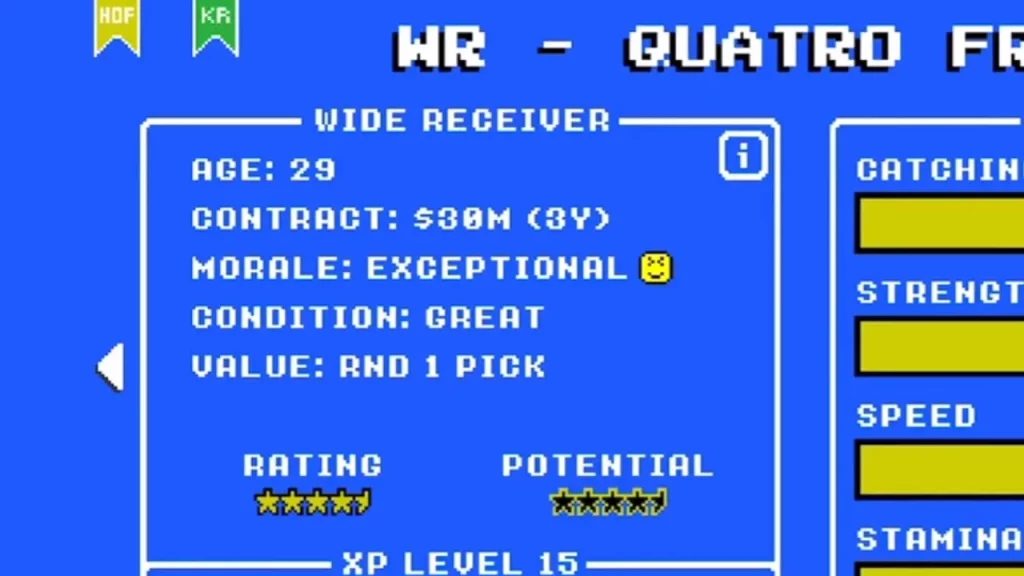
First, players will have to identify who they have in their team that is worthy of being the kick returner. While it can be a wide receiver, running back, or defensive back, keep in mind that the one you select as the kick returner in Retro Bowl will need to have good stamina and high speed. Since you would want your kick to cross the 20 yards line without being intercepted every time, you will have to figure out the best possible player from your team to be given this duty.

Once you have identified the player you want to choose, navigate to their player profile and then look for the Green Flag on the top left part. Upon selecting, you will be able to see the initials KR which stand for Kick Returner. Now, every time you have the opportunity in the match, you will be able to control this player during a Kick Return. Although you can change it as easily, it would be better if you select the best player in the first go. You won’t have to worry about punt returns any further.

That’s all we have from this guide. If you found this guide useful, do check out how to Throw Bullet Pass, Take a Knee, and other such guides here at Gamer Tweak.
  • GTA 6 Sprint Control Change: Rockstar Ditches Button Mashing?

    GTA 6 Sprint Control Change: Rockstar Ditches Button Mashing?

    Published Date :

    Rockstar is making a small but important change to how players sprint in GTA 6. The new instalment appears to be moving away from the button-mashing controls used in earlier GTA titles and switching sprinting to the left stick. This means running around Vice City should require fewer repeated button presses when playing as Jason… Read More

  • Dungeon Lootr Codes (September 2026)

    Dungeon Lootr Codes (September 2026)

    Published Date :

    Dungeon Lootr is a Roblox hack-and-slash game built around challenging dungeons, different classes, builds and plenty of loot. You can fight enemies, collect better gear, upgrade your weapons, and use different abilities as you progress and codes can give you useful items such as Luck Potions, Forge Stones, Aspect Gems, and Coins. If you don’t… Read More

  • U7BUY Steal a Brainrot Items Review: Pricing, Delivery Speed, and Service Quality

    U7BUY Steal a Brainrot Items Review: Pricing, Delivery Speed, and Service Quality

    Published Date :

    When playing Roblox Steal a Brainrot, you will be aware of the frustration it causes. You need a unit that actually earns $/sec, but those units have such low probability of appearance that you can only find one of them in 0.1% of cases. Many hours of farming sometimes lead to days, and still, you… Read More

  • MM2 of The Locust Codes (September 2026)

    MM2 of The Locust Codes (September 2026)

    Published Date :

    MM2 of The Locust is a Roblox horror game where you are trapped inside a dangerous nest with a giant creature hunting you. Your goal is to survive, find your way around the map, and escape before the Locust catches you. You can also collect Keys during your runs and use them to get different… Read More