
Home > Baldur’s Gate 3 > How To Select Multiple Items In Baldur's Gate 3

Baldur’s Gate 3: How To Select & Move Multiple BG3 Items

Published Date :

Moving one item at a time from your inventory to a companion or camp can be quite infuriating. Luckily, Baldur’s Gate 3 players can select and send Multiple items elsewhere. Although it is quite simple, the lack of any tutorial or any update on such game mechanics is why players are still manually sending each item separately. In this guide, we will show you how you can select more than one items and then move them or send them to any companion in BG3.

How to Select Multiple Items in Baldur’s Gate 3
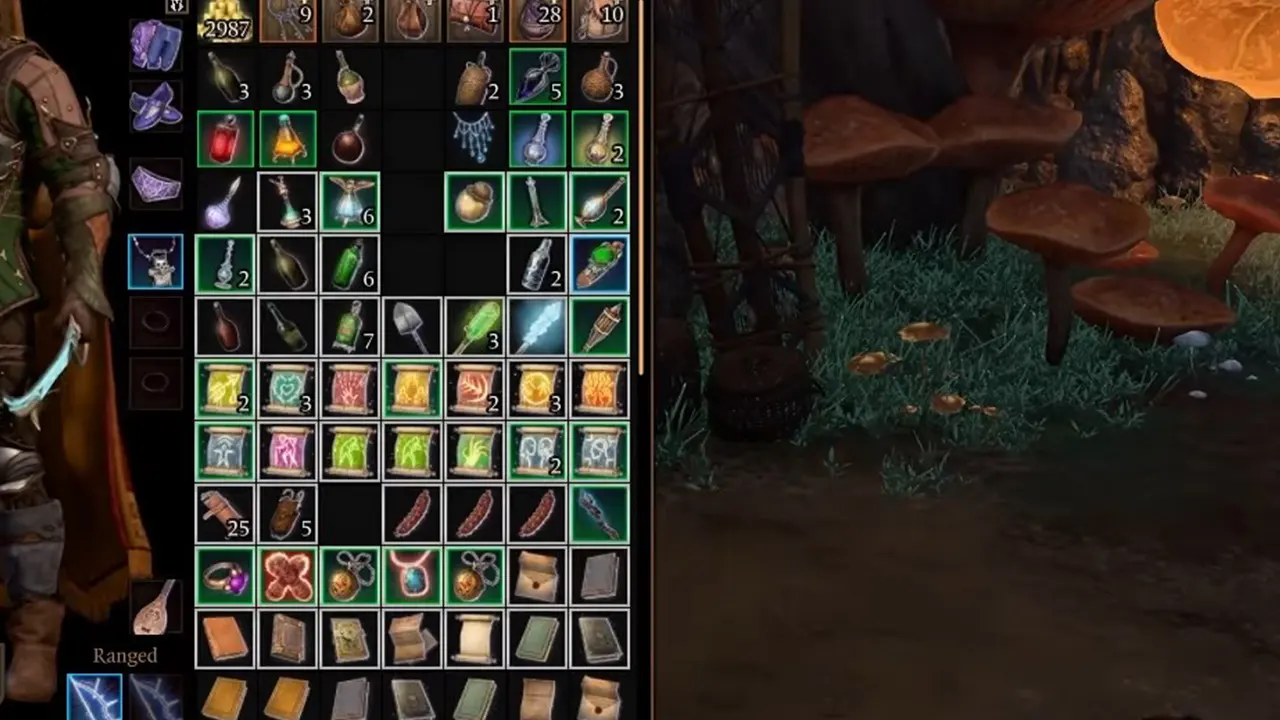
BG3 Select Move Multiple Items
Image Source: HardReset.Info (YouTube)

Players can simply press Ctrl and select Multiple items by clicking on them in Baldur’s Gate 3. You’ll be able to see that the items are highlighted once you manage to do it successfully. Additionally, you can also select the multiple rows of items. All you have to do is select the first item you want to move or send and then press Shift and select the last time. This will select all the items from the first to the last one that you selected.

Although it would have been more convenient if there was a drag and drop system to select multiple items in BG3, at least players can avoid the solo item select. Once you have selected the items, simply right-click and you will get the drop down menu to either send it to camp or give it to a companion. While collecting numerous items through loots, it’s essential that you keep your current inventory clear.

Now that you know how to select multiple items and move them in Baldur’s Gate 3, it should be easier to get by with your inventory. If you found this guide helpful, make sure you check out more such guides on our Baldur’s Gate 3 dedicated section here at Gamer Tweak.


  • Coin Flip Codes (August 2026)

    Coin Flip Codes (August 2026)

    Published Date :

    Coin Flip is an incremental coin-flipping game where you flip your coin, hit crits, unlock rebirth tiers, and progress even further. As you keep going, stronger boosts and rarer rewards make the game much more fun and redeeming the latest Coin Flip Codes is the fastest way to claim free Exclusive Chests, Potions, Luck Boosts,… Read More

  • Own a Cafe Codes (August 2026)

    Own a Cafe Codes (August 2026)

    Published Date :

    Own a Cafe lets you create and manage your own coffee shop, serving customers, earning cash, and expanding your business with new upgrades. As your café grows, you’ll unlock more ways to improve your service and attract even more visitors. Redeeming the latest Own a Cafe Codes is an easy way to earn free cash… Read More

  • Spin a Duel Monster Codes (August 2026)

    Spin a Duel Monster Codes (August 2026)

    Published Date :

    In Spin a Duel Monster, you buy packs from the Shop, spin and reveal Duel Monster cards, earn money from them and then you can use them for battle! Since it’s going to take time to level up, you may need to redeem all new Spin a Duel Monster codes that can provide various freebies.… Read More

  • Bridge Battles Codes (July 2026)

    Bridge Battles Codes (July 2026)

    Published Date :

    Bridge Battles is a thrilling game where you and your team try to build your bridge before the other teams – you can slow down their progress by destroying their bridges with RPGs as well as killing their teammates. The first team to reach the end wins – which means you need all the speed… Read More







