It is crucial to understand how you can scuttle your ship in Sea of Thieves. Once you have learned how to master the use of this in-game feature, you can save your crew and yourself from encountering any unfortunate situations. You might need to access this feature if your ship is under attack and enemies have been destroying everything on it or if your ship has been stuck due to obstacles like rocks.
Similarly, learning how you can deliberately sink your ship so that you can respawn will come in handy. If you want to find out how you can easily use this option and get out of a tricky situation, here’s everything you need to know.
How to Scuttle Your Ship in Sea of Thieves
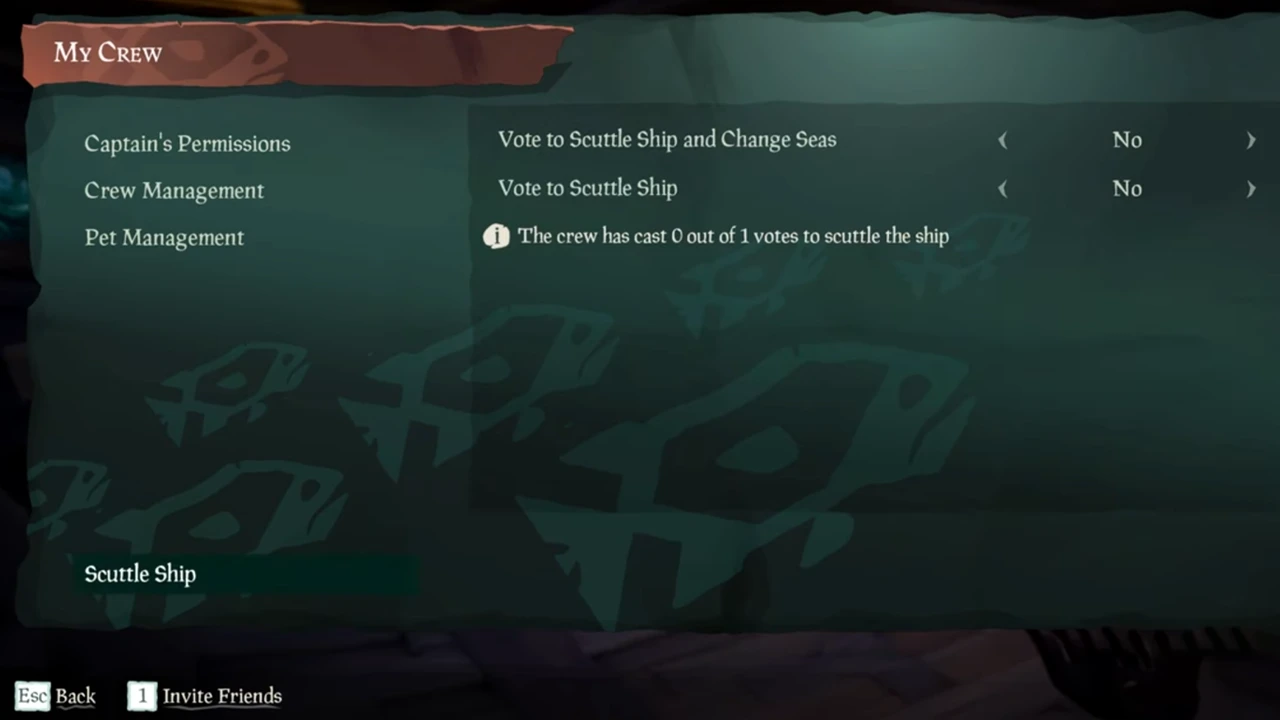
To become a pirate legend, you will have to familiarize yourself with different in-game features, one of which will be scuttling your ship in Sea of Thieves. However, there are two ways of using this option in the game.
Firstly, to access this feature, open your pause menu and select the “My Crew” option. Towards the bottom left corner of this menu, you will see the “Scuttle Ship” option. Click on it and you will see two options show up in the menu.
The first one will be “Vote to Scuttle Ship and Change Seas.” Once you have a majority of votes from the other members of your crew, unrepairable holes will appear all over your ship and it will start to sink.
However, you will respawn in a different server, which grants the players a fresh start. It is important to note that after you respawn, you will lose all the items and treasures you had onboard.
With regards to the section option, if you wish to choose “Vote to Scuttle Ship,” and all of the other members have voted, your ship will start to sink. However, when you use this option, you will respawn at another area or outpost, but you will be on the same server.
Keep in mind that scuttling your ship should always be the last option when it comes to navigating your way out of a tricky situation. This is because, if you have any valuable items or treasures onboard, you will lose it once the ship sinks, which will be a waste of resources.
This concludes our guide on how you can scuttle your ship in Sea of Thieves. If you are looking for more helpful guides, find out what is the Red Skull and go through our Sea of Thieves crossplay guide.