
Whether you’re modding, transferring, or just want to back up your progress, knowing the location where Schedule 1 save files are stored can save you a ton of stress. Interestingly, the location is quite different and isn’t easy to find. Here’s where you will be able to see them.
Also Read | Best Schedule 1 Console Commands and Cheats
Knowing the save file location matters because if you experience a game crash out of nowhere, or you’re trying out a risky mod that could mess with your progress, you know that you can recover to a previous version without having to start all over. Plus, you can:
- Back up your progress for safety.
- Transfer saves between devices or accounts.
- Share progress with friends.
Schedule 1 Save File Location (Windows PC)
For most Windows users, the save file for Schedule 1 is located in the user’s AppData folder. Here’s how to find it:
- Press Windows + R to open the Run dialog.
- Type %LocalAppData%Low and hit Enter. Make sure there are no extra spaces and you type exactly as shown.
- This will open up a window with the path C:\Users\Your Username\AppData\LocalLow
- Here you will see TVGS folder. TVGS is the name of Schedule 1’s game developer, so click on it and you’ll see the Schedule 1 folder. Click on it and then click on the Saves folder.
- There will be another folder inside named with your Steam ID and finally, there should be a SaveGame_1 folder next.
- Here you will see various folders named Businesses, Deliveries, NPCs, Owned Vehicles, Players, Quests, Trash, etc. So if you’re modding, this is where you will find the necessary files including json files of rank, time, money and more.
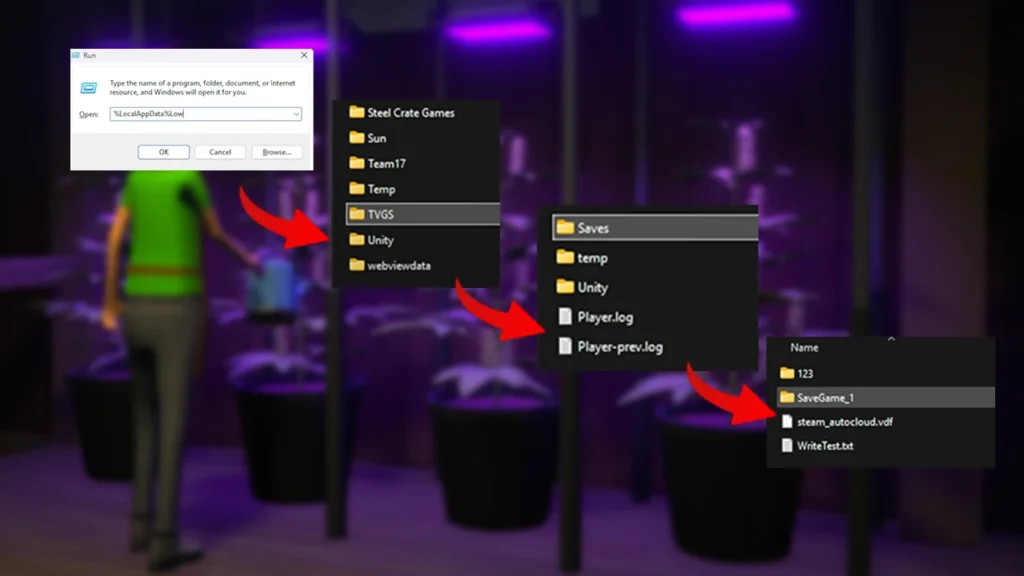
If you want to move your saves from one Steam ID to another, you can move the files from the Steam ID shown and paste them into another account.
Before making any tweaks, edits, or adding mods, copy your save file to a separate folder. That way, if something goes wrong, you’re only a paste away from getting back on track.
With that done, if you head to the Pawn Shop and don’t see the NPC there, here’s why he could be missing.











