Home > Roblox Guides > How To Get Rider Sonic In Roblox Sonic Speed Simulator

How To Get Rider Sonic In Roblox Sonic Speed Simulator

Published Date :

Sonic Speed Simulator is a Roblox game that revolves around speeding around the world. Although it was introduced as a paid Roblox game for 50 Robux, it is free to play currently. You need to collect the XP and rings to proceed through the game. You can also unlock and get several characters from Sonic as playable characters. But for that, you need to find unlock cards of these characters in different worlds. While most of the players have figured out how to get all characters, some are confused about getting the Rider Sonic skin. And, for this skin, you don’t need to find out his unlock card. So, here’s our guide on how to get the Rider Sonic skin in Roblox Sonic Speed Simulator.

How to Get Rider Sonic in Roblox Sonic Speed Simulator

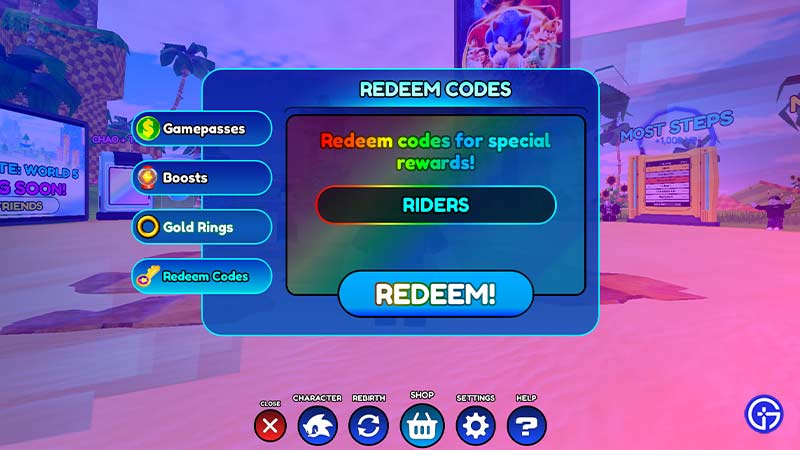
Although it would require a few clicks, you need to type a specific code to unlock the Rider Sonic. Follow the mentioned below steps:

  • Once you have launched the game, click on the Start option to begin the game.
  • Click on the Shop option.
  • Then, click on the Redeem Codes option.
  • Type and enter the RIDERS code to redeem the skin.
get rider sonic speed simulator

  • Enjoy the Sonic Rider skin as it sprints around.
  • Once you have redeemed this skin, head over to the menu.
  • Select the Riders Sonic to use it as a playable character.
  • You can also switch to other characters by selecting them under the Characters option.

As the free Rider Sonic skin might be available only for a limited time, hurry up to redeem it quickly and get the best out of it. While equipping these skins doesn’t affect its speed, it is always better to see Sonic speeding around.

That’s all on how to get the Rider Sonic skin in Sonic Speed Simulator. If you are looking to unlock more characters, check out our guide on how to unlock Knuckles and Shadow in Roblox Sonic Speed Simulator. You can also check out our massive list of Roblox Promo Codes and Roblox Game Codes right here on Gamer Tweak.

  • Throw a Coin Codes (July 2026)

    Throw a Coin Codes (July 2026)

    Published Date :

    Throw a Coin’s gameplay loop is very addictive – you start by throwing a coin into the fountain, and it gives you a random item of a certain value. The fountain can drop anything from a Guitar, a TV, a Trophy, a Magnet, a Wheel, to the rare Treasure Chests. Your goal is to upgrade… Read More

  • Rintama High Codes (July 2026)

    Rintama High Codes (July 2026)

    Published Date :

    Rintama High codes can help your journey by providing free cash (Yen), Reroll Tokens, with more freebies to come in the future. They can expire at any time without warning, so, if you don’t want to miss out, this guide is for you! Last checked for new codes on July 27, 2026. New Rintama High… Read More

  • Roll Anime to Fight Codes (July 2026)

    Roll Anime to Fight Codes (July 2026)

    Published Date :

    In Roll Anime to Fight, the fighters you get make all the difference, and to build the strongest team, you need resources. Thankfully, the developers frequently share codes that provide free Gold, Trait Shards, Godly Essences, and more, which make the process much easier. If you don’t want to miss out on these boosts, redeem… Read More

  • A Guide to CS2 Trading Tools and Pro Trading Tips

    A Guide to CS2 Trading Tools and Pro Trading Tips

    Published Date :

    Successful CS2 trading is rarely based on guesswork. Experienced traders rely on data to compare prices, track market trends, and identify good opportunities before making a trade. With so much information available, keeping up with the market without the right tools can be difficult. That’s where CS2 trading tools come in. In this guide, we’ll… Read More