Home > Mobile > Goddess Of Victory Nikke Reroll Guide

Goddess Of Victory: Nikke Reroll Guide

Published Date :

The game takes place in the post-apocalypse wherein the Planet is attacked by some creatures known as Raptures. Your commander is now heavily injured and it’s your duty to protect him from harm. Being a Nikke, you have certain abilities that you can use to take out the enemies. May it be normal strikes or burst strikes, it all counts when you enter the battlefield. It has a Gaccha System that allows you to recruit Nikke and other rewards. Sometimes, you may not be satisfied with an obtained reward and at the same time, you might run out of rolls. That’s why players look to reroll again and again until they get their desired SSR character. If you are one of those players, then this article is all you need. Check out this guide that features the steps to reroll in Goddess of Victory Nikke.

How to Reroll in Goddess of Victory Nikke
Goddess Of Victory Nikke Reroll Guide

Here’s how you can reroll in this game and try your luck again to gain some precious rewards.

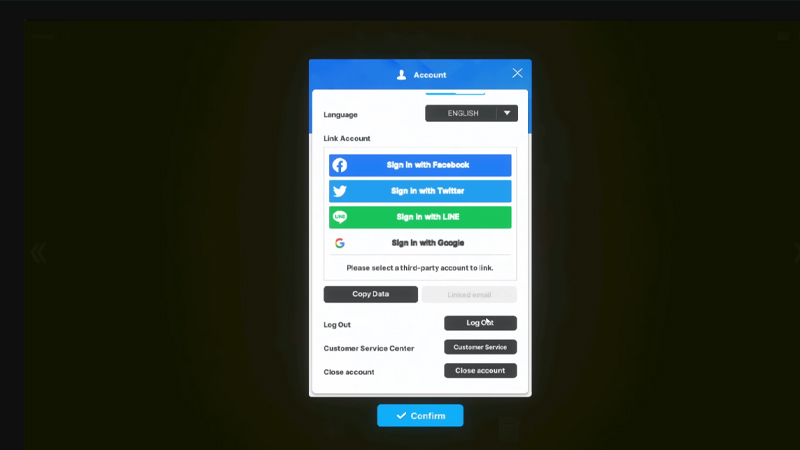
  • Click on the Menu icon in the top-right corner of the screen.
  • Further, click on Account from where you can log out of the game.
  • You will now be redirected to the login page again.
  • Make sure you have a new e-mail account ready before going further.
  • If you do, then click on Create Account and enter the credentials.
  • After verification, you will enter the game again.
  • Complete the first boss fight again to reroll in Goddess of Victory Nikke.

It is recommended to use e-mail with a number in it. For example, your first account is named [email protected], then your second account should go as [email protected]. This will help you to keep a track of the number of times you have rerolled in Goddess of Victory Nikke. Moreover, such email ids are easy to remember as well.

That’s all you have to do in order to reroll in Goddess of Victory Nikke. If you found this article helpful, then make sure to check out our other gaming guides on Gamer Tweak.

  • Will GTA 6 Have First-Person Mode? Latest Footage Leaves Fans Wondering

    Will GTA 6 Have First-Person Mode? Latest Footage Leaves Fans Wondering

    Published Date :

    GTA 6’s latest extended look has given players a closer look at the game’s action, story, driving, exploration, and open world. However, the gameplay steers away from one familiar feature: first-person mode. The new footage shared by Rockstar has brought back questions about whether GTA 6 will let players switch between third-person and first-person perspectives… Read More

  • Who is Jason’s Voice Actor in GTA 6? His Voice Is Already Dividing Fans

    Who is Jason’s Voice Actor in GTA 6? His Voice Is Already Dividing Fans

    Published Date :

    Jason Duval is one of GTA 6’s two main protagonists, but Rockstar Games has yet to reveal the actor behind his voice. That hasn’t stopped fans from trying to figure it out, especially after the latest GTA 6 footage gave players more of Jason’s dialogue to analyze. The discussion has also moved beyond his identity,… Read More

  • Fly Your Wings Codes (August 2026)

    Fly Your Wings Codes (August 2026)

    Published Date :

    Fly Your Wings lets you glide across the map and earn Coins as you improve your equipment. You can upgrade your wings and fireworks to travel farther and free Coins from codes can help you get those upgrades without waiting as long. Here are all the codes you can redeem right now. Last checked for… Read More

  • Power a City Codes (August 2026)

    Power a City Codes (August 2026)

    Published Date :

    Power a City is all about keeping a growing city supplied with electricity. You can build generators, connect your power network, upgrade your equipment, and expand your operation as the city’s energy needs increase. Managing everything well can take time, so free Cash and other rewards can give your progress quite a boost. So, here… Read More