
Home > Tech Guides > How To Get Rid of My AI On Snapchat

How To Get Rid of My AI On Snapchat

Updated Date :

Looking to get rid of My AI On Snapchat? Snapchat released My AI, a new chatbot using ChatGPT technology. The AI, which presents itself as a virtual friend, was then only accessible to Snapchat+ users, but now it is available to all users. Unfortunately, many users have expressed their annoyance at this new virtual friend, that automatically appears at the top of discussions on the interface. If this is your case, and you want to delete My AI, the procedure is not that simple! In this guide, we will tell you how to remove My AI on Snapchat.

Ignoring the lack of creativity, privacy concerns, as well as the annoying side of the chatbot, many users simply don’t see the point of using My AI. This is one of the main reasons why every user wants to remove My AI on Snapchat, and therefore we will tell you how to remove the chatbot with the step-by-step solution listed below.

How to Get Rid of My AI on Snapchat
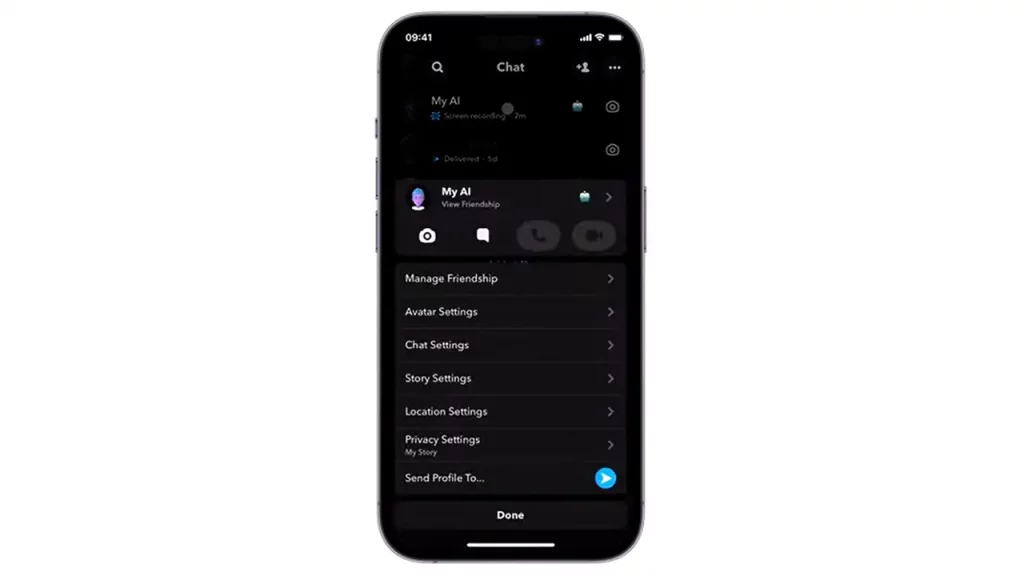
Using Snapchat+ is essential to remove My AI

Snapchat has clarified in its official document what can and cannot be done with My AI. Thus, only Snapchat+ subscribers (more than 3 million people worldwide) can reject the new AI.

For paying subscribers, the method is simple and listed below:

  • Press My AI for a few seconds (in conversations or in the Chat tab).
  • Go to “Chat Settings”.
  • Click “Clear from Chat Thread”.

Another possible workaround:

  • Go to the settings.
  • Scroll down to the bottom and click on the “Privacy controls” menu, then press “Clear data”.
  • Click on the small cross to the left of the My AI conversation to remove it.

How to delete My AI without having Snapchat+?

Without the subscription, the possibilities of deleting My AI, even temporarily, are reduced to nothing. In Snapchat’s design, traditional users only have to accept the change or paid method.

That is everything you need to know about how to get rid of My AI on Snapchat. If you liked this guide, read more about unlocking butterflies lens, and unblocking someone, on Gamer Tweak.


  • GTA 6 Players in Australia May Need Age Verification Due to New Online Safety Rules

    GTA 6 Players in Australia May Need Age Verification Due to New Online Safety Rules

    Published Date :

    Australian players could have an extra requirement to meet before accessing Grand Theft Auto VI’s online features. Under the country’s updated online safety regulations, games classified as R18+ may need to verify that players are adults instead of relying on a simple age confirmation (as per news.com.au). If GTA 6 falls under those requirements, Rockstar… Read More

  • Tactical Swat Simulator Codes (July 2026)

    Tactical Swat Simulator Codes (July 2026)

    Published Date :

    This action-packed game is all about completing objectives, clearing the area, and stopping hostile suspects, and while you’re at it, you can earn plenty of cash. Luckily, Tactical SWAT Simulator codes also give you free Cash that can be put toward new gear and upgrades, helping you strengthen your loadout before heading back into the… Read More

  • Roblox Chameleon Codes (July 2026)

    Roblox Chameleon Codes (July 2026)

    Published Date :

    Meccha Chameleon’s virality is bringing similar games to Roblox, and this one’s called Chameleon! Blending into your surroundings is the key to staying hidden, but unlocking new cosmetics and customization options makes every match even more enjoyable. Roblox Chameleon codes give you free Coins that you can spend on new skins and other in-game items,… Read More

  • Reclone Codes (July 2026)

    Reclone Codes (July 2026)

    Published Date :

    Reclone is a sci-fi stealth horror game where you get on a research spaceship and survive the dangers that lurk. This means, you need all the boosts you can get which is exactly what Reclone codes provide! If you’re running short of Tokens or cash, make sure to redeem them quickly so that you have… Read More







