Home > Mass Effect Legendary Edition > How to Use Quick Slots in Mass Effect Legendary Edition

How To Use Quick Slots In Mass Effect Legendary Edition?

Updated Date :

Mass Effect Legendary Edition knows the importance of quick action and being on toes. They have let you equip your character with abilities in something called quick slots. Abilities that are equipped in the quick slots come in handy during fights. These slots are however in limited numbers and can only have a few abilities equipped at a time. These slots are 8 in total. If you assign an ability to the 3rd quick slot, during fights you can press 3 use that ability in real-time. They are usually seen on the top left side of the HUD. These can sometimes act up though. Some players are having difficulties assigning their character talents and abilities to the quick slot. So to help you out, here is a guide on how to use Quick Slots in Mass Effect Legendary Edition and assign abilities to your character.

How to Use Quick Slots in Mass Effect Legendary Edition?
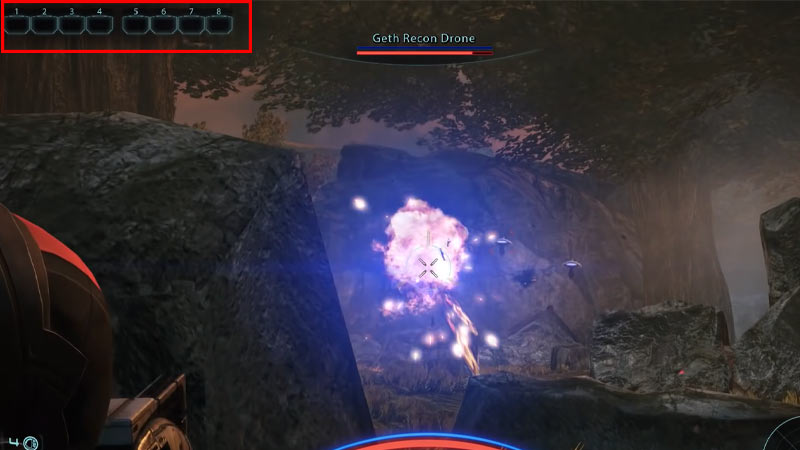
Quick Slots assign abilities to your character

To use your Quick Slots in Mass Effect Legendary Edition, hold the Space button on your keyboard. Keep pressing it constantly until the game pauses and a pop-up of your pause menu is visible. All your talents and abilities will be visible on the bottom of your screen in small boxes. You can now release your space button.
To allot these abilities on your quick slot, use your mouse. Hover your pointer over the ability or talent that you want to add to your quick slot. Then left-click on that ability and simply drag it to one of the quick slots. Ther you have it. You are now equipped with your ability in the quick slot.

So that is all there is to it on how to use quick slots in Mass Effect Legendary Edition and assign abilities to your character. If you would like to know how to fix the Spectre weapons not showing bug or how to get the Spectre gear in the game, do check out our article on that too.


  • Roblox Lowball Codes (August 2026)

    Roblox Lowball Codes (August 2026)

    Published Date :

    Buying items below their market value and flipping them for a profit is the fastest way to get rich in Lowball. Every successful negotiation grows your cash, letting you take on bigger trades and expand your inventory even further. If you want an extra boost without waiting for your next big deal, redeeming the latest… Read More

  • Junk Mechanics Codes (August 2026)

    Junk Mechanics Codes (August 2026)

    Published Date :

    Turning piles of scrap into powerful cars is the key to progressing in Junk Mechanics. As you keep playing, you’ll start needing plenty of cash for purchases and upgrades, which is why free rewards are always worth claiming. Be sure to redeem the latest Junk Mechanics codes whenever they’re available and check out this complete… Read More

  • GTA 6’s Extended Look Will Debut on Netflix Before YouTube

    GTA 6’s Extended Look Will Debut on Netflix Before YouTube

    Published Date :

    Rockstar Games has revealed an unexpected way for fans to watch the next major Grand Theft Auto 6 showcase. Instead of heading straight to YouTube, the studio’s upcoming Extended Look presentation will premiere first on Netflix, which means subscribers get an early preview before it becomes available to everyone else. It is set to air… Read More

  • Stream a Mukbang Codes (August 2026)

    Stream a Mukbang Codes (August 2026)

    Published Date :

    Mukbang games are gaining more popularity on Roblox these days, and Stream a Mukbang is where you eat food live, gain views, likes, followers, and earn cash for upgrades. As your live videos become more popular, you’ll need more resources to keep attracting new viewers, and that’s where free rewards can make a difference. Redeeming… Read More