
Home > Gaming Guides > How To Put On Equipment In MLB The Show 22

MLB The Show 22 – How To Put On Equipment

Published Date :

Equipment are items that you can put on your Ballplayer in MLB The Show 22. In MLB, Equipments provide a certain boost to your character. Each of them provides a stat change on either offense or defense side. Due to this, the game doesn’t auto-equip them. Rather the Player must decide on what Equipment they want to use for their Ballplayer that synergies well. Does a question arise on how we can put the Equipment on them? In this guide, I will show you how to put on Equipment in MLB The Show 22.

How to Put on Equipment in MLB The Show 22
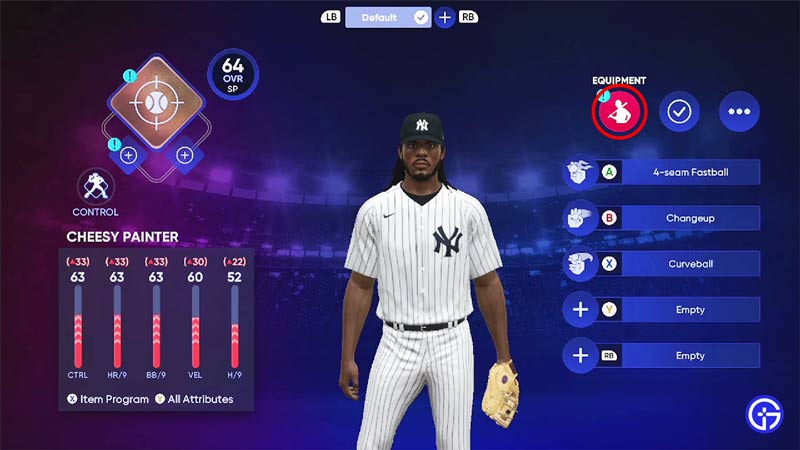
put on equipment mlb the show 22

Putting on an Equipment is pretty easy in MLB The Show 22. From the Main Menu, click on your Profile. This will open up a Menu with things you can change like your Ballplayer, Profile, & Collection. Under your Ballplayer, select the Loadout option. This will load up your Ballplayer avatar. On the right side, there should be an option called Equipment, click on it. After clicking it, it will open up a menu of the Equipments that you can put onto your Ballplayer. These Equipments can go over different parts of the avatar like:

  • Bat
  • Bat Grip
  • Catcher Mask
  • Cleats
  • Compression Sleeve
  • Elbow Guard
  • Eyewear
  • Leg Guards
  • Shin Guard
  • Socks
  • Batting Gloves
  • Chest Protector
  • Fielding Glove
  • Ritual Item
  • Wrist Guard

If you have an Equipment from any one of these categories then you will be able to put it on. Just select the type of Equipment and equip it. This will help you boost certain stats of your Ballplayer. Do keep in mind that depending on what type of playstyle your character uses, make sure to use that kind of gear. For example, if your Ballplayer is a Power Catcher. As a Catcher, you will need good Arm Strength, Vision, Contact, etc. So using Equipment that can boost these attributes is key.

This was all about how to put on an Equipment in MLB The Show 22. Hopefully, this guide has helped you. You can also check our guides on Best Teams To Use For March To October in MLB The Show 22


  • GTA 6 Stephen Root Role Finally Confirmed

    GTA 6 Stephen Root Role Finally Confirmed

    Published Date :

    GTA 6 finally has its first publicly confirmed actor. Stephen Root has confirmed that he is part of Rockstar’s upcoming game, putting an end to months of speculation surrounding one of the characters seen in its trailers. He confirmed his involvement during an interview with the Associated Press at the BAFTA TV Tea Party in… Read More

  • Larp Your Character Codes (September 2026)

    Larp Your Character Codes (September 2026)

    Published Date :

    Larp Your Character is a simulator game where you play character-based minigames to earn money, buy upgrades, and unlock new characters through crates. You can also rebirth for permanent boosts, trade duplicate characters for titles, and compete with other players on leaderboards. If you also want some free boosts while you’re at it, you need… Read More

  • Drive-Thru Empire Codes (September 2026)

    Drive-Thru Empire Codes (September 2026)

    Published Date :

    In Drive-Thru Empire, you build and expand a fast-food drive-thru business. You can roll to collect rare cars, and server high-tier cars to earn more money as your empire grows. Codes can give you bonus Cash and temporary Luck boosts to help with your progress and so, don’t miss out on this list of all… Read More

  • GTA 6 Respawn Mechanics: How Death & Arrests Work Differently

    GTA 6 Respawn Mechanics: How Death & Arrests Work Differently

    Published Date :

    GTA 6 is reportedly changing what happens when Jason or Lucia dies or gets busted. You may not have to deal with respawning at a hospital every single time. Now, Rockstar could be setting up a faster system that drops you right back near where you fell. Here is how death, arrests, and your equipment… Read More







