PS5 comes with Rest Mode settings. It is turned on by default and the console will go to sleep mode. To turn it on the back you have to get up from your couch and press the Power button. Isn’t this annoying? You can disable PS5 Rest Mode settings if you hate getting up and pressing the physical key to turn it on back. Here is a step-by-step instruction on how to turn off Rest Mode in PS5?
How to Turn of Rest Mode in PlayStation 5?
From the Home Screen select the Settings icon on the top right. Go to Power Settings and then select Rest Mode Settings. There are 7 options, you can pick one of you to want to delay PS5 Rest Mode. Or you can pick the last option “Don’t Put in Rest Mode” to permanently turn it off.
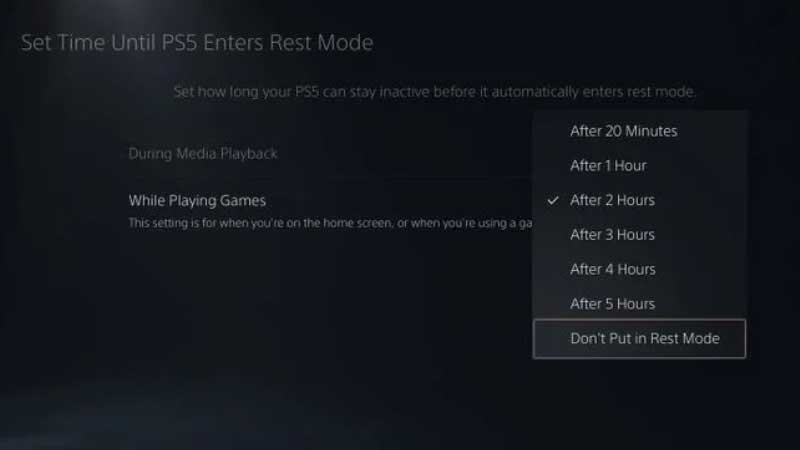
This is through the console settings, but there is one more shortcut to turn off rest mode in the console. You don’t have to go into settings you can turn off PS5 Rest Mode and turn it on the back by pressing a single key. Here is how to do that, press the POWER key twice on the console to turn off the Rest Mode. Press it twice again to turn it on.
If you hate to walk around and finding it hard to scan through the settings, then there is one final way to do the same thing. You can turn off PS5 Rest Mode using the new Dual Sense Controller. Hold the PlayStation button for some time and through the Power menu disable Rest Mode.
So these are three ways to turn of Rest Mode in the PS5 console. Rest Mode is similar to Sleep Mode on PC and Laptop. On ideal mode, the console goes into power save mode, by turning the screen off. To turn it back you have to press the Power key on the console.
This is one of the settings that will make your life easy. You can try one more thing, PS5 will not offer you max fps on default. There is a way to enable 120Hz video on the console, and for this, you have to hit the link. By turning on PS5 performance mode, you can unlock the max potential of the console.